
When you add Service Reference into Silverlight project, some time you get “failed to generate code for the service reference…” error. Which means Visual Studio is failed to generate client code, and if see “Reference.cs” file it is empty. This is the common error most of the people get.
There is work around to fix this issue. You may use below options for the same.
Option 1:
Use this option if your WCF service reference is not added into your project.
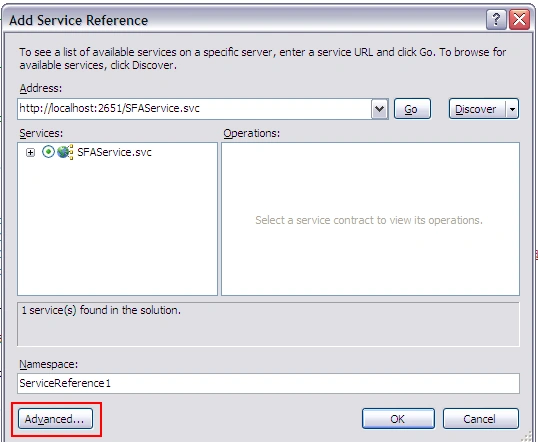
In “Add Service Reference” dialog click on “Advanced…” button. This will open Service Reference Settings dialog box.
In the Settings dialog box uncheck the “Reuse types in referenced assemblies” check box and click on Ok button.
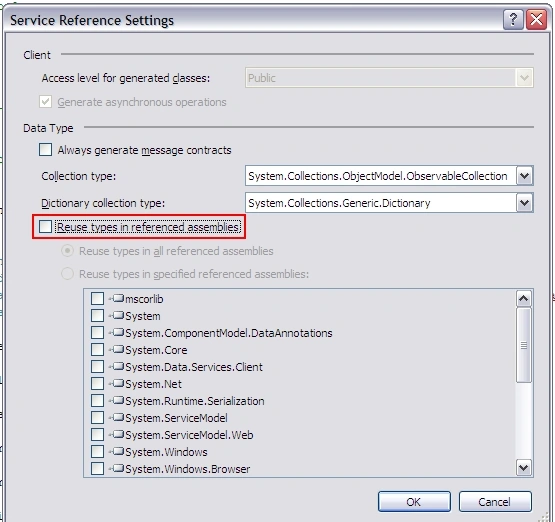
Once you click on Ok button in Service Reference dialog box, the client code will be generated and you will not get any error. Now if you open “Reference.cs” file you can see the generated code.
Option 2:
Use this option if the service reference is already added into your project.
Right click on the service reference and select “Configure Service Reference…” option.
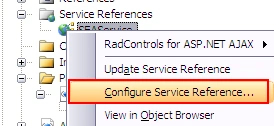
This will open “Service Reference Settings” dialog box (see image #2 in Option 1). Now as I mentioned in Option #1, uncheck “Reuse types in referenced assemblies” and click on Ok button.
Right click on service reference and select “Update Service Reference”. Once the service reference is updated you can see the client code is generated, you may verify this in “Reference.cs” file.
Christian TheriaultPosted Sep 23, 2010, 11:40 AM
THANKS, this post has been useful to me. I'm not using Siverlight, the Web-Service mechanic is the same for Win-Form or ASPX applications anyway. Without having done any meaningful changes to a project, it suddenly stopped being able to generate the proxy classes for a remote web-service... I then start to get the compiler error: "Error 105: Custom tool error: Failed to generate code for the service reference. ...." When comparing former "working" version with my source control, I noticed missing stuff which was normally generated by Visual Studio. I still need to understand the root cause, but meanwhile my project is up and running!