

Hi Readers, this article may help you to troubleshoot one strange issue that happens in SharePoint sometimes.
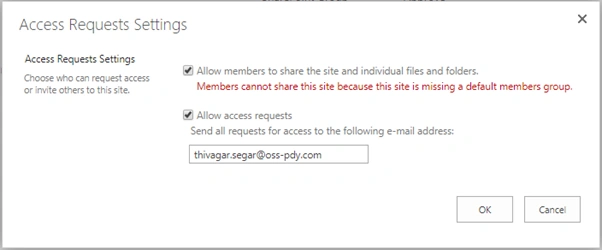
Here you can see something is identified in red, which means SharePoint default group is not associated with the SharePoint page.
You can get the default permission group at https://tenant.sharepoint.com/_layouts/15/groups.aspx
But for restore default permission group, you need to modify the URL like https://Tenant.sharepoint.com/_layouts/15/permsetup.aspx
It will take you to the permission setup page
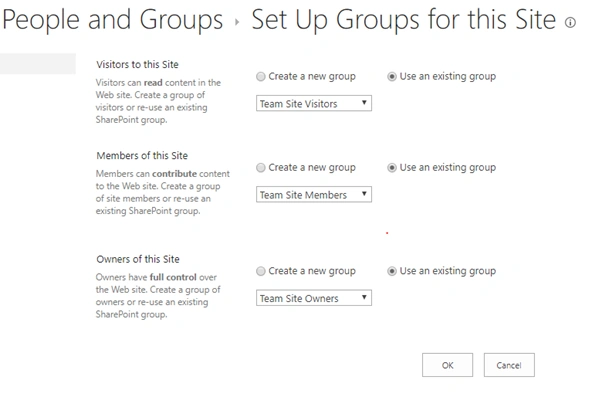
If you can see the Default group at following URL https://tenant.sharepoint.com/_layouts/15/groups.aspx, then you can select the Use an existing group option to restore the default permission group, or else you can create the new permission group and it will associate with your sharepoint page.
Once it associates, that red error will disappear from the Access Request setting
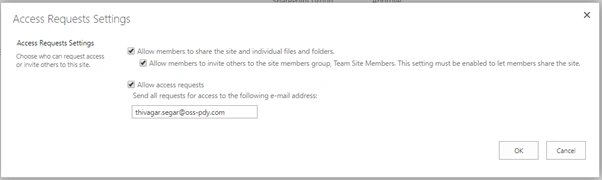
After that site owner can access the “Access Request page” to approve the users request.
But, sometime after following this step, site owners may not able to access it. On that time, ask site owner to send a request from the access form like below
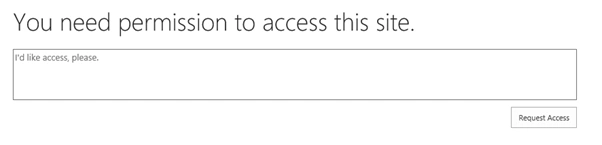
And some one should log in as a site collection administrator to that SharePoint site and approve that access request and add it to site owners group, after that every site owner can view the “Access Request page”.
Join the conversation! Your thoughts help the community grow.