

The control would work something like this
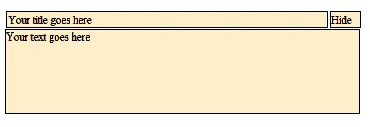
Click on HIDE and the text slides UP

Create an HTML file with the following code
<html>
<head>
<script type="text/javascript" src="http://ajax.googleapis.com/ajax/libs/jquery/1.4.2/jquery.min.js"></script>
<script type="text/javascript" src="http://ajax.aspnetcdn.com/ajax/jquery.ui/1.8.10/jquery-ui.min.js"></script>
<style type="text/css">
div.panel
{
height: 120px;
width: 500px;
}
div.panel, p.para
{
margin: 0px;
background-color: #FFEECA;
border-style: solid;
border-width: 1px;
}
td.tdTitle, td.tdHideShow
{
border: 1px solid black;
background-color: #FFEECA;
}
</style>
<script type="text/javascript">
$(document).ready(function () {
$("#pHideShow").toggle(function () {
$("#panel").slideToggle();
$("#pHideShow").text("Show");
}
, function () {
$("#panel").slideToggle()
$("#pHideShow").text("Hide");
}
);
});
</script>
<style type="text/css">
</style>
</head>
<body>
<table class="Title">
<tr>
<td class="tdTitle" width="450">
Your title goes here
</td>
<td class="tdHideShow" width="40">
<p id="pHideShow">
Hide</p>
</td>
</tr>
</table>
<div class="panel" id="panel">
<p>
Your text goes here</p>
</div>
</body>
</html>
The “slidetoggle” method of jquery does the actual toggling of the control Up and Down. The TOGGLE method has been used to alternate the ‘hide' and ‘show' labels.
You can have your own stylings and make it more presentable. This is just to give a basic idea of the Toggle and slide toggle functions of JQuery. Hope this helps!
Join the conversation! Your thoughts help the community grow.