

Missing SQL Server Compact 4.0 Data Source
If you plan to work with SQL Server CE 4.0 in Visual Studio
2010, you must have an ADO.NET data provider installed on your machine.
First, I would recommend you to install Visual Studio 2010
SP1. That should install the data provider. After that, you may download the
latest version of Microsoft SQL Server Compact 4.0 here:
http://www.microsoft.com/download/en/details.aspx?id=17876
I would also recommend you to install SQL Server Compact
Toolbox from Visual Studio Gallery.
Download
SQL Server Compact Toolbox
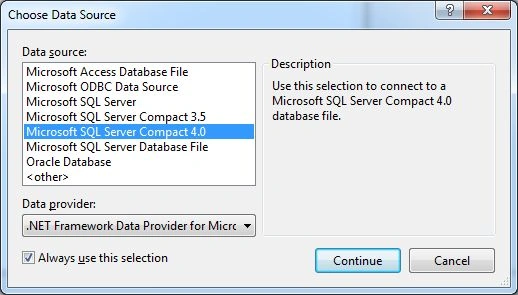
If you have data provider installed correctly, you should see Microsoft SQL Server Compact 4.0 in the data source list when adding a new connection in Server Explorer.
Mitchell ElutovichPosted Sep 12, 2012, 7:20 PM
May need to install <a href="http://download.microsoft.com/download/0/5/D/05DCCDB5-57E0-4314-A016-874F228A8FAD/SSCEVSTools-ENU.msi">SQL Server Compact 4 tools</a> as well, if it did not install directly when Visual Studio 2010 SP1 was installed, you can install it. This is what worked for me when I had a problem after a reinstall of SP1.
David Dawson David DawsonPosted May 14, 2012, 2:44 AM
Whoa! Man, you have certainly helped me a lot. However hats off to you. Your artifact became a genuine blessing for me. Hold it all up man.<a href="www.diskdoctors.com/raid-recovery.asp">Raid Recovery</a>