

Introduction
The master database is the most important database in the SQL Server. The SQL server has no meaning without the master database, and a user is unable to access SQL database without it. It stores all the primary configuration details of the SQL Server. Whenever a user installs the SQL Server, it creates master, MSDB, model, and TEMPDB system database by default. All these system databases, along with the master database, create system tables, which record all the Server parameters and detailed information about every database and user. Moreover, the master database is stored in a physical file known as master.mdf, and transaction log file corresponding to the master file is named as masterlog.ldf file. This database is stored at a default location, with a small size. However, if SQL Server master database gets corrupted due to some reason, the system database will not start with the user database.
Master database corruption in SQL Server is a common problem faced by users. Therefore, it is always suggested to take backup of the master database on a regular basis to have permanent access to the SQL Server. If the level of corruption is really high in master.mdf file, then SQL Server will not get started. However, to fix the issue, a user needs to rebuild master.mdf using command prompt. Moreover, if a master database is suffering from a minor level of corruption, a user can start the database but is not allowed to access the details stored in the database.
How to Fix SQL Server Master Database Corruption
In this segment of the article, different solutions to overcome master database corruption are discussed. Users can choose any of these according to their choice.
Restore Master Database from Backup
In order to restore the master database from backup, a user must have a complete backup of master.mdf file. Moreover, before you begin, please start SQL Server in single user mode. For this, follow the steps given below.
- First of all, open SQL Server Configuration Manager and choose SQL Server 2005 Services option.
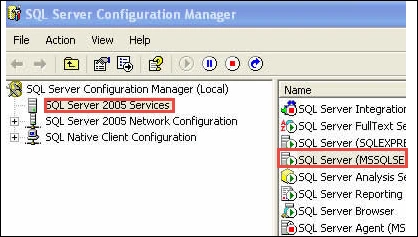
- After that, a user needs to choose SQL Server instance.
- Now, right-click on it and select Properties.
- In the Properties window, click on Advanced tab to open it.
- Now, go to the Startup Parameters option and add -m; prefix before already existing parameters.
- Then, start the SQL Server in single user mode.
Now, to restore master.mdf file, follow the given steps.
- Start the SQL Server and open cmd.exe from the Start menu.
- Enter SQLCMD on command prompt.
- Now, to restore the master database, run the following command:
RESTORE DATABASE master FROM DISK = ‘D:\Backupfolder\master.bak’ WITH REPLACE
- After executing the above command, remove prefix (-m) parameter and start SQL Server.
A user can use this method to fix the SQL Server master database corruption problem without any hassle. But, the only condition is that one must have the backup to use this method.
Rebuild Master Database in SQL Server
To rebuild SQL Server master database, follow the steps mentioned below
- First of all, open the command prompt and try to change the directories to the location of setup.exe file on the local server. However, its default location on the server is
C:\Program Files\Microsoft SQL Server\130\Setup Bootstrap\Release
- Now, run the following commands in the command prompt setup.
- Setup / QUIET / ACTION = REBUILDDATABASE / INSTANCENAME = InstanceName1 / SQLSYSADMINACCOUNTS = accounts[/SAPWD= Strong_Password ] [ /SQLCOLLATION=CollationName]
- As the rebuilding process completes, it returns the command prompt without any message.
- To confirm, one can view the summary.txt log file. The default location of the summary.txt log file is:
C:\Program Files\Microsoft SQL Server\130\Setup Bootstrap\Logs
Alternate Solution
Another option that a user can use is third party SQL database recovery tool to have an effortless solution. They help users in removing almost all types of corruption from SQL databases. Moreover, the tool is very easy-to-use as compared to the manual solution.
Conclusion
The master database or master.mdf stores all the available meta data related to the SQL Server, for example, login details, configuration details, information about pointers, file location, and much more. As it is not possible for a user to start the SQL Server with an inconsistent or corrupted master database, there is a need to recover the corrupt master database. Therefore, in this post, we have discussed tricks to resolve master database corruption in SQL Server. A user can use any of these methods depending upon the criteria. However, the above suggested solutions are tried-and-tested before for master database recovery and can be used without any risk.
Jessika VanPosted Nov 28, 2017, 5:56 AM
SQL Recovery tool is one the best and easy solution repair inaccessible sql database.For more details - http://www.sql.recoverydeletedfiles.com/