

It's a project to demonstrate how to put your database file in window form project.
Steps
- Firstly create a database using SQL Server.
- Let we create a database named “employee”.
- Create a table in this database.
- Detach it form SQL Server.
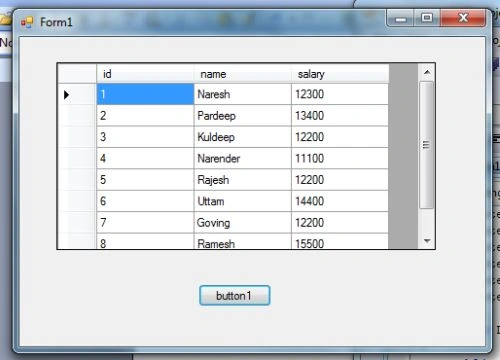
- Create a “Window Form Application Project” having a “grid view” and “button”.
- Button is use to programmatic binding table with grid view.
- Now “Right click” on Project file in solution explorer click on Add>>existing items.

Add your database form folder “C:\Program Files\Microsoft SQL Server\MSSQL.1\MSSQL\Data” in your project it will also generate “EmployeeDataSet.xsd” file having three supported files:
- EmployeeDataSet.Designer.cs
- EmployeeDataSet.xsc
- EmployeeDataSet.xss
Now Double click on button to generate method and in button1_click method specify:
private void button1_Click(object sender, EventArgs e)
{
employeeDataSet.empDataTable empdatatable = new employeeDataSet.empDataTable();
employeeDataSetTableAdapters.empTableAdapter empta = new DatabaseIncludingProject.employeeDataSetTableAdapters.empTableAdapter();
empta.Fill(empdatatable);
dataGridView1.DataSource = empdatatable;
}
It will bind employee table with gridview.
Join the conversation! Your thoughts help the community grow.