
Introduction
When working with ASP.NET MVC, we often need to pass data:
From Controller to View
From one page to another
After redirect
ASP.NET MVC provides three ways to pass data:
ViewData
ViewBag
TempData
Many beginners get confused:
What is the difference?
When should I use each?
Why do we need three methods?
In this article, we will understand everything in very simple language with example and output.
Why Do We Need to Pass Data?
In MVC:
Controller handles logic
View shows data
Model stores data
If the controller has some message or data, how will it send it to the view?
That is why we use:
ViewData
ViewBag
TempData
ViewData
What is ViewData?
ViewData is a dictionary object used to pass data:
From Controller to View
Only for the current request
It works like a key-value pair.
Why Use ViewData?
We use ViewData when:
We want to send small data
Only for one page
No redirect involved
Example of ViewData
Controller
public ActionResult Index()
{
    ViewData["Message"] = "Hello from ViewData";
    return View();
}
View (Index.cshtml)
<h2>@ViewData["Message"]</h2>
Output
When you run:
https://localhost:xxxx/Home/Index
You will see:
Hello from ViewData
Important Note
If you refresh the page, data still works (same request).
But if you redirect to another action, ViewData will not work.
ViewBag
What is ViewBag?
ViewBag is a dynamic object used to pass data:
From Controller to View
Only for the current request
It is easier to use than ViewData.
Why Use ViewBag?
Cleaner syntax
No need to use key inside string
More readable
Example of ViewBag
Controller
public ActionResult Index()
{
    ViewBag.Message = "Hello from ViewBag";
    return View();
}
View
<h2>@ViewBag.Message</h2>
Output
Hello from ViewBag
ViewData vs ViewBag
Both work the same way.
Difference is:
ViewData uses dictionary
ViewBag uses dynamic object
Internally, ViewBag uses ViewData.
TempData
What is TempData?
TempData is used to pass data:
From one request to another
Mainly used after Redirect
It stores data temporarily.
Why Use TempData?
We use TempData when:
We redirect to another action
We want to show success message after form submit
We need data for next request
Example of TempData
Controller
public ActionResult Index()
{
    TempData["Message"] = "Data saved successfully!";
    return RedirectToAction("About");
}

public ActionResult About()
{
    return View();
}
About View
<h2>@TempData["Message"]</h2>
Output
Data saved successfully!
Important
TempData works only once.
After reading it, data is removed automatically.
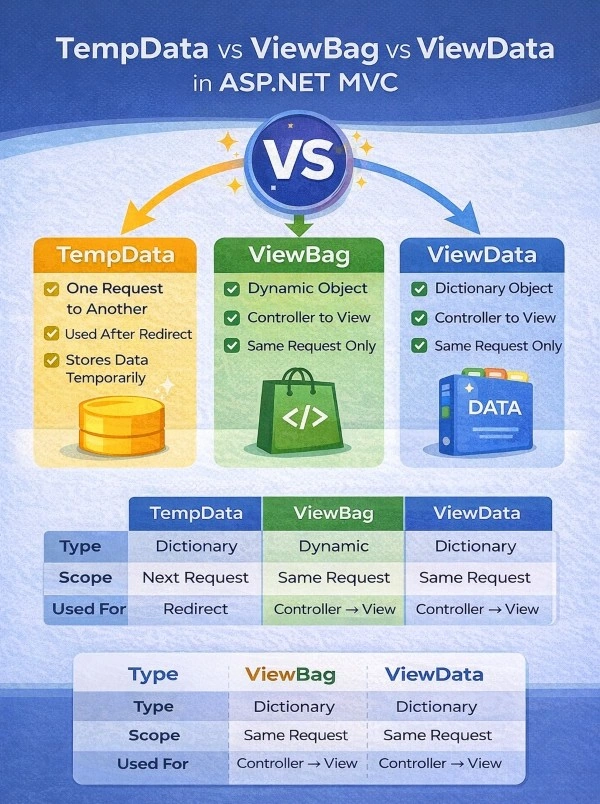
Comparison Table (Easy to Understand)
| Feature | ViewData | ViewBag | TempData |
|---|---|---|---|
| Type | Dictionary | Dynamic | Dictionary |
| Scope | Current request | Current request | Next request |
| Used For | Controller → View | Controller → View | Redirect |
| Lifetime | Until request ends | Until request ends | Until read |
Real-Life Example (Very Easy)
Imagine a teacher giving homework.
ViewData → Teacher tells message in class (same period only)
ViewBag → Same as above but easier way
TempData → Teacher gives note to student to show parents at home (next request)
When Should You Use What?
Use ViewData when:
Passing small data
Current page only
Use ViewBag when:
Simple data
Cleaner code
Beginner-friendly
Use TempData when:
Redirecting to another action
Showing success message after form submit
Conclusion
In this article, we learned:
What is ViewData
What is ViewBag
What is TempData
Why we use them
When to use them
Example with output
Real-life explanation
Join the conversation! Your thoughts help the community grow.