
When you finished your Dynamics CRM Plugin you need to write a Unit test to achieve 100% code coverage. Writing unit tests can be difficult, time-consuming, and slow when you can't isolate the classes you want to test from the rest of the system. Here are some steps you need to follow and cover your plugin code using Unit test methods.
Here in this blog, I have explained how to write unit test method for different functionality, data types and events like Retrieve, Retrieve Multiple, PreImage data, Post Image data, Entity, EntityReference, Option set, TargetEntity data, etc.
How to create a Unit test project: Create Unit test project in VS 2019
Step 1
Add Fakes references to your MS project

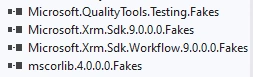
The Fakes Assemblies will automatically be created in your project.
Now you can start writing your Unit test method code.
Always remember Unit test for the plugin is passing hardcoded value only. The plugin does not connect with the CRM database while writing the Unit test methods.
Step 2
Use Fakes libraries in your Unittest.cs file
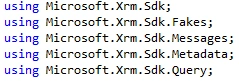
Now the below code is for every test method will be same. It contains the declaration, Initialization of the IPlugin interface.
- /// <summary>
- /// Organization Service Response
- /// </summary>
- private OrganizationResponse response = new CreateResponse();
- /// <summary>
- /// Gets or sets Service Provider
- /// </summary>
- private static StubIServiceProvider ServiceProvider { get; set; }
- /// <summary>
- /// Gets or sets Plugin Execution Context
- /// </summary>
- private static StubIPluginExecutionContext PluginExecutionContext { get; set; }
- /// <summary>
- /// Gets or sets Organization Service
- /// </summary>
- private static StubIOrganizationService OrganizationService { get; set; }
- /// <summary>
- /// Gets or sets Test Entity
- /// </summary>
- private Entity TestEntity { get; set; }
- /// <summary>
- /// Class Initialize
- /// </summary>
- /// <param name="textContext">text Context</param>
- [ClassInitialize]
- public static void ClassInit(TestContext textContext)
- {
- var context = new StubIPluginExecutionContext();
- var tracingService = new StubITracingService();
- var orgFactory = new StubIOrganizationServiceFactory();
- ServiceProvider = new StubIServiceProvider();
- OrganizationService = new StubIOrganizationService();
- PluginExecutionContext = context;
- ////override GetService behaviour and return our stubs
- ServiceProvider.GetServiceType = (type) =>
- {
- if (type == typeof(IPluginExecutionContext))
- {
- return context;
- }
- else if (type == typeof(IOrganizationServiceFactory))
- {
- return orgFactory;
- }
- else if (type == typeof(ITracingService))
- {
- return tracingService;
- }
- else if (type == typeof(IOrganizationService))
- {
- return OrganizationService;
- }
- return null;
- };
- ////return our stub organizationservice
- orgFactory.CreateOrganizationServiceNullableOfGuid = (userId) => OrganizationService;
- ////write trace logs to output. only works when debugging tests
- tracingService.TraceStringObjectArray = (message, args) => Debug.WriteLine(message, args);
- }
- /// <summary>
- /// Initialize Test File
- /// </summary>
- [TestInitialize]
- public void TestInit()
- {
- ////setup initial values for each test
- var inputParameters = new ParameterCollection();
- PluginExecutionContext.InputParametersGet = () => inputParameters;
- this.TestEntity = new Entity();
- inputParameters.Add(new KeyValuePair<string, object>("Target", this.TestEntity));
- }
- /// <summary>
- /// Test Cleanup
- /// </summary>
- [TestCleanup]
- public void TestCleanup()
- {
- this.TestEntity = null;
- }
Step 3
Write your Unit test methods
- [TestMethod]
- public void UnitTestMethod()
- {
- ////Arrange
- ParameterCollection parameter;
- ////setup input parameters.
- PluginExecutionContext.InputParametersGet = () =>
- {
- parameter = new ParameterCollection
- {
- ["Target"] = new Entity("account", Guid.Parse("e910c8ae-4c9d-e911-a98f-002248005d8"))
- {
- }
- };
- return parameter;
- };
- PluginExecutionContext.PostEntityImagesGet = () =>
- {
- // new entity
- Entity contactEntity = new Entity("contact", Guid.NewGuid());
- // Entity image object collection
- EntityImageCollection parameterImage = new EntityImageCollection();
- // Lookup field
- EntityReference entityReference = new EntityReference
- {
- Id = Guid.NewGuid(),
- LogicalName = "opportunity"
- };
- contactEntity["opportunityid"] = entityReference;
- // Option set field
- contactEntity["advertise"] = new OptionSetValue(3);
- // Date time field
- contactEntity["starttime"] = DateTime.Now;
- // Post Image data
- parameterImage["PostImage"] = contactEntity;
- return parameterImage;
- };
- PluginExecutionContext.PreEntityImagesGet = () =>
- {
- EntityImageCollection parameterImage = new EntityImageCollection();
- parameterImage["PreImage"] = new Entity();
- return parameterImage;
- };
- // Retrieve based entityId
- OrganizationService.RetrieveStringGuidColumnSet = (entityName, id, columns) =>
- {
- var entity = new Entity(entityName)
- {
- Id = id
- };
- entity.Attributes["date"] = DateTime.Now.AddHours(2);
- entity.Attributes["dateTime"] = DateTime.Now.AddHours(4);
- return entity;
- };
- // Retrieve multiple
- OrganizationService.RetrieveMultipleQueryBase = (req) =>
- {
- EntityCollection ec = null;
- if (req is FetchExpression)
- {
- var fe = req as FetchExpression;
- if (fe.Query.Contains("msdyn_timegroupdetail"))
- {
- ec = new EntityCollection();
- ec.Entities.Add(new Entity()
- {
- Attributes = new AttributeCollection()
- {
- { "msdyn_starttime", DateTime.Now.AddHours(2)},
- { "msdyn_endtime", DateTime.Now.AddHours(3)},
- }
- });
- }
- }
- if (req is QueryExpression)
- {
- ec = new EntityCollection();
- ec.Entities.Add(new Entity()
- {
- Attributes = new AttributeCollection()
- {
- { "timezonecode", 85},
- }
- });
- }
- return ec;
- };
- PluginExecutionContext.StageGet = () => 40;
- PluginExecutionContext.MessageNameGet = () => "Update";
- PluginExecutionContext.PrimaryEntityNameGet = () => "account";
- UnittestPlugin unitTestPlugin = new UnittestPlugin();
- unitTestPlugin.Execute(ServiceProvider);
- }
Using the above code you can easily cover your code coverage for your code.
Somewhere in the code, we needed a plugin exception for code coverages. Using the below code you can cover the IPluginExecutionException, FaultException, Exception for the exception handling process in the Unit test.
- [TestMethod, ExpectedException(typeof(InvalidPluginExecutionException))]
- public void PluginException()
- {
- ////Arrange
- ParameterCollection parameter;
- //// put wrong GUID in entity GUID it will show you IPluginExecutionException
- PluginExecutionContext.InputParametersGet = () =>
- {
- parameter = new ParameterCollection
- {
- ["Target"] = new Entity("account", new Guid("ed33f83c-9ed3-e911-a813-000d3a6d652"))
- {
- Attributes = {
- }
- }
- };
- return parameter;
- };
- }
For Fault Exception put null values or make cast error,
- [TestMethod, ExpectedException(typeof(InvalidCastException))]
- public void LoggedInUserDoesNotHaveSysAdminRole()
- {
- //// Now Here "accountcategory" code field is an Option set field but we are passing
- //// string value to the field So it will generate an error
- PluginExecutionContext.PreEntityImagesGet = () =>
- {
- EntityImageCollection preImage = new EntityImageCollection
- {
- ["PreImage"] = new Entity("account")
- {
- Attributes = {
- { "accountcategorycode", "value" }
- }
- }
- };
- return preImage;
- };
- }
I hope this article will solve your problem with writing a Unit test using Fakes.
Keep learning new things.....

Join the conversation! Your thoughts help the community grow.