Introduction
In this blog, we will discuss how to work with Views in SQL Server and learn the concepts with an example in a simple way. I hope this is very useful for beginners to help them understand the basic concept.
View
A View is a Select statement or SQL query that contains the data from one base table or multiple tables in a virtual table that has no physical storage space. When we perform some operation on the View, it is applied to the base tables on which the View is created.
Basically, whenever the DBA or any developer creates the database, the database is set up in a very normalized way, so the data is divided into multiple tables to display the required columns and to reduce the complexity of the database schema, Views are used.
We create the views for security purposes since it restricts the user to view some columns or fields of the tables and hide the sensitive information and display the data from one base table or multiple tables virtually. As a security mechanism by allowing users to access the data through the View, without granting the users permissions to directly access the underlying base tables.
Views show only those columns that are present at a time query preparation or create the View.
Types of View
There are two types of View in SQL Server.
- User Defined View
- Simple View
- Complex View
- System Defined View
- Information Schema View
- Catalog View
- View Create Information/Script
Let's see each concept with example, in detail. For this, we have to create the below tables.
VehicleModels
- CREATE TABLE VehicleModels
- (
- Id int primary key identity,
- Model nvarchar(40),
- Description nvarchar(80),
- TotProdctionCost money,
- ProdctionSellingPrice money
- )
Now, you can insert the records by executing the following code.
- Insert into VehicleModels values('L551','L551',51000, 71000)
- Insert into VehicleModels values('L550','L550',41000, 61000)
- Insert into VehicleModels values('L538','L538',31000, 51000)
- Select * from VehicleModels
Output

Customers
- CREATE TABLE Customers
- (
- Id int primary key identity,
- FirstName nvarchar(40),
- LastName nvarchar(40),
- Address nvarchar(80),
- City nvarchar(40),
- State nvarchar(40),
- Country nvarchar(40)
- )
Now, you can insert the records by executing the following code.
- Insert into Customers values('Shrimant','T','ABC','Latur','Maharashtra','India')
- Insert into Customers values('Arun','J','ABC','Latur','Maharashtra','India')
- Insert into Customers values('Kishor','D','ABC','Latur','Karnataka','India')
- Insert into Customers values('Madhav','S','ABC','Latur','Karnataka','India')
- Insert into Customers values('Jitendra','W','ABC','Latur','Hydrabad','India')
- Insert into Customers values('Tukaram','M','ABC','Latur','Hydrabad','India')
- Insert into Customers values('Aditya','W','ABC','Latur','Gujrath','India')
- Insert into Customers values('Harsha','M','ABC','Latur','Gujrath','India')
- Select * from Customers
Output

ProductionTransactions
- CREATE TABLE ProductionTransactions
- (
- Id int primary key identity,
- CustomerId int foreign key references Customers(Id),
- VehicleModelId int foreign key references VehicleModels(Id),
- DateofBooking datetime,
- Qty int
- )
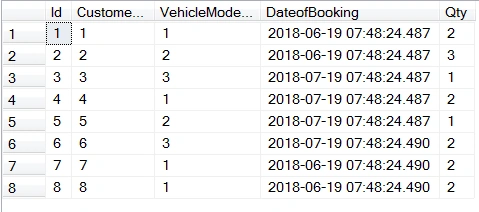
Now, you can insert the records by executing the following code.
- Insert into ProductionTransactions values(1,1, DATEADD(month, -2, GETDATE()),2)
- Insert into ProductionTransactions values(2,2, DATEADD(month, -2, GETDATE()),3)
- Insert into ProductionTransactions values(3,3, DATEADD(month, -1, GETDATE()),1)
- Insert into ProductionTransactions values(4,1, DATEADD(month, -1, GETDATE()),2)
- Insert into ProductionTransactions values(5,2, DATEADD(month, -1, GETDATE()),1)
- Insert into ProductionTransactions values(6,3, DATEADD(month, -1, GETDATE()),2)
- Insert into ProductionTransactions values(7,1, DATEADD(month, -2, GETDATE()),2)
- Insert into ProductionTransactions values(8,1, DATEADD(month, -2, GETDATE()),2)
User Defined View
These type of views are defined by users. We have two types of view like below
Simple View
If view is created on a single table then the view is called simple view. We will execute CREATE, UPDATE, DELETE operation on view based on above tables.
Creating View
Syntax
- CREATE VIEW View_Name AS
- SELECT column1, column2, column...n
- FROM Table_Name
- WHERE [Condition];
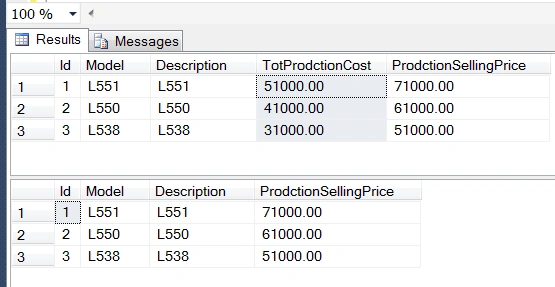
We are creating simple view on VehicleModels table using Create View command and we are hiding one single column ‘TotProdctionCost’ for security purposes and creating view.
Example
- CREATE VIEW v_VehicleModels
- AS
- SELECT Id, Model, Description, ProdctionSellingPrice
- FROM VehicleModels
- Select * from VehicleModels
- Select * from v_VehicleModels
Output
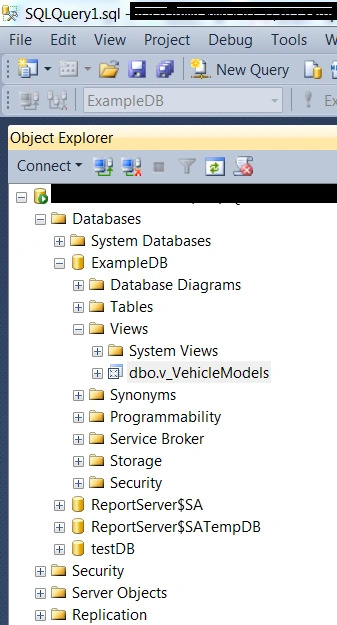
We can check in object explorer as well if the View is created or not.
Update View with Where clause
We can update the view and but this would ultimately update the base table.
Example
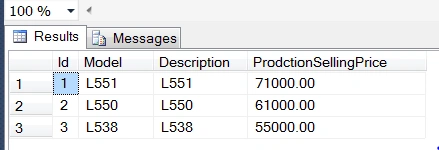
We are going to update the v_VehicleModels view but this would ultimately update the base table VehicleModels and the same will reflect in the View itself.
- UPDATE v_VehicleModels
- SET ProdctionSellingPrice = 55000
- WHERE Id =3 AND Model = 'L538'
- select * from v_VehicleModels
Delete View
We can delete the record from the View. I’m adding one row extra to delete the row or record from view
Example
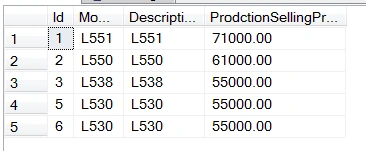
- Insert into VehicleModels values('L530','L530',45000, 55000)
- select * from v_VehicleModels
Output
Example
- Delete from v_VehicleModels where Model = 'L530'
We can drop single view or multiple view as well
Syntax
Example
- DROP VIEW v_VehicleModels;
Complex View
The view is created on multiple tables or tit may be that view contains aggregate function or group by the clause select statement.
Let’s say that the customer purchases/books the vehicles. We can check this entry in the production transaction table. We are going to create the View "display only", selected fields or columns, and removed the sensitive information from VehicleModels, ProductionTransactions, and Customers tables.
Complex View with joins
Whenever you are retrieving the records from multiple tables via View, we need to join two or more tables and fetch the data from that using complex View like below.
Syntax
- CREATE VIEW View_Name AS
- SELECT column1, column2, column...n
- FROM Table_Name1 t1
- INNER JOIN
- Table_Name2 t2 on t1.CommanFeild = t2.CommanFeild
- WHERE [Condition];
Example
- CREATE VIEW V_CustomerVehicleModelProduction
- AS
- SELECT c.Id, FirstName, LastName, Country, v.Model, p.DateofBooking, p.Qty As Quantity
- FROM Customers c
- Left JOIN
- ProductionTransactions p on c.Id= p.CustomerId
- INNER JOIN
- VehicleModels v on v.Id = p.VehicleModelId
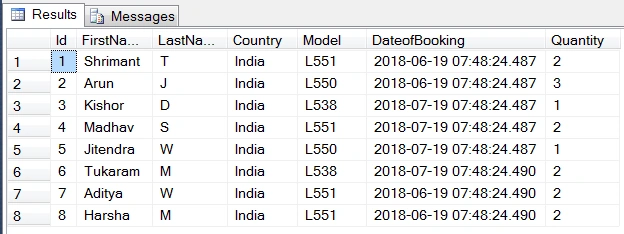
- select * from V_CustomerVehicleModelProduction
Output
Complex view with join where
You can add a condition on view either by creating view one at a time or after you have created view
Example
- CREATE VIEW V_CustomerVehicleModelProductionWithWhere
- AS
- SELECT c.Id, FirstName, LastName, Country, p.DateofBooking, p.Qty As Quantity
- FROM Customers c
- Left JOIN
- ProductionTransactions p on c.Id= p.CustomerId
- WHERE p.Qty = 3
- select * from V_CustomerVehicleModelProductionWithWhere
Complex view with group by
You can add a group by clause on the View either at the time of creating a View or after creating it.
Example -
- CREATE VIEW V_CustomerVehicleModelProductionWithGroupBy
- AS
- SELECT State, Country, Sum(p.Qty) As vPurchaseQuantity
- FROM Customers c
- LEFT JOIN
- ProductionTransactions p on c.Id= p.CustomerId
- group by State, Country,p.Qty
- select * from V_CustomerVehicleModelProductionWithGroupBy
Output
Updating Complex View
If you are updating the complex View, basically, the complex Views are based on multiple tables and if you update the View, it may not update the base table correctly.
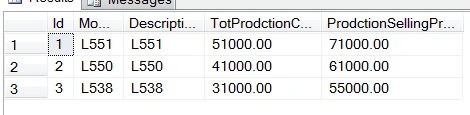
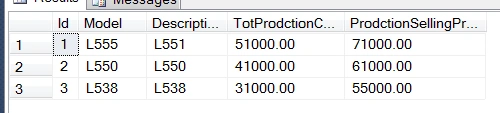
Before updating the View, the base table ‘VehicleModels’ -
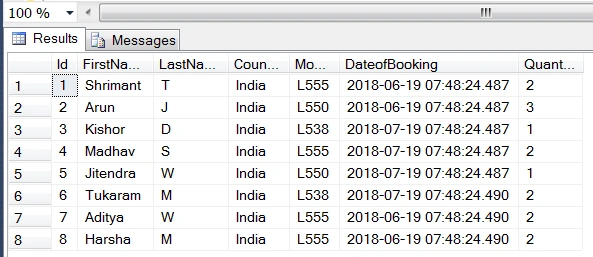
We are updating the View now.
- Update V_CustomerVehicleModelProduction
- Set Model= 'L555'
- where Model= 'L551'
Output
After updating the View, the base table ‘VehicleModels’ looks like this.
System Defined View
The System-Defined Views are the ones that already exist in a database on SQL server.
Information Schema View
This View is used to display the information database, table column, and datatype etc.
Example -
- SELECT * FROM INFORMATION_SCHEMA.COLUMNS
- where TABLE_NAME='ProductionTransactions'
Output
This View is used to show the database's self-description information.
Example
Output
View Schema Information/Script
To get the View information, we need to use the below syntax or example.
Syntax
- exec sp_helptext 'View_Name'
Example
- exec sp_helptext 'V_CustomerVehicleModelProduction'
Output
Conclusion
I hope you understand the concept. Please post your feedback, questions, or comments about this blog and feel free to tell me the required changes in this write-up to improve the content quality.







Rajesh KumarPosted Aug 31, 2018, 12:29 AM
Nice article...........