

Cross Join or Cartesian product
When combining two sequences using this process, every item in the first collection is combined with every item in the second one. No key selection is required as there is no filtering of data. The resultant sequence will always have a number of items equal to the product of the sizes of the two source sequences.
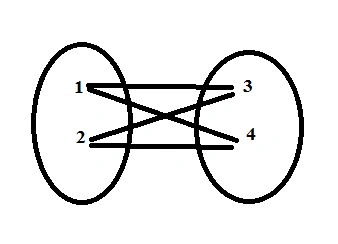
SQL Syntax
- SELECT table1.column1, table2.column2...
- FROM table1, table2 [, table3 ]-
Okay! Now, let us see the example in both LINQ and lambda. For that, I have created two classes and added dummy values to it.
- class Customer {
- public int CustId {
- get;
- set;
- }
- public string Name {
- get;
- set;
- }
- public string Address {
- get;
- set;
- }
- public string PhoneNumber {
- get;
- set;
- }
- }
- class Car {
- public int CarId {
- get;
- set;
- }
- public string ModelName {
- get;
- set;
- }
- public string Color {
- get;
- set;
- }
- public int SoldTo {
- get;
- set;
- }
- }
- Customer[] customers = new Customer[] {
- new Customer {
- CustId = 101, Name = "Charlie C", Address = "USA", PhoneNumber = "042-548685"
- },
- new Customer {
- CustId = 102, Name = "Bean ", Address = "UK", PhoneNumber = "043-48521"
- },
- new Customer {
- CustId = 103, Name = "Albert", Address = "Germany", PhoneNumber = "044-5445522"
- }
- };
- Car[] cars = new Car[] {
- new Car {
- CarId = 4251, Color = "Black", ModelName = "Ambassador", SoldTo = 101
- },
- new Car {
- CarId = 4252, Color = "White", ModelName = "Audi", SoldTo = 102
- },
- new Car {
- CarId = 4253, Color = "Silver", ModelName = "BMW", SoldTo = 103
- },
- };
The collection values are shown below.
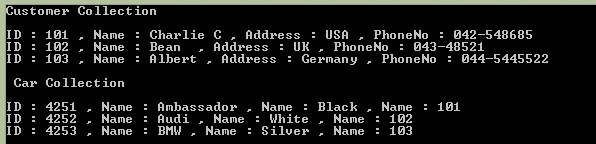
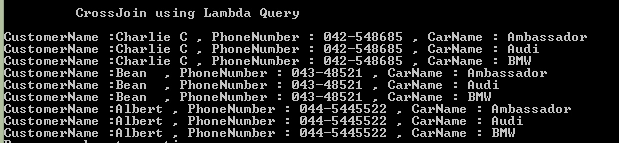
The following sample code demonstrates a cross join query using Lambda.
The following sample code demonstrates a cross join query using Lambda.
- #region CrossJoin using Lambda Query
- //defered query execution
- var crossJoinLambda = customers.SelectMany(t1 => cars.Select(t2 => new {
- CustomerName = t1.Name,
- PhoneNumber = t1.PhoneNumber,
- CarName = t2.ModelName,
- }));
- //Immediate query execution
- foreach(var custmerData in crossJoinLambda) {
- Console.WriteLine("CustomerName :" + custmerData.CustomerName + " , PhoneNumber : " + custmerData.PhoneNumber + " , CarName : " + custmerData.CarName);
- }#endregion
Result
The following sample code demonstrates a cross join query using LINQ.
- #region CrossJoin using Linq Query
- //defered query execution
- var crossJoinLinq = from customer in customers
- from car in cars
- //where customer.CustId == car.SoldTo
- select new {
- CustomerName = customer.Name, PhoneNumber = customer.PhoneNumber, CarName = car.ModelName
- };
- //Immediate query execution
- foreach(var custmerData in crossJoinLinq) {
- Console.WriteLine("CustomerName :" + custmerData.CustomerName + " , PhoneNumber : " + custmerData.PhoneNumber + " , CarName : " + custmerData.CarName);
- }#endregion
Result
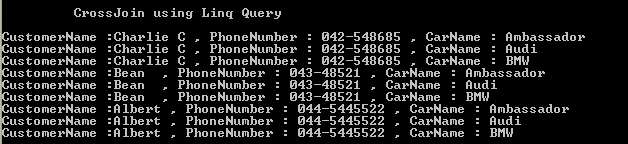
I hope you got the clear picture about cross join.
Complete Code
- using System;
- using System.Collections.Generic;
- using System.Linq;
- using System.Text;
- using System.Threading.Tasks;
- namespace CrossJoinINLinqAndLambda {
- class Program {
- static void Main(string[] args) {
- Customer[] customers = new Customer[] {
- new Customer {
- CustId = 101, Name = "Charlie C", Address = "USA", PhoneNumber = "042-548685"
- },
- new Customer {
- CustId = 102, Name = "Bean ", Address = "UK", PhoneNumber = "043-48521"
- },
- new Customer {
- CustId = 103, Name = "Albert", Address = "Germany", PhoneNumber = "044-5445522"
- }
- };
- Car[] cars = new Car[] {
- new Car {
- CarId = 4251, Color = "Black", ModelName = "Ambassador", SoldTo = 101
- },
- new Car {
- CarId = 4252, Color = "White", ModelName = "Audi", SoldTo = 102
- },
- new Car {
- CarId = 4253, Color = "Silver", ModelName = "BMW", SoldTo = 103
- },
- };#
- region Customer and Car Collection
- Console.WriteLine("Customer Collection \n\t");
- foreach(var customer in customers) {
- Console.WriteLine("ID : " + customer.CustId + " , Name : " + customer.Name + " , Address : " + customer.Address + " , PhoneNo : " + customer.PhoneNumber);
- }
- Console.WriteLine("\n Car Collection \n\t");
- foreach(var car in cars) {
- Console.WriteLine("ID : " + car.CarId + " , Name : " + car.ModelName + " , Name : " + car.Color + " , Name : " + car.SoldTo);
- }#
- endregion
- Console.WriteLine("\n\t CrossJoin using Linq Query \n\t");#
- region CrossJoin using Linq Query
- //defered query execution
- var crossJoinLinq = from customer in customers
- from car in cars
- //where customer.CustId == car.SoldTo
- select new {
- CustomerName = customer.Name, PhoneNumber = customer.PhoneNumber, CarName = car.ModelName
- };
- //Immediate query execution
- foreach(var custmerData in crossJoinLinq) {
- Console.WriteLine("CustomerName :" + custmerData.CustomerName + " , PhoneNumber : " + custmerData.PhoneNumber + " , CarName : " + custmerData.CarName);
- }#
- endregion
- Console.WriteLine("\n\t CrossJoin using Lambda Query \n\t");#
- region CrossJoin using Lambda Query
- //defered query execution
- var crossJoinLambda = customers.SelectMany(t1 => cars.Select(t2 => new {
- CustomerName = t1.Name,
- PhoneNumber = t1.PhoneNumber,
- CarName = t2.ModelName,
- }));
- //Immediate query execution
- foreach(var custmerData in crossJoinLambda) {
- Console.WriteLine("CustomerName :" + custmerData.CustomerName + " , PhoneNumber : " + custmerData.PhoneNumber + " , CarName : " + custmerData.CarName);
- }#
- endregion
- }
- }
- class Customer {
- public int CustId {
- get;
- set;
- }
- public string Name {
- get;
- set;
- }
- public string Address {
- get;
- set;
- }
- public string PhoneNumber {
- get;
- set;
- }
- }
- class Car {
- public int CarId {
- get;
- set;
- }
- public string ModelName {
- get;
- set;
- }
- public string Color {
- get;
- set;
- }
- public int SoldTo {
- get;
- set;
- }
- }
- }
I hope it's helpful.
Join the conversation! Your thoughts help the community grow.