

Step 1
In this article, we are going to learn about integrating Google maps in Xamarin Android projects. First, as default create a Xamarin Android project.
In this article, we are going to learn about integrating Google maps in Xamarin Android projects. First, as default create a Xamarin Android project.
Step 2
Add Xamarin Android Google Maps NuGet package in the reference.
Add Xamarin Android Google Maps NuGet package in the reference.

Step 3
Generate Your Google Map API key in Google API Console. Here
Step 4
Add your API key in the AndroidManifest.xml with some permissions.
- <uses-permission android:name="android.permission.ACCESS_COARSE_LOCATION" />
- <uses-permission android:name="android.permission.ACCESS_FINE_LOCATION" />
- <uses-permission android:name="android.permission.ACCESS_NETWORK_STATE" />
- <uses-permission android:name="com.googlemap.googlemap.permission.MAPS_RECEIVE" />
- <uses-permission android:name="com.google.android.providers.gsf.permisson.READ_GSERVICES" />
- <uses-permission android:name="android.permission.INTERNET" />
- <application android:allowBackup="true" android:label="@string/app_name">
- <meta-data android:name="com.google.android.maps.v2.API_KEY" android:value="YOUR API KEY" />
- <meta-data android:name="com.google.android.gms.version" android:value="@integer/google_play_services_version" />
- </application>
Add Fragment in Main.xml to show your map
- <fragment
- android:id="@+id/googlemap"
- android:layout_width="match_parent"
- android:layout_height="match_parent"
- class="com.google.android.gms.maps.MapFragment" />
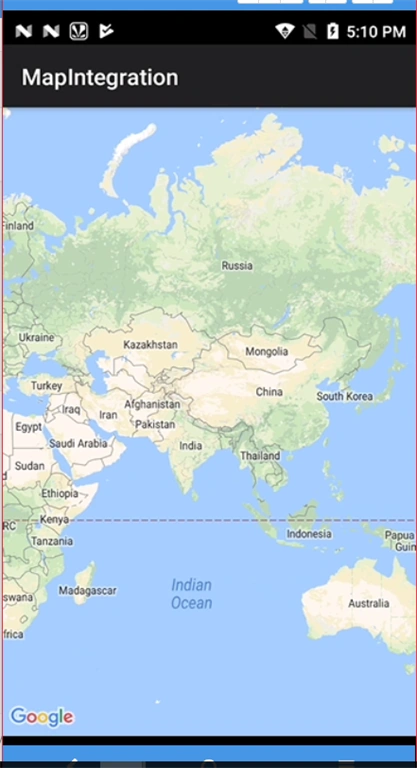
Run and test your app whether map is displaying or not. If not check with API Key and permissions again.
Note
We can only be able to view the simple map without any controls.
Step 7
To get our map instance we have to set GetMapAsync.
- protected override void OnCreate(Bundle savedInstanceState)
- {
- base.OnCreate(savedInstanceState);
- // Set our view from the "main" layout resource
- SetContentView(Resource.Layout.Main);
- var googleMap = FragmentManager.FindFragmentById<MapFragment>(Resource.Id.googlemap);
- googleMap.GetMapAsync(this);
- }
Now, we have to implement Interface IOnMapReadyCallback so that the Method OnMapReady will be called after the Google Map is ready.
Step 8
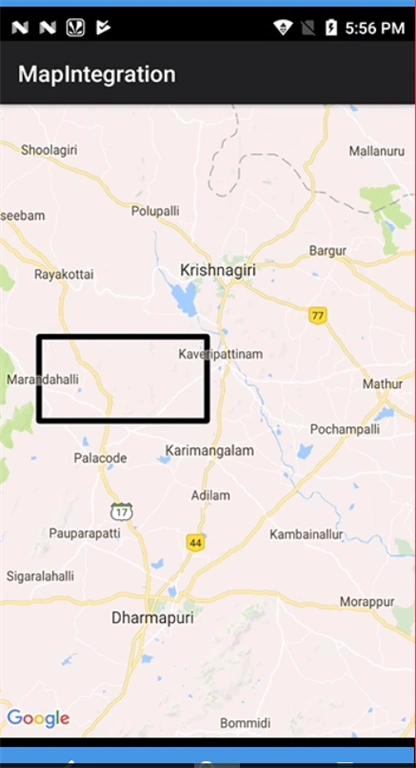
To Set a Rectangle Add the following code inside OnMapReady Method.
- public void OnMapReady(GoogleMap googleMap)
- {
- mMap = googleMap;
- PolygonOptions rectOptions = new PolygonOptions();
- rectOptions.Add(new LatLng(10.35, -122.0));
- rectOptions.Add(new LatLng(10.45, -122.0));
- rectOptions.Add(new LatLng(10.45, -122.2));
- rectOptions.Add(new LatLng(10.35, -122.2));
- // notice we don't need to close off the polygon
- mMap.AddPolygon(rectOptions);
- CameraPosition.Builder builder = CameraPosition.InvokeBuilder();
- builder.Target(new LatLng(10.35, -122.2));
- builder.Zoom(10);
- builder.Bearing(0);
- builder.Tilt(0);
- mMap.MoveCamera(CameraUpdateFactory.NewCameraPosition(builder.Build()));
- }
Now, you can see the rectangle in the map.
Finally our class will be:
- [Activity(Label = "MapIntegration", MainLauncher = true, Theme = "@style/Theme.AppCompat")]
- public class MainActivity : AppCompatActivity, IOnMapReadyCallback
- {
- private GoogleMap mMap;
- public void OnMapReady(GoogleMap googleMap)
- {
- mMap = googleMap;
- PolygonOptions rectOptions = new PolygonOptions();
- rectOptions.Add(new LatLng(12.35, 78.0));
- rectOptions.Add(new LatLng(12.45, 78.0));
- rectOptions.Add(new LatLng(12.45, 78.2));
- rectOptions.Add(new LatLng(12.35, 78.2));
- // notice we don't need to close off the polygon
- mMap.AddPolygon(rectOptions);
- CameraPosition.Builder builder = CameraPosition.InvokeBuilder();
- builder.Target(new LatLng(10.35, 78.2));
- builder.Zoom(10);
- builder.Bearing(0);
- builder.Tilt(0);
- mMap.MoveCamera(CameraUpdateFactory.NewCameraPosition(builder.Build()));
- }
- protected override void OnCreate(Bundle savedInstanceState)
- {
- base.OnCreate(savedInstanceState);
- // Set our view from the "main" layout resource
- SetContentView(Resource.Layout.Main);
- var googleMap = FragmentManager.FindFragmentById<MapFragment>(Resource.Id.googlemap);
- googleMap.GetMapAsync(this);
- }
- }
Step 10
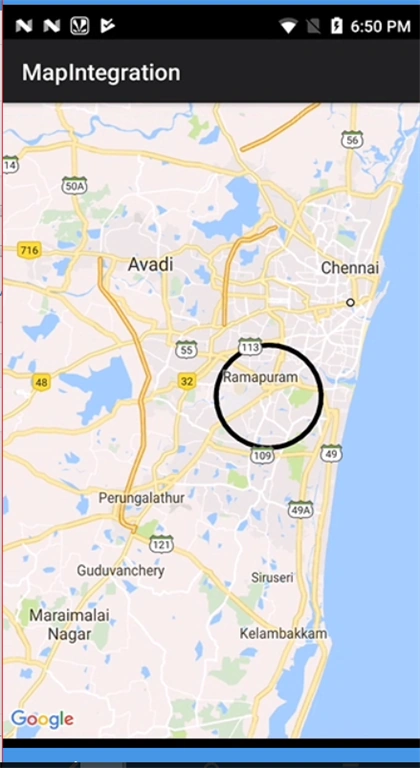
To get a circle add the following code:
- CircleOptions options = new CircleOptions();
- options.InvokeCenter(new LatLng(13,80.2));
- options.InvokeRadius(5000);
- mMap.AddCircle(options);
Join the conversation! Your thoughts help the community grow.