I'll appreciate your help in the next problem :
I have 2 TextBoxes (i.e. X1,X2) binding to 1 TextBox (i.e. Y) so whenever X1's or X2's foreground changes Y's foreground will change also to the same color and vice versa.
In my program, at first, all TextBoxes' foregrounds are Green and when the user insert a key to one of them it's foreground changes to Red (and the binded textBoxes should turn Red also).
The problem is that one side of the binding is working fine but the other side does nothing (meaning when the user inserts a key to Y all X1,X2,Y TextBoxes' foregrounds stay Green - which is not the desirable behaviour).
notes:
1. I find it hard to figure how one side is working just fine while the oppsite side does not.
2. I have almost the same code binding the same fields (X1, X2 with Y and vice versa) just with texts and not foregrounds and it works great on both sides!like this case Convert method is being called automatically after ConvertBack is done but unlike this case object[] values does holds the right values (which was returned from ConvertBack) - this it truly odd... :/
I have the short code with the problem attached.
Thank you very much, appreciate your time and effort!
Gil.
preview of the code:
***************************************** C# **************************************************

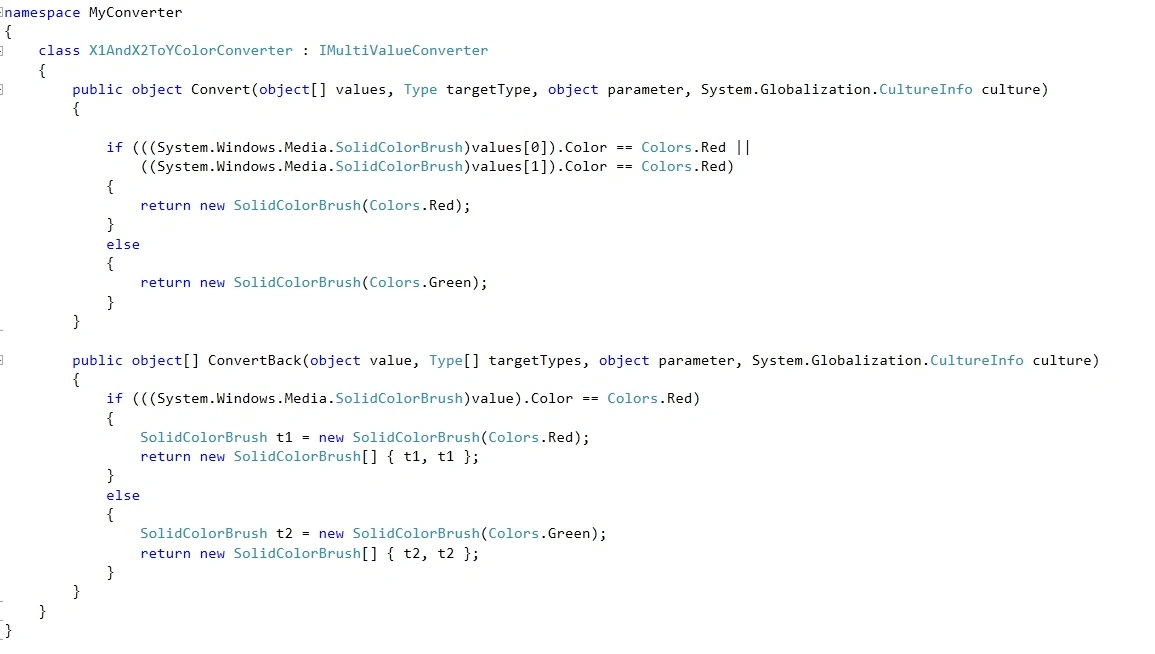
***************************************** XAML **************************************************

gil elgrablyPosted Jun 8, 2012, 10:58 AM
I will clarify.
First, X1 and X2 and Y foregrounds are green lets say they all have the default text value "0". now the wanted behaviour is:
case 1: The user inserts a digit to X1 -> as a result X1 and Y text foregronds turns red.
case 2: The user inserts a digit to X2 -> as a result X2 and Y text foregronds turns red.
case 3: The user inserts a digit to Y -> as a result Y and X1 and X2 text foregronds turns red.