System.ArgumentException: 'Parameter is not valid.'
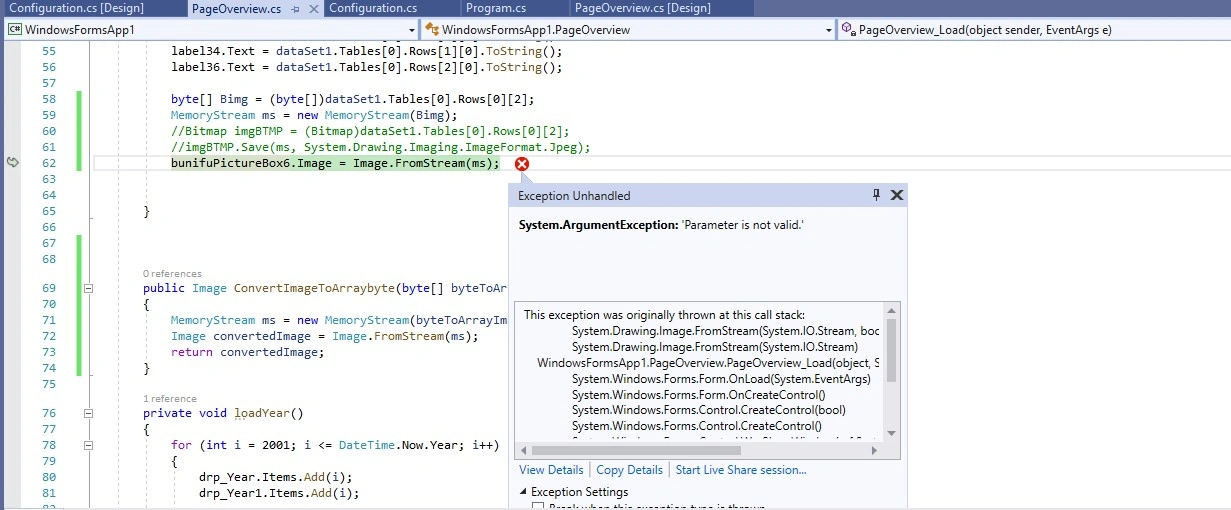
 private void PageOverview_Load(object sender, EventArgs e)
        {
            loadYear();
            configurationBLL = new ConfigurationBLL();
            DataSet dataSet = configurationBLL.GetTotalUserCount();
            label1.Text = dataSet.Tables[0].Rows[0][0].ToString();
            label8.Text = dataSet.Tables[0].Rows[0][1].ToString();
            label6.Text = dataSet.Tables[0].Rows[0][2].ToString();

            DataSet dataSet1 = configurationBLL.GetTopVolunteer();
            label31.Text = dataSet1.Tables[0].Rows[0][0].ToString();
            label34.Text = dataSet1.Tables[0].Rows[1][0].ToString();
            label36.Text = dataSet1.Tables[0].Rows[2][0].ToString();

            byte[] Bimg = (byte[])dataSet1.Tables[0].Rows[0][2];
            MemoryStream ms = new MemoryStream(Bimg);
            //Bitmap imgBTMP = (Bitmap)dataSet1.Tables[0].Rows[0][2];
            //imgBTMP.Save(ms, System.Drawing.Imaging.ImageFormat.Jpeg);
            bunifuPictureBox6.Image = Image.FromStream(ms);


        }
Sql Server Code
USE [BiometricDB]
GO
/****** Object:  StoredProcedure [dbo].[sp_GetTop3VolunteerReport]    Script Date: 28/10/2022 13:07:01 ******/
SET ANSI_NULLS ON
GO
SET QUOTED_IDENTIFIER ON
GO
ALTER PROCEDURE [dbo].[sp_GetTop3VolunteerReport]
AS
BEGIN
-- Top 3 Volunteer Report
SELECT
	TOP 3 v.[displayfullname] AS [Full Name], SUM(t.duration) AS [Total Duration], CAST(v.[profilephoto] as Varbinary) AS [Profile Photo]
FROM
	tblattendancelog t INNER JOIN
	tblvolunteer v ON v.[volunteerid] = t.[volunteerid]
WHERE
	t.[type] = 'Present'
GROUP BY
	v.[volunteerid], v.[displayfullname], CAST(v.[profilephoto] as Varbinary)
ORDER BY
	SUM(duration) DESC
END
I Will Find whole google but can't find Help Me
Guest UserPosted Nov 9, 2022, 11:05 PM
Guest UserPosted Nov 8, 2022, 6:44 AM
this Is My Configuration.cs file
I Will upload visual studio code file
Guest UserPosted Nov 8, 2022, 6:41 AM
this is my data save code
====================================================================================================
Image Draw
====================================================================================================
Upload Photo
====================================================================================================
Data Save
====================================================================================================
here retive data in text box and pic box
Guest UserPosted Nov 8, 2022, 6:31 AM
Not show image i will paste array byte
But show me on desktop app
i will upload image in zip file
Jignesh KumarPosted Nov 7, 2022, 3:49 AM
Hi Shoib,
Please check your byte array is valid or not using below site online, just paste byte array in text box and then click on generate image if this one is correct then above code should work else you need to check your image upload code while saving image
https://codebeautify.org/base64-to-image-converter
Guest UserPosted Nov 6, 2022, 4:14 PM
I Got Same Error i will upload image with zip file
Image Link For Sql Data Base https://ibb.co/r5N24bs
Jignesh KumarPosted Nov 6, 2022, 6:12 AM
Hi Shoib,
Please try to conver byte array to image then assign that image to your image,
Call Above method in your code,