Skip to content
Loading
Datalist click Image
  • Neha Sharma
    Hello sir,

    thx for your reply,

    \first i need to open and run your application,

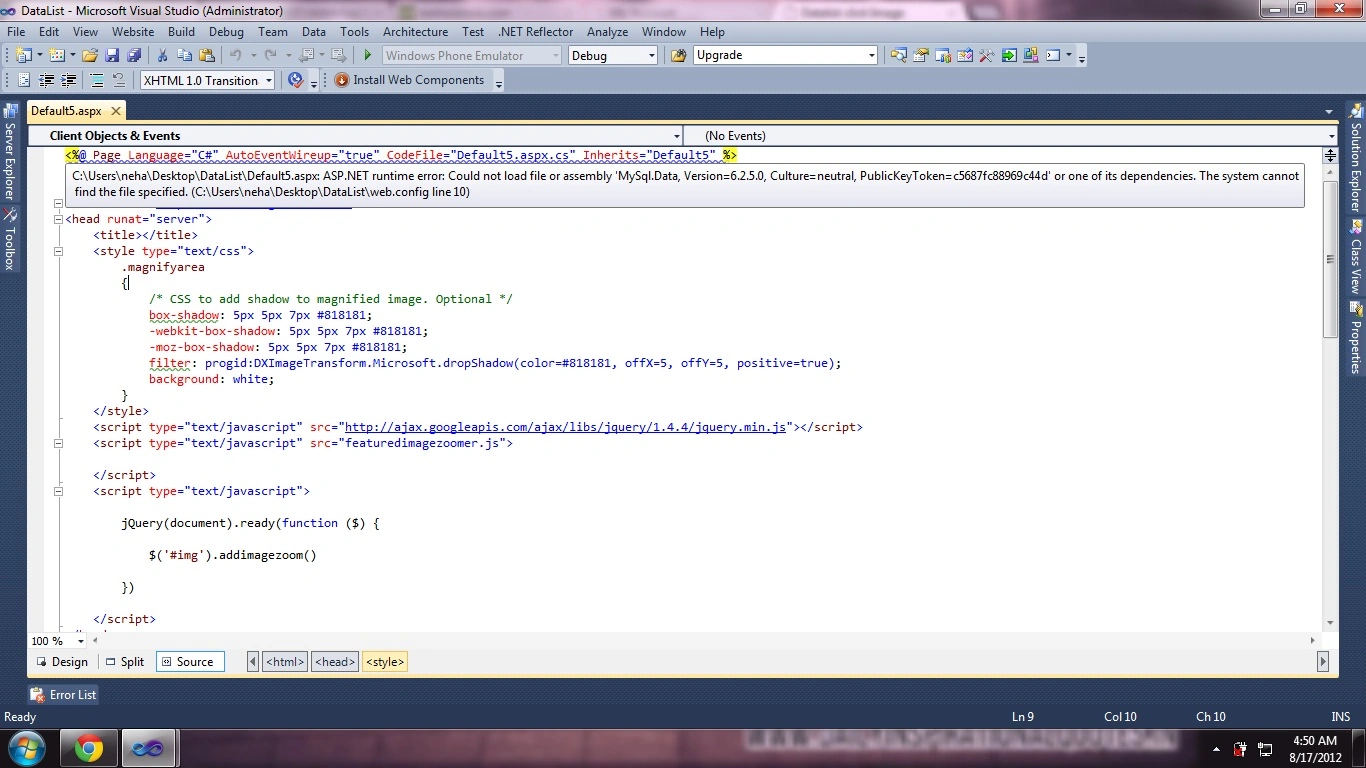
    but as i open that it says following error,please have a look over this image:

     fro your reply.

    Thx
    0
  • Dorababu Meka
    Can you tell what didn't work in that
    0
  • Dorababu Meka
    For me it is working fine Neha Sharma do one thing create a new application and test it with the following table

    CREATE TABLE `tblimages` (
      `Id` int(11) NOT NULL AUTO_INCREMENT,
      `Image1` varchar(550) DEFAULT NULL,
      PRIMARY KEY (`Id`)


    Insert data in to that as follow in place of Image1

    ~/Images/1.jpg
    ~/Images/2.jpg
    ~/Images/3.jpg

    Then create Image folder in your newly created application and add some jpg Images to that folder and rename them with 1,2,3 and then test my code and let me know
    0
  • Neha Sharma
    Hello Dorababu M Sir, Thx for your kidn help, But its not working exaclty. :( Looking forward for your kind response. Thanks.
    0
  • Dorababu Meka
    Check out my attachment and do the necessary change as per your requirement. 

    Sample Image with desired functionalty

    0
  • Neha Sharma
    Yes Dorababu M Sir. Please help me. Thanks.
    0
  • Dorababu Meka
    Do you need that zoom option too
    0
  • Hello Neha, That day u ask one question i think flyout image like jabong.com. So, what u r looking u can do using jquery. 
    u download jquery
    6 - Resize,zoom popup custom position, fadein, fadeout effects
    From
    http://www.mind-projects.it/projects/jqzoom/demos.php#demo1 

    0
  • Neha Sharma
    Hello Dorababu M, Yes,i am binding images from database,my table containing path+imagename and a folder is saving the image. Hope you ll again solve my problem for more i want to make a section like this on my page for product's sub Images: http://www.jabong.com/Plain-Purple-Tunic-85437.html?&rt=in.retargeting.sociomantic.sm_retarget.sm_retarget.sm_retarget&utm_source=sociomantic&utm_medium=retarget&utm_campaign=sm_retarget# THANKS.
    0
  • Dorababu Meka
    Are you binding the images from database or from a specified folder. check this article

    http://www.aspsnippets.com/Articles/Image-Gallery-using-ASP.Net-DataList-Control-Part-II---Image-Slideshow.aspx
    0
  • Neha Sharma
    When i use your given code or method its says: Invalid postback or callback argument. Event validation is enabled using in configuration or <%@ Page EnableEventValidation="true" %> in a page. For security purposes, this feature verifies that arguments to postback or callback events originate from the server control that originally rendered them. If the data is valid and expected, use the ClientScriptManager.RegisterForEventValidation method in order to register the postback or callback data for validation.
    0
  • Neha Sharma
    Hello Naresh Avari, Thx for your reply, It's not working for me i don't need to go on any other page,i want on the same page. Looking forward for your kind response. Thx
    0
  • Naresh Avari
    Here I am modifying your code:

                            RepeatDirection="Horizontal" OnItemCommand="DataList1_ItemCommand">


                                    Height="107" CommandName="imgClick" />


    and in Code behind:

    protected void DataList1_ItemCommand(object source, DataListCommandEventArgs e)
        {
            if (e.CommandName == "imgClick")
            {
                string imgURL = ((Label)e.Item.FindControl("lblImgName")).Text;
                Response.Redirect("dailydealsdetail.aspx?imgurl=" + imgURL);
            }
        }
    +2
  • Neha Sharma
    Hello Naresh Avari,

    Thx, for your kind reply

    Please elaborate me more,
    here is my code, not working:

    -1
  • Naresh Avari
    Hi Neha,

    Here I am giving one example: 

    DataList with onItemCommand event and ImageButton with CommandName=imgClick:

       
        Products List


    Code Behind:

    protected void dList_ItemCommand(object source, DataListCommandEventArgs e)
        {
            if (e.CommandName == "imgClick")
            {
                Response.Write("Image Clicked");
            }
        }


    Hope this helps you....
    0