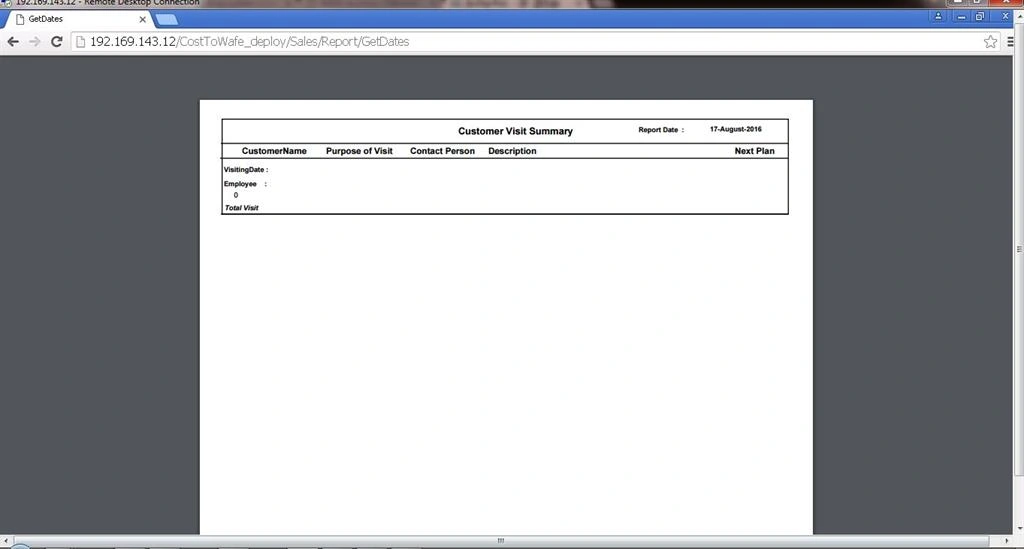
Hi i have one view called DailyVisitReport . it contain 2 fields called FromDate and ToDate. I am generating report depend upon the dates. I am using Crystal Report 2010. In normal Local Machine run it working fine after deploying my application in web server it showing empty report. I will explain my issue clearly.
I upload my application in online using Web server. So I purchased Virtual Private Server from Godaddy. I upload my application in online using Remote desktop connection by purchased web server IP address (from Godaddy).
Before i got one error while generating report after i deploying my application in web server that error is mention below.
so i asked many forums and search google. Many of them suggest me to add CrystalDecistion.ReportAppServer.CommLayer dll in assembly folder of the web server system and also refer that in Web.config File.I also did the same. Again i deploy my appliation in web server and try to generate the report. This time it didnt show any error and also generate the empty report.
The issue is date is not binding correctly. The Date Format which i send to controller is 01-mar-16 from Fromdate and Todate. But the date format which is retrieving from db is different eg 08/12/2016 and also it coming with time.I am saving Date without time in db.But while retrieving it will come with one default time.
So i convert the date format in sql as string format using
Replace(Convert(varchar(50), vf.VisitingDate,6), ' ', '-')As VisitingDate
And also i change the VisitingDate Format from String to date while retrieving. Now the format of date while retrieving from db and format of fromdate and to date both are same.I normal local machine run its working perfectly. But it showing empty report after deploying in web server.And one thing that is if i didnt select any date and click ok button means it shows all the data (which is in the table) in report in web server
My Controller Code
public ActionResult VisitSummaryReport()
{
return View();
}
[HttpPost]
public ActionResult GetDates(VisitorsViewModel VisitorsVM)
{
var fromdt = Convert.ToString(string.Format("{0:dd/MMM/yy}", VisitorsVM.FromDate));
var todt = Convert.ToString(string.Format("{0:dd/MMM/yy}", VisitorsVM.ToDate));
SqlConnection connection = new SqlConnection(@"Data Source=S192-169-143-12\WAFEEXPRESS;Initial Catalog=CRM;User ID=sa;Password=Wafe@win;");
//SqlConnection connection = new SqlConnection(@"Data Source=192.168.0.73\SQLEXPRESS,14330;Initial Catalog=CRM;User ID=sa;Password=wafewin;");
DataTable dt = new DataTable();
try
{
SqlCommand command = new SqlCommand();
command.Parameters.Add("@fromDate", System.Data.SqlDbType.Date).Value = fromdt;
command.Parameters.Add("@toDate", System.Data.SqlDbType.Date).Value = todt;
command.CommandText = "Select * from [View_VisitorsForm] Where CAST(VisitingDate AS Date) >= @fromDate and CAST(VisitingDate AS Date) <= @toDate";
command.Connection = connection;
connection.Open();
SqlDataAdapter adp = new SqlDataAdapter(command);
adp.Fill(dt);
}
catch (Exception ex)
{
throw;
}
ReportDocument rpt = new ReportDocument();
rpt.Load(Server.MapPath("~/Areas/Sales/CrystalReports/rpt_VisitSummaryCrystalReport.rpt"));
rpt.SetDataSource(dt);
Stream stream = rpt.ExportToStream(CrystalDecisions.Shared.ExportFormatType.PortableDocFormat);
return File(stream, "application/pdf");
}
My web config
Still i am getting Empty report in web server. I tried my level best to explain my issue.Any one understand my isssue and help me to resolve this problem.

Sneha KPosted Aug 23, 2016, 8:38 AM
Midhun T P you are correct.
Midhun TpPosted Aug 23, 2016, 7:26 AM
Sneha KPosted Aug 23, 2016, 6:07 AM
Midhun T P i pass in the format of dd/mmm/yy
Midhun TpPosted Aug 23, 2016, 4:32 AM
Sneha KPosted Aug 23, 2016, 4:18 AM
Midhun TpPosted Aug 23, 2016, 3:31 AM
Sneha KPosted Aug 23, 2016, 12:30 AM
Joginder BangerPosted Aug 22, 2016, 12:36 PM