I have two cases in one PowerApps application where I need to use a Dropdown control.However, I may be trying to force a dropdown to do something that it was not designed for.
I need help on the following on how to accomplish this. This is my first PowerApps. I am normally designing C# or VB.Net applications.
I have my PowerApps application connected to a SharePoint List. Currently the list consists of only a few fields and 3 records used for Task Management.
Fields: Work Order, Person Assigned, and Priority Level. All are single line text datatypes.
Case 1)
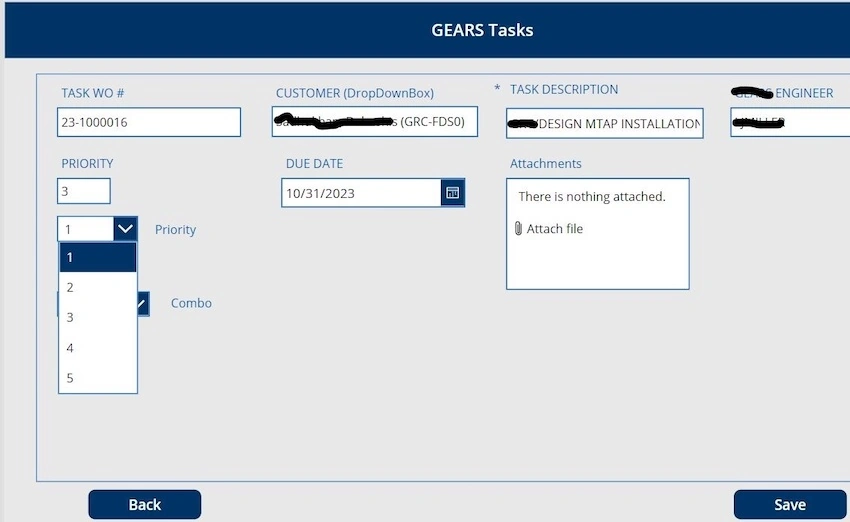
My Browse page loads all the records. Then if I want to edit an existing record/row or add a new record/row, I use an Edit form with DataCards for each field as a textbox. However, I would like to swap out my Priority Level textbox to a dropdown control, so a user does not have to type in the new priority level. My goal is to be able to edit the current rows Priority Level using a dropdown. The dropdown needs to have a choice of [1-10] that the user can select from. Therefore, if the current row being edited is Work Order] [200] , Person Assigned [J Smith], Priority Level [3]. I want the user to be able to select a different Priority Level from the dropdown and choose a value from 1 to 10 from a static predefined collection. For example, if value 1 is selected from the dropdown it needs to change the current rows value being displayed from 3 to 1. This would mean that one dropdown control needs to; have the current row connected to the SharePoint List and be able to provide the dropdown choices from 1 to 10. Can a dropdown do this? Or do you have to use a textbox to display the current rows field value and a dropdown with static values from 1 to 10 as choices that will update the textbox? I prefer that the dropdown can do both. And even better is to have One SharePoint list contain the rows, and another SharePoint list that contains the Priority Level values 1 to 10. And connect to both lists from one PowerApps simultaneously.
I have supplied a screenshot of my failed attempt at the end of these questions.
Case 2)
Same scenario as the first case. But have the dropdown control retrieve the entire list of possible persons that names exist in a group from Microsoft Teams and provide that list as dropdown choices when the current displayed record is modified, or a new record is to be entered.
Kadapa RangaswamyPosted Jan 28, 2023, 12:55 PM
Hello,
As I understood, you can have a dropdown only.
The values for the priority can be given dynamically rather giving it staticly, based on the number of values in the list can generate the priority values in the dropdown.
Now as it is a PowerApps form once the user goes to editmode, Edit Form will automatically fetch the priority value and display. And the user can change it accordingly.
Thanks
Vishal JoshiPosted Nov 11, 2022, 6:51 AM
Hello
As i understand. you don't need textbox and dropdown both. you can do it with dropdown only.
As you have static list of priority from [1 - 10] you can set it in sharepoint database sepratly and load that list in dropdown selection opions.
Now, Whatever item saved in Task Management the priority value in edit mode set as selected in dropdown selected options. so that whay we can show current priority and if enduse want to change he can change to other priority.
Thanks