A column named '1' already belongs to this DataTable.
My Code To Convert datatable
public static DataTable ConvertCSVtoDataTable(dynamic file)
{
    DataTable dt = new DataTable();
    using (StreamReader sr = new StreamReader(file.InputStream))
    {
        string[] headers = sr.ReadLine().Split(',');
        foreach (string header in headers)
        {
            dt.Columns.Add(header);
        }
        while (!sr.EndOfStream)
        {
            string[] rows = sr.ReadLine().Split(',');
            DataRow dr = dt.NewRow();
            for (int i = 0; i < headers.Length; i++)
            {
                dr[i] = rows[i];
            }
            dt.Rows.Add(dr);
        }

    }
    return dt;
    }
}
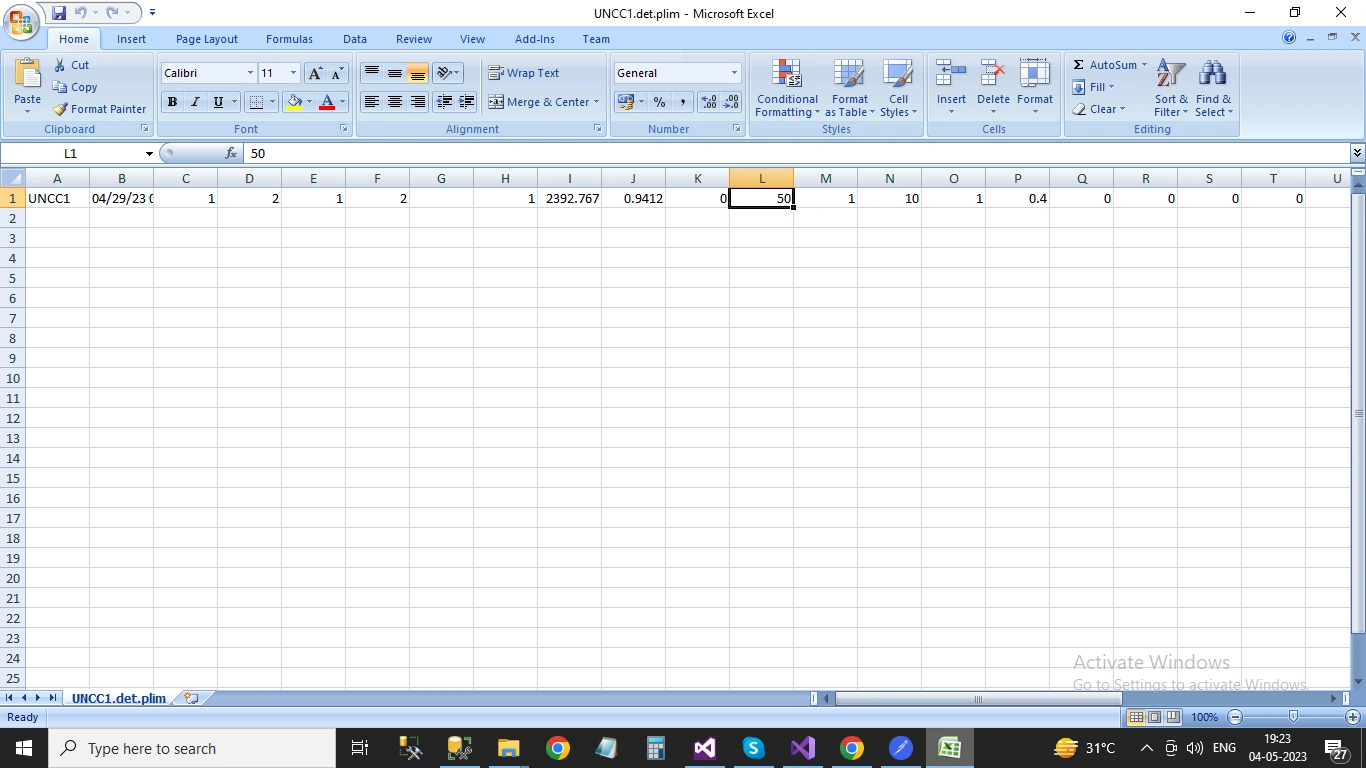
this is my csv file
Rajkiran SwainPosted May 4, 2023, 2:02 PM
It seems like the issue is that one of the column headers in your CSV file is named "1", which is causing a conflict with the existing columns in the `DataTable`. In C#, column names cannot begin with a number or be entirely numeric.
To fix this, you can modify your code to assign a new name to any column that starts with a number or is entirely numeric. Here's an updated version of your code that does this:
This code uses a regular expression (`^\d`) to check if the column name starts with a number, and the `int.TryParse` method to check if the column name is entirely numeric. If either of these conditions are met, the code adds a prefix ("col_") to the column name before adding it to the `DataTable`.