Hi Team
I need help with two things, one on my column Select a user must be able to click when selecting a module name then the image of this module must show picture. How can i do this on this given code below?
 Booking Courses
The courses available for booking or registration by the student.
Tuhin PaulPosted Jan 24, 2025, 1:51 AM
Another approach is image display via Form submission
Modify the Form to Include a Hidden Input for the Selected Module:
checkbox).Modified Code: Update the table to include radio buttons instead of checkboxes.
Add a "Preview" button to trigger the image preview..
Add a "Preview" button next to the register button:
Add JavaScript to dynamically preview the image:
Here this approach is slower; page reload needed for server logic
Tuhin PaulPosted Jan 24, 2025, 1:48 AM
Add a Click Event Listener for Module Names:
![]()
Modified Code: Add an empty image container ( or 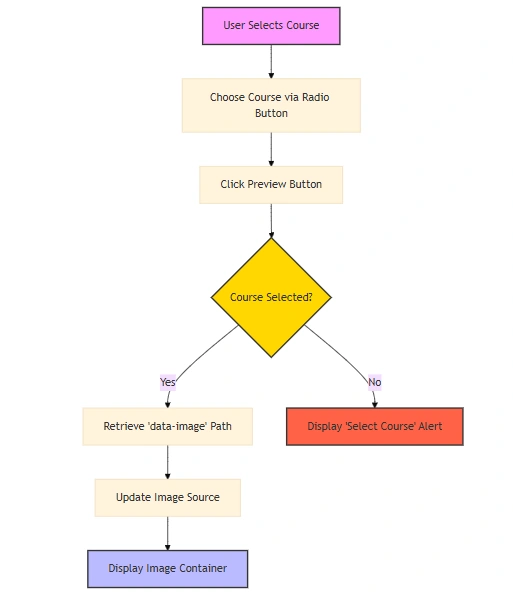
![]()
Add a
data-imageattribute to store the image path for each module name.Add JavaScript for Interaction:
this approach requires slightly more complex (requires JavaScript)
Sarthak VarshneyPosted Jan 23, 2025, 1:59 PM
-
-
-
Updated Code ExampleAdd a Dropdown to Select Modules
Replace or add to your current table structure with a
dropdown for modules.Load Images Dynamically Using JavaScript
Use JavaScript to update the displayed image when a user selects a module from the dropdown.
Fetch Images via AJAX (Optional)
If you want the dropdown to dynamically fetch images based on a selected value, you can use an AJAX request to get the image URL from the server without reloading the page.
HTML and JavaScript for Dynamic Image Display
Below is the revised section for dynamic image loading:
Key Changes and Additions-
-
-
-
Optional: Using AJAX for Real-Time FetchingDropdown with
data-imageAttributesEach
in the dropdown includes adata-imageattribute containing the image path.Dynamic Image Update
JavaScript listens for the
changeevent on the dropdown and updates the image'ssrcattribute accordingly.Image Display Container
An empty
![]()
#moduleImagediv, which updates dynamically.Fallback for No Image Selected
If no module is selected, the image is hidden.
If your images or course details are stored in different locations or need additional database queries, you can use AJAX to fetch the image dynamically from the server. Here's a simplified approach:
PHP Endpoint (
fetch_image.php)JavaScript AJAX Request
Replace the
changeevent listener in the earlier script with the following: