
How to use Termly cookie in react.js ?
while using it I faced the error window.TermlyCookies is undefined.
How to use Termly cookie in react.js ?
while using it I faced the error window.TermlyCookies is undefined.
Know the answer? Post it — somebody with the same question will find it here.
Sign in to answer this question
It is the same account you read, post and publish with — and you will come straight back to this page.
Mohamed Azarudeen ZPosted May 16, 2023, 11:58 AM
To use the Termly cookie in a React.js application, you need to follow these steps:
1. Install the Termly package: Start by installing the Termly package using npm or yarn. Open your project's terminal and run the following command:
```bash
npm install termly
```
or
```bash
yarn add termly
```
2. Import and use Termly in your component: In your React component file, import the Termly package at the top of the file:
```javascript
import { TermlyCookies } from 'termly';
```
3. Initialize Termly: In the component's lifecycle method (e.g., `componentDidMount`), initialize the Termly cookie by calling the `init` method and passing the Termly script URL and your Termly consent policy ID:
```javascript
componentDidMount() {
TermlyCookies.init({
policyUrl: 'https://www.termly.io/legal/privacy-policy',
policyId: 'your-policy-id',
});
}
```
Make sure to replace `'https://www.termly.io/legal/privacy-policy'` with the URL to your privacy policy and `'your-policy-id'` with your actual policy ID from Termly.
4. Handle the consent banner: Termly will automatically inject the consent banner into your application. To handle the consent banner display, you can render it conditionally based on whether the user has already given consent. For example:
```javascript
render() {
const isConsentGiven = TermlyCookies.consentIsGiven();
return (
{!isConsentGiven &&
{/* Rest of your component's code */}
);
}
```
5. Use the cookie consent information: You can access the cookie consent information and make decisions based on it. For example, you can retrieve the user's consent status and handle different behaviors accordingly:
```javascript
// Check if consent is given
const isConsentGiven = TermlyCookies.consentIsGiven();
// Get the user's consent preferences
const preferences = TermlyCookies.getUserPreferences();
// Use the preferences to handle cookie behavior
if (isConsentGiven && preferences && preferences.marketing) {
// Load marketing cookies
} else {
// Do not load marketing cookies
}
```
Make sure to handle the consent banner display and cookie behavior based on your specific requirements and policies.
Regarding the error message "window.TermlyCookies is undefined," please ensure that you have properly imported the Termly package and that you're calling the `TermlyCookies.init` and `TermlyCookies.consentIsGiven` functions after the component has mounted. Additionally, double-check that the Termly script is loaded correctly in your application.
If you continue to encounter the error, please provide more details or share your code snippet so that I can assist you further.
Tuhin PaulPosted May 15, 2023, 9:03 AM
To get a cookie, you can use the following code:
If you are facing the error window.TermlyCookies is undefined, it means that the Termly library has not been loaded correctly. To fix this error, make sure that the library is installed and imported correctly.
Tuhin PaulPosted May 15, 2023, 9:02 AM
Code to use Termly cookies in React.js:
Prathap ReddyPosted May 15, 2023, 8:43 AM
The code you provided is a React component that embeds the Termly cookie preference modal on a website. The component uses the following steps to do this:
scriptelement and sets itssrcattribute to the URL of the Termly embed script.data-website-uuidattribute of thescriptelement to the website's UUID.scriptelement to theheadof the document.loadevent of thescriptelement. The event listener sets the component'sisScriptLoadedstate totrue.displayPreferenceModalmethod checks the value of theisScriptLoadedstate. If the state istrue, the method calls thedisplayPreferenceModalmethod of theTermlyCookiesobject. If the state isfalse, the method logs a message to the console.The
displayPreferenceModalmethod of theTermlyCookiesobject displays the Termly cookie preference modal. The modal allows users to choose which cookies they want to allow on the website.To use the code, you would need to add it to the
componentDidMountmethod of your React component. You would also need to replace the value of theyour-website-uuidvariable with the UUID of your websiteOn page load, it is working but when I click on the button of manage cookie preferences it shows this error - TermlyCookies object is not defined and the popup is not showing. window.TermlyCookies
The error "TermlyCookies object is not defined" means that the Termly embed script has not finished loading when you click on the "Manage Cookie Preferences" button. This can happen if the script is blocked by a ad blocker or if the website is loading slowly.
To fix the error, you can try the following:
Here are some additional things you can try:
note : refference from google for this querry
Brahma Prakash ShuklaPosted May 15, 2023, 7:42 AM
On page load, it is working but when I click on the button of manage cookie preferences it shows this error - TermlyCookies object is not defined
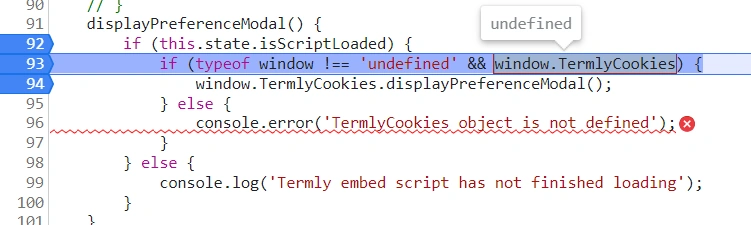
and the popup is not showing.
@prathap Reddy
Prathap ReddyPosted May 15, 2023, 6:27 AM
componentDidMount() {
const script = document.createElement('script');
script.src = 'https://app.termly.io/embed.min.js';
script.setAttribute('data-website-uuid', 'your-website-uuid');
document.head.appendChild(script);
script.addEventListener('load', () => {
this.setState({ isScriptLoaded: true });
});
}
// ...
displayPreferenceModal() {
if (this.state.isScriptLoaded) {
if (typeof window !== 'undefined' && window.TermlyCookies) {
window.TermlyCookies.displayPreferenceModal();
} else {
console.error('TermlyCookies object is not defined');
}
} else {
console.log('Termly embed script has not finished loading');
}
}
you can try this code
otherwise you can use this github
Brahma Prakash ShuklaPosted May 15, 2023, 6:24 AM
Hi, Prathap.
I have only the UUID.
This is my code-
Prathap ReddyPosted May 15, 2023, 6:12 AM
Termly provides a cookie consent solution that can be easily integrated into a React.js application. To use Termly cookie consent in your React.js app, you can follow these steps:
Sign up for a Termly account and create a cookie policy.
Install the Termly JavaScript SDK in your React.js project using the following command:
npm install termlyIn your React component where you want to display the cookie banner, you can add the following code to load the Termly cookie consent script:
useEffect(() => { const script = document.createElement("script");
script.src = "https://cdn.termly.io/launcher/xxxxxxxx-xxxx-xxxx-xxxx-xxxxxxxxxxxx.js";
script.async = true;
document.body.appendChild(script); return () => { document.body.removeChild(script);
};
}, []);
Replace the
xxxxxxxx-xxxx-xxxx-xxxx-xxxxxxxxxxxxwith the actual script ID for your cookie policy, which can be found in your Termly account dashboard.Finally, add the Termly cookie consent banner to your component by using the
data-termly-slugattribute:Replace
cookie-policywith the actual slug for your cookie policy, which can also be found in your Termly account dashboard.