Hi
Images preview not getting displayed. Screenshot attched. Similarly WhatsApp Icon image not get displayed in toolbar.
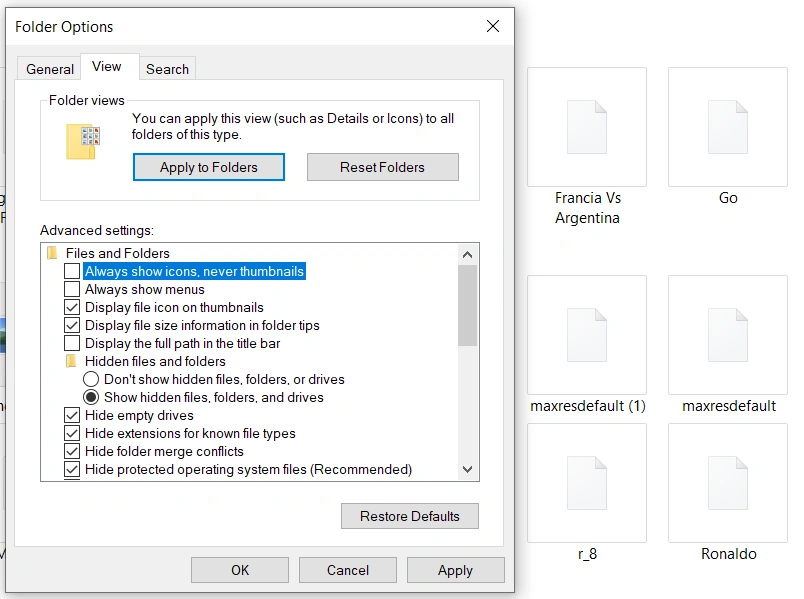
Thanks
Hi
Images preview not getting displayed. Screenshot attched. Similarly WhatsApp Icon image not get displayed in toolbar.
Thanks
Know the answer? Post it — somebody with the same question will find it here.
Sign in to answer this question
It is the same account you read, post and publish with — and you will come straight back to this page.
Naimish MakwanaPosted May 6, 2024, 4:25 AM
Here are a few steps you can try:
Check View Settings: Open the folder where your images are stored. Click on the “View” tab in the top menu and make sure that the option “Large icons” or “Extra large icons” is selected. This will display the images as thumbnails in the folder.
Rebuild Thumbnail Cache: The issue might be due to a corrupted thumbnail cache. You can rebuild the thumbnail cache by following these steps:
Win + Sto open the search box.Disk Cleanupand open the application.OK.Thumbnailsand then clickOKandDelete Files.Check if Images are Hidden: Make sure the images are not set as hidden files. To view hidden files, open the folder, click on the “View” tab in the top menu, and check the box for “Hidden items”.
File Explorer Options: Open File Explorer Options (you can search for it in the Start Menu), go to the “View” tab, and make sure “Always show icons, never thumbnails” is unchecked.
If none of these solutions work, the images might be in a format that Windows doesn’t recognize, or they might be corrupted.
Thanks