
I have 'Product Category Attribute' table,

Then, I want to create dynamically generating html controls with respect to this table. So I have designed html like this,
- @foreach (var item in Model)
- {
- if (item.AttributeControlType == "textbox")
- {
- <tr><td>@Html.TextBox("AttributeName", item.AttributeName ?? " ")td><td>@Html.TextBox("txtValidValues", item.ValidValues ?? " ", new { maxlength = item.AttributeMaxLength ?? 0 })td>tr>
- @Html.Hidden("idProductCategoryAttribute", item.idProductCategoryAttribute)
- }
- else if (item.AttributeControlType == "DropDownList")
- {
- <tr><td>@Html.TextBox("AttributeName", item.AttributeName ?? " ")td><td>@Html.DropDownList("ddlValidValues", new SelectList(item.ValidValues.Split(new char[] { ',' })), new { @class = "form-control", @style = "width:200px;height:20px;", size = item.AttributeMaxLength ?? 0 })td>tr>
- @Html.Hidden("idProductCategoryAttribute", item.idProductCategoryAttribute)
- }
- else if (item.AttributeControlType == "checkbox")
- {
- <tr><td>@Html.TextBox("AttributeName", item.AttributeName ?? " ")td><td><ul><li> <input type="checkbox" id="chkValidValue" checked />li>@item.ValidValues<li>ul>td>tr>
- @Html.Hidden("idProductCategoryAttribute", item.idProductCategoryAttribute)
- }
- }
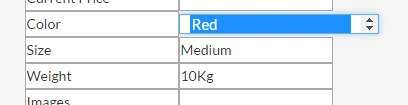
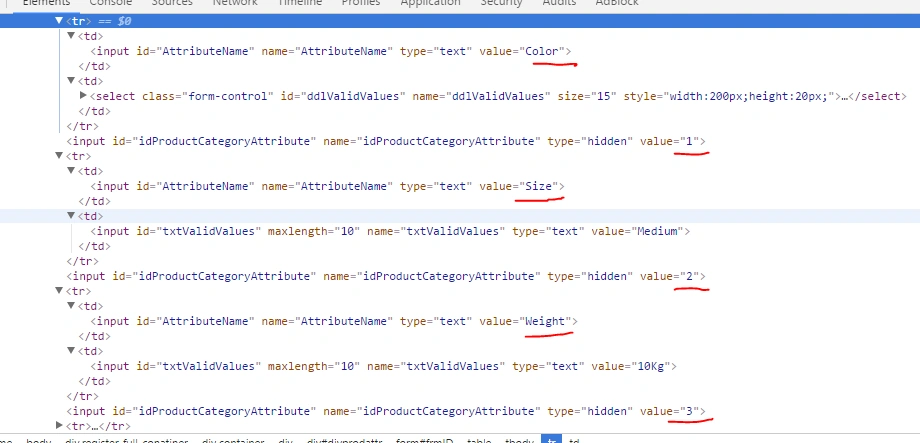
Now If I have to update the 'ValidValues' by one button click, how can I do this?
I have tried jquery,
- $( "#btnAddProduct" ).click(function() {
- var values = $('input[name="idProductCategoryAttribute"]').map(function () {
- return this.value;
- }).get();
- var hdidAttribute = values.join(", ");
- /*before submitting the form*/
- });
Ramesh PalanivelPosted Apr 19, 2017, 7:20 AM
Abhilash J APosted Apr 19, 2017, 6:41 AM
Ramesh PalanivelPosted Apr 19, 2017, 6:37 AM