Hello,
i do have the following Code:
- private static void AddElements(Canvas canvas)
- {
- double canvasHeight = canvas.Height;
- double canvasWidth = canvas.Width;
- double y0 = canvasHeight / 2;
- double x0 = canvasWidth / 2;
- // Defining the new Coordinate-Point (0,0) to mid auf Canvas
- TranslateTransform tt = new TranslateTransform(x0, y0);
- Line line1 = new Line();
- line1.X1 = -350;
- line1.Y1 = 0;
- line1.X2 = 350;
- line1.Y2 = 0;
- line1.Stroke = Brushes.Black;
- line1.StrokeThickness = 2.0;
- line1.RenderTransform = tt;
- canvas.Children.Add(line1);
- Line line2 = new Line();
- line2.X1 = 0;
- line2.Y1 = -350;
- line2.X2 = 0;
- line2.Y2 = 350;
- line2.Stroke = Brushes.Black;
- line2.StrokeThickness = 2.0;
- line2.RenderTransform = tt;
- canvas.Children.Add(line2);
- Label lblN = new Label();
- lblN.Width = 50;
- lblN.Background = Brushes.Red;
- lblN.Margin = new System.Windows.Thickness(0, -300, 0, 0);
- lblN.Content = $"N";
- lblN.HorizontalContentAlignment = System.Windows.HorizontalAlignment.Center;
- lblN.VerticalContentAlignment = System.Windows.VerticalAlignment.Center;
- lblN.RenderTransform = tt;
- lblN.Padding = new System.Windows.Thickness(0);
- lblN.BorderBrush = Brushes.Black;
- lblN.BorderThickness = new System.Windows.Thickness(2.0);
- lblN.RenderTransform = tt;
- canvas.Children.Add(lblN);
- Label lblS = new Label();
- lblS.Width = 50;
- lblS.Background = Brushes.Red;
- lblS.Margin = new System.Windows.Thickness(0, 300, 0, 0);
- lblS.Content = $"S";
- lblS.HorizontalContentAlignment = System.Windows.HorizontalAlignment.Center;
- lblS.VerticalContentAlignment = System.Windows.VerticalAlignment.Center;
- lblS.RenderTransform = tt;
- lblS.Padding = new System.Windows.Thickness(0);
- lblS.BorderBrush = Brushes.Black;
- lblS.BorderThickness = new System.Windows.Thickness(2.0);
- lblS.RenderTransform = tt;
- canvas.Children.Add(lblS);
- }
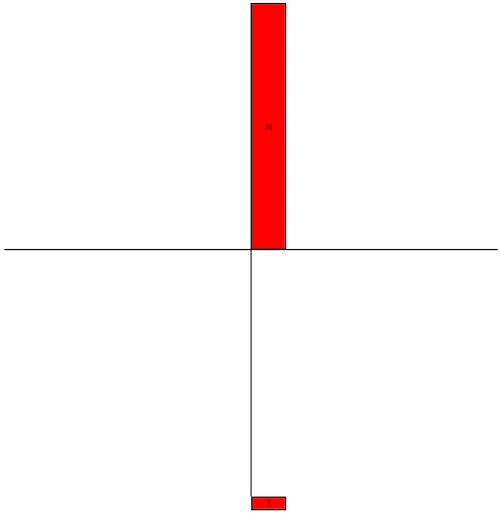
this method is called on an Menu-Eventhandler and it shows an coordinate system with (0,0) in the mid of the canvas. It should show a label with "N" at the top and a label with "S" at the bottom.
But i shows the attached image
Does anyone know, why lblN looks different than lblS ?
best regards
Volkhard
Sandhiya PriyaPosted Jan 2, 2026, 11:01 AM
it’s not a bug in WPF, it’s a subtle interaction between Canvas layout, Margin, and RenderTransform.
Why
lblNlooks different thanlblSYou’re using a TranslateTransform to shift everything so that
(0,0)is in the middle of the canvas.For the lines, this works fine because their coordinates are relative to
(0,0).For the labels, however, you’re mixing two layout systems:
Canvas.Children normally positions elements using
Canvas.LeftandCanvas.Top.You’re instead using
Margin(which is interpreted differently depending on alignment).Then you apply a
RenderTransformon top of that.So the label at
Margin(0, -300, 0, 0)ends up being offset differently than the one atMargin(0, 300, 0, 0)because the negative margin interacts with the control’s alignment and layout pass. That’s why “N” looks shifted compared to “S”.How to Fix It
Instead of using
Margin, place the labels with Canvas coordinates and then apply the transform:Note
Use Canvas.SetLeft/SetTop for positioning inside a
Canvas.Avoid
Marginin this scenario — it’s meant for layout panels likeGridorStackPanel, not for absolute positioning.With
Canvas.SetTopandCanvas.SetLeft, both “N” and “S” will render symmetrically.