Hi
I am using Microsoft Visual Studio Professional 2019
Version 16.11.19 . I amgetting below error .
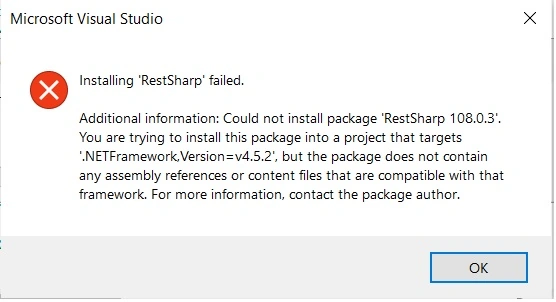
Thanks
Hi
I am using Microsoft Visual Studio Professional 2019
Version 16.11.19 . I amgetting below error .
Thanks
Know the answer? Post it — somebody with the same question will find it here.
Sign in to answer this question
It is the same account you read, post and publish with — and you will come straight back to this page.
Pankajkumar PatelPosted Dec 13, 2022, 4:55 AM
Hi Ramco Ramco,
If anyone encounters this kind of problem in the future. I solved it by installing it via Package Manager Console found in (Tools -> NuGet Package Manager -> Package Manager Console) and running the following command:
Notice that the installation for RestSharp version 106.1.0 always kept failing, so I changed the version to 103.1.0. Hope this helps anyone with a similar issue.
For more details:
Hope this will help you!
Amit MohantyPosted Dec 13, 2022, 5:12 AM
Hey, RestSharp 108.0.3 support .Net version 4.6.1 and above. So if you want to use RestSharp 108.0.3 then change your application target framework to 4.6.1 or above or you can you can use lower version of RestSharp
Check the below link to check supported frameworks.
https://www.nuget.org/packages/RestSharp#supportedframeworks-body-tab