I am new to c# and as a project decided to create a colour picker control, to test my code I wrote it in a vanilla form first and then copied the code into the control when I was sure it was working.
This results in a control that in design view shows absolutely nothing thus far but when the control is compiled you see a visual representation of the final result.
Here is the rub however; as I said the compiled control looks perfect when I place it on a form in the designer - but when I run the program the control on the form looks about 25% larger and due to this its right and bottom edges are clipped.
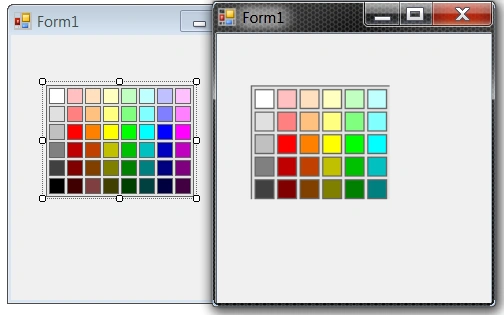
Now I have no idea why this is happening, can anyone tell me why and how to fix it?
Chasse CourtPosted Jun 28, 2013, 9:42 AM
Thanks for taking the time to respond but I don't think you quite got the gist of what I am asking I agree that the code works in that it generates the image for the control to drop onto the form but:
On the picture that I posted above it shows a form in design mode on the left in which the control looks perfect and you will note that the 8 selection toggles around the outside denoting the controls boundaries are correctly positioned so that the control should not overlap anything else - running it this way yields the image on the right, in order to get the image on the right to display all 8 squares across and 6 squares down it was necessary to take the selection indicator in the lower right hand corner and move it diagonally to the lower right so that those extra squares could be displayed and the end result was that the image on the right was around 25% larger when it did display those squares than the control in design mode on the form.
What I want is to make the design mode representation and the executing form representation look the same so instead of having to do this:
which makes the right hand representation larger. I want the representation on the design time form and that of the Running form both to be the same size - the reason I want to do this is so that when you put the design time representation of the control on a form you know exactly where to put other controls as opposed to having to worry about the resized area possibly blanking out a piece of something else.
Its a hard thing to describe but basically it shouldn't mater if I'm dropping the control onto a new form or looking at it when its in a program that's running I want both representations to be identical so that what I see is what I get.
I hope this helps explain what I am trying to achieve a bit better.
Sanjeeb LenkaPosted Jun 28, 2013, 1:29 AM
just check the attached code