You have to change it manually, it isn't be done automatically. However, if it is referenced somewhere then it will be changed accordingly using Refractoring.
In this video it is said that .Net Standard Class Library can be used in .Net Core or .Net Framework. Therefore it is advise to create a Class Library in .Net Standard. I want to develope an app and add-in to engineering design software. That is the reason I refresh my memory in C# knowledge.
Above is a screen shot of Visual Studio 2017, which quite typically shows many of the project types,
Class Library (.NET Core)
Class Library (.NET Standard)
Class Library (.NET Framework)
Class Library (Portable)
Class Library (iOS)
Class Library (tvOS)
Class Library (watchOS)
Class Library (Xamarin.Forms)
Class Library (Android)
Others (like UWP and so on)
Well, many people get lost as you do, as there are so many of them. So how should we understand Microsoft’s logic behind the scene? I think we can divide all of them into two categories.
Platform Specific Class Library
Class Library (.NET Framework) has been there for long since .NET Framework 1.0. We have known its rule that any such class library can only be consumed by .NET Framework apps. Such a rule also applies to other project types, targeting iOS/tvOS/watchOS/Android/UWP.
We have to rely on such class library types, as later we will see for cross platform class library types we usually cannot work against all types available on the underlying platforms.
Cross Platform Class Library
Class Library (Portable) has been the first type of cross platform library we can use, and is also called PCL for short. It allows the code to be written against a common API set extracted from a set of platforms. Its design has many flaws, so Microsoft later introduces .NET Standard.
Class Library (.NET Standard) is the new type to replace PCL. It allows developers to write code against a much larger API surface. Thus, if you are now developing something new and would like to support many platforms, make sure you use such a project type.
However, there are still two special types here for .NET Core and Xamarin.Forms.
Class Library (.NET Core) is so special, that your code can actually run on many platforms (as long as .NET Core is supported there). However, unlike Class Library (.NET Standard) which can be consumed by almost all kinds of application projects, this type can only be consumed by .NET Core apps. You cannot consume such class libraries in a .NET Framework app. So if we treat .NET Core as a platform of its own, then this class type can also be analyzed as a platform specific type.
Class Library (Xamarin.Forms) is similar, as Xamarin.Forms is cross platform and supports iOS/Android/UWP (WPF and macOS support is coming). If you create a project of this type, it can only be consumed by Xamarin.Forms apps.
How to Migrate Code Among Them
So far, my personal experience is that cut and paste is the simplest and most effective way.
Simple change in editor too as Employee, When you change physical file name it will ask below message, you should click on yes then in editor also it will change as Employee


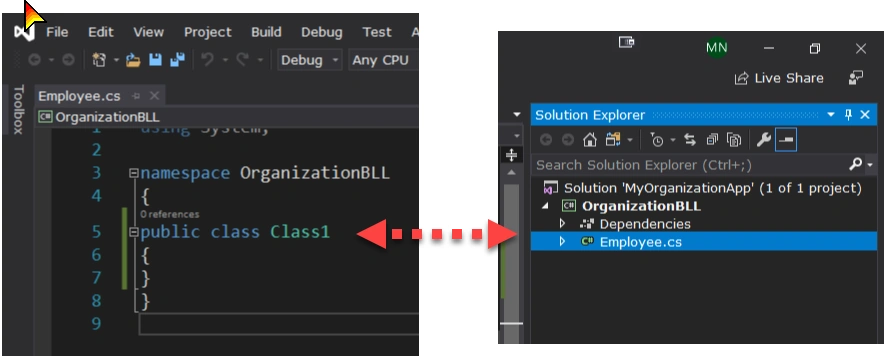
MahaPosted Aug 25, 2019, 5:19 PM
"@Maha, i told you clearly, with it will ask by displaying messagebox to change or not"
Rajanikant HawaldarPosted Aug 25, 2019, 4:51 AM
MahaPosted Aug 25, 2019, 4:45 AM
Amit GuptaPosted Aug 25, 2019, 3:45 AM
MahaPosted Aug 24, 2019, 2:34 PM
Rajanikant HawaldarPosted Aug 24, 2019, 1:11 PM
Rajanikant HawaldarPosted Aug 24, 2019, 11:44 AM