I'm trying to create a user interface, where I should be able to add elements from within the application, and order them correctly.
I'll try to describe it as clear as possible, with a little help of the screenshot in below.
I want to be able to add buttons (via code) to the list, every time one button after another (is it possible to sort these buttons as well?).
When the list of buttons exceeds my window or grid size, I want to be able to use a scrollbar (as shown in the screenshot).
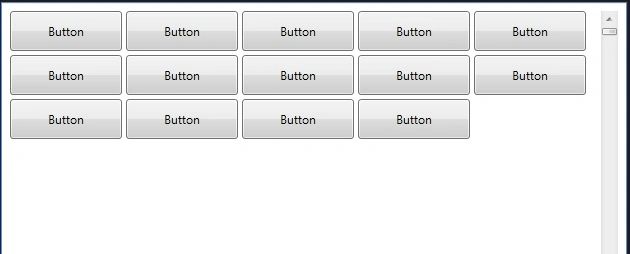
How should I be able to do this?
Any help is appreciated!
Thanks in advance!
Greetz!
Kevin BrigittaPosted Jun 4, 2011, 10:06 AM
First off, I would like to apologize for not indicating that this concerns a WPF application. I realise that this doesn't make my question any easier, and that no proper answer can be given until this was cleared out.
Regarding the issue:
I have a window, which contains 2 buttons (btn_food & btn_drinks). When I press btn_food, a grid (grd_food) becomes visible and another grid (grd_drinks) becomes hidden using following code:
grd_food.Visibility = System.Windows.Visibility.Visible;
grd_drinks.Visibility = System.Windows.Visibility.Hidden;
When I press the btn_drinks, the opposite happens.
So far, there is no issue (anymore).
What I would like to do know, is to construct (inside these seperate grids) lines with buttons, where each button within the grd_food is indicating a food type (e.g. spaghetti, steak,...), and every button within the grd_drinks is indicating a drinks type (e.g. water, sprite,...).
I can order these buttons in whatever way I want using seperate stackpanels that 'stack' these buttons horizontally.
But what I want to do, is to be able to dynamically add buttons to each grid from within the application. The button should be added to the lines of button, set on the correct position in that line (correct spacing etc.). If the line (stackpanel?) is full (for example contains 5 buttons), it has to go to a next line (new stackpanel?) and continue to add a button there. When the lines (stackpanel) exceed the grid, a vertical scrollbar should become active, so it becomes possible to scroll down to the last line.
The window is fixed size.
And on top of this -if this would be possible- I would like to be able to order these buttons, given what color they have (alcohol = red, warm drinks = yellow,...).
To give an idea what I mean, I posted a screenhot in below:
I hope I stated my question clear enough with this. If any other information is required, please ask!
Thanks in advance!
Sam HobbsPosted Jun 3, 2011, 6:39 PM
For the benefit of others, this is for a WPF application.
So please tell us; did you decide not to use a Grid? What about a Panel?
I do think you have explained your requirements better in this thread than in the previous one.
Do you need for the window to be resizable or shoud it be fixed in size? If resizable then should the buttons be moved around so they fill the window or should the window have horizontal scrollbars as needed?