When I try to run a .net core web application in my IIS 10.0, its not able to run. The default website is working fine and another application without database connection is also working. below is the web.config file
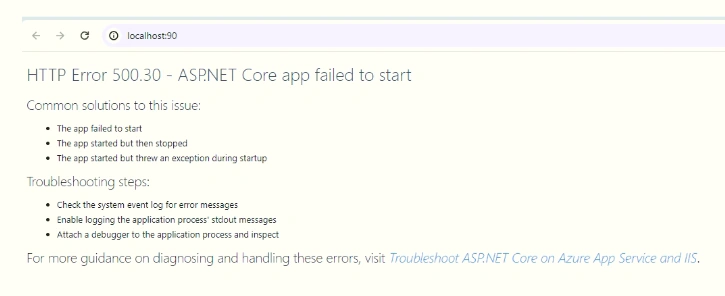
this is the error getting
Jignesh KumarPosted Jun 18, 2024, 6:06 AM
Hello,
You need to add environment variable,,
Prasad RaveendranPosted Jun 17, 2024, 7:28 PM
Wondering this is got resolved?
Naimish MakwanaPosted Jun 6, 2024, 9:06 AM
The error
HTTP Error 500.31 - Failed to load ASP.NET Core runtimetypically occurs when the specified version ofMicrosoft.NetCore.ApporMicrosoft.AspNetCore.Appwas not found12. Here are some troubleshooting steps you can follow:Check the system event log for error messages: The system event log might contain more detailed information about the error.
Enable logging: You can enable logging by setting
stdoutLogEnabled="true"in yourweb.configfile, which you have already done. The logs can provide more information about the error2.Check the .NET Core versions: Make sure that the .NET Core versions specified in your project match the versions installed on your machine3.
Install the ASP.NET Core Module: If you haven’t already, make sure to install the ASP.NET Core Module4.
Publish as Self-Contained: A quick fix might be to publish your application as self-contained. This includes the .NET runtime with your application, so it can run even if the server does not have the correct .NET runtime installed2.
URL Rewrite Module: If you don’t have URL Rewrite Module installed, you will often encounter a 500.31 error. Please try to install it and reopen the IIS Management, then check it5.
Remember to always backup your files before making any changes. If none of these solutions work, please provide more information about your setup, such as the .NET Core version you’re using and the specific settings in your
web.configfile.Thanks
Bineesh ViswanathPosted Jun 6, 2024, 5:55 AM
when i checked .csproj file , i can see framework version using is 8.0
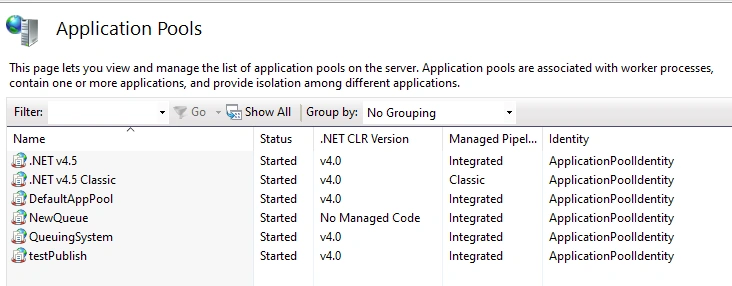
windows server hosting bundle 8.0 is already there. but in IIS only v4 and No Managed Code option in my .NET CLR Version in my IIS
Bineesh ViswanathPosted Jun 6, 2024, 5:14 AM
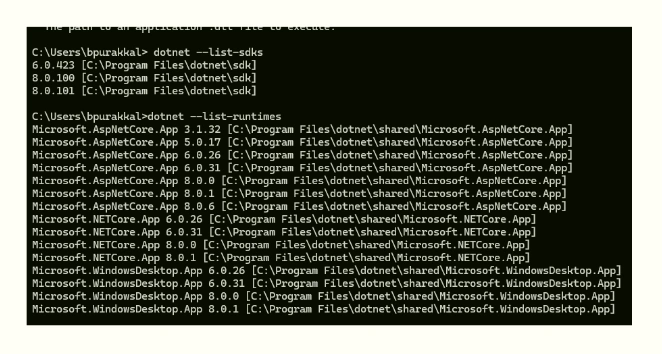
I have various types of runtime installed.
Microsoft.AspNetCore.App 8.0.0 [C:\Program Files\dotnet\shared\Microsoft.AspNetCore.App]
Microsoft.AspNetCore.App 8.0.1 [C:\Program Files\dotnet\shared\Microsoft.AspNetCore.App]
Microsoft.AspNetCore.App 8.0.4 [C:\Program Files\dotnet\shared\Microsoft.AspNetCore.App]
Microsoft.NETCore.App 8.0.0 [C:\Program Files\dotnet\shared\Microsoft.NETCore.App]
Microsoft.NETCore.App 8.0.1 [C:\Program Files\dotnet\shared\Microsoft.NETCore.App]
Microsoft.NETCore.App 8.0.4 [C:\Program Files\dotnet\shared\Microsoft.NETCore.App]
Microsoft.WindowsDesktop.App 8.0.0 [C:\Program Files\dotnet\shared\Microsoft.WindowsDesktop.App]
Microsoft.WindowsDesktop.App 8.0.1 [C:\Program Files\dotnet\shared\Microsoft.WindowsDesktop.App]
will this be a issue for getting this error?
my application pool is look like this
Prasad RaveendranPosted Jun 6, 2024, 1:08 AM
Install the ASP.NET Core Hosting Bundle: If you haven't already, install the ASP.NET Core Hosting Bundle. This will ensure that IIS is properly configured to host ASP.NET Core applications. You can download it from the .NET Core Hosting Bundle page.
Bineesh ViswanathPosted Jun 2, 2024, 6:39 AM
Hi Prasad Raveendran,
I changed config file as per above and its showing different error code while running application
HTTP Error 500.31 - Failed to load ASP.NET Core runtime
Common solutions to this issue:
The specified version of Microsoft.NetCore.App or Microsoft.AspNetCore.App was not found.
This may be because of i have many runtime installed on pc
Prasad RaveendranPosted Jun 1, 2024, 10:23 PM
Could you please confirm whether your application is connecting to database? if yes, ensure that the Apppool identity user has access to the database.
To troubleshoot why your .NET Core web application isn't running on IIS 10.0, there are a few key areas to check:
Web.config File: Your
web.configfile seems to have some issues. Specifically, there's an extraweb.config:Permissions: Ensure that the application pool identity has the necessary permissions to access the application files and folders, especially the
Logsdirectory if logging is enabled.Event Viewer Logs: Check the Windows Event Viewer logs for any errors related to the application. Look under
Windows Logs -> Applicationfor any .NET Core or IIS related errors.IIS Logs: Check the IIS logs located at
C:\inetpub\logs\LogFilesfor any requests hitting your application and any related errors.Application Logs: If stdout logging is enabled in your
web.config, check the.\Logs\stdoutfile for any application-specific errors. Ensure the path exists and the application pool identity has write access to it.IIS Configuration:
Bineesh ViswanathPosted Jun 1, 2024, 1:50 PM
Allani Saikumar
I tried it. getting below error
HTTP Error 500.31 - Failed to load ASP.NET Core runtime
Common solutions to this issue:
The specified version of Microsoft.NetCore.App or Microsoft.AspNetCore.App was not found.
in cmd , i treid to list out the .net dsk and runtime
Allani SaikumarPosted Jun 1, 2024, 1:33 PM
Try this once.