Abstract
GridView is a very common control used in all .net Web Application. Also selecting a single row or multiple rows is a very common task in GridView operation. Most of the cases we do the Server Side Selection which is very pain-full. It's still more pain-full if we have a functionality for multi-select.
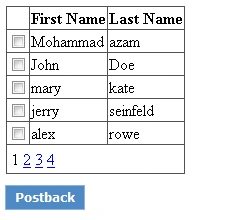
(Fig-1: Multi Select Gridview using Checkbox)
In some cases we add a Checkbox Control to get the selected rows at server side (see the above sample). But we always try for a Client Side row selection and Server Side row Manipulation.
Mult-Select using JQuery
Here, I used the power of JQuery Selector functionality to do the Client Side row Selection and a server side row Manipulation. Hope this will help you a lot in your GridView operation.
Step by step to implement Multiselect by using JQuery.
Step 1:
Download and add JQuery source file to your project. The download is available at http://jquery.com/
Add the JQuery reference to the Webpage.
<script src="jquery-1.4.3.js" type="text/javascript"></script>
Step 2:
Add an HiddenField to any of the TemplateField inside the GridView <Column> tag, which will store the selection mode (Here HiddenField will do the same operation like the CheckBox checked status).
Here I have added HiddenField along with the Id Column.
 <asp:TemplateField HeaderText="Id#" HeaderStyle-Width="50px">
    <ItemTemplate>
        <asp:Label ID="lblId" runat="server" Text='<%# Eval("Id") %>'></asp:Label>
        <asp:HiddenField ID="hdnIsItemSelected" runat="server" />
    </ItemTemplate>
</asp:TemplateField>
|
Step: 3
Within JavaScript block add the following code. This the main part where selection of the row is being handled.
<script type="text/javascript">
$(document).ready(function () {
$('input[id*=hdnIsItemSelected][value=true]')
             .parent().parent().addClass('RowHighlight');
});

$(function () {
$('#MultiSelectGrid tr').mouseover(function () {
$('#MultiSelectGrid tr').removeClass('RowHover');
$(this).addClass('RowHover');
});
});

$(function () {
$('#MultiSelectGrid tr td').click(function () {
if ($(this).parent()[0].className == 'RowHover') {
$(this).parent().addClass('RowHighlight');
$('input[id*=hdnIsItemSelected]')[$(this).parent()[0]
             .rowIndex - 1].value = 'true';
}
else {
$(this).parent().removeClass('RowHighlight');
$('input[id*=hdnIsItemSelected]')[$(this).parent()[0]
            .rowIndex - 1].value = 'false';
}
});
});
</script>
|
Step: 4
Add the following CSS to your StyleSheet or inside the <style></style> of <head> tag. These CSS classes will control the mouse hover and selection effect of the Gridview.
 .RowHighlight
{
    color: #336699;
    cursor: pointer;
    background-image: url('images/selected_item_back.png');
    background-repeat: repeat-x;
}

.RowHover
{
    color: #336699;
    cursor: pointer;
    background-image: url('images/hover_item_back.png');
    background-repeat: repeat-x;
}
|
Step: 5
Now in the button click event or in the postback event, search each HiddenField status, if it's "true" it's selected else not selected.
foreach (GridViewRow row in MultiSelectGrid.Rows)

{
HiddenField selectionButton = (HiddenField)row.FindControl("hdnIsItemSelected");
if (selectionButton.Value == "true")
{

        // do your operation here...
      selectedName += (selectedName == "" ? "" : " / ") + ((Label)row.FindControl
      ("lblFirstName")).Text;

    }

}
Step: 6
Now run the application and see the impact of JQuery while selecting the row. In the given sample application I have added the DataSource for GridView in the Page_Load() Event.
Below two sample screens for Multi-Row Select and Single-Row Select of a Gridview.
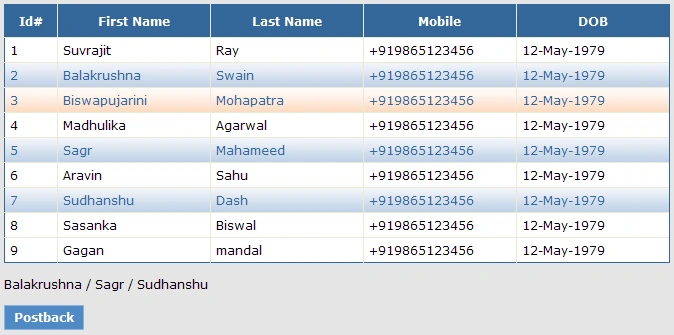
(Fig-2: Multi Select Gridview using JQuery)
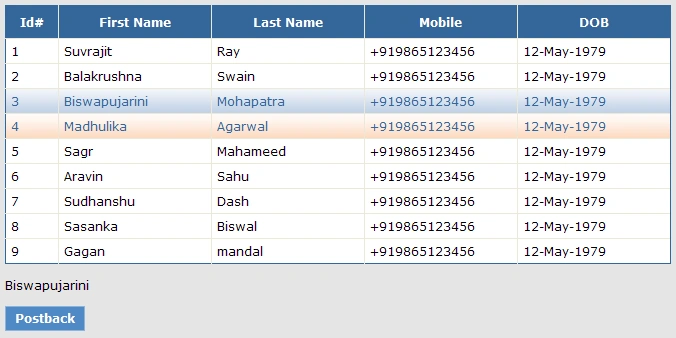
(Fig-3: Single row selection in Gridview using JQuery)
Download the sample code and open it in VS-2010 and see how easy to understand the implementation.


Pankaj TiwariPosted Dec 4, 2012, 8:00 PM
You can refer my blog for more tips and trick in Microsoft Technology
Pankaj TiwariPosted Dec 4, 2012, 7:59 PM
Hey !! Its Helpful Dear :)
Rajamanikkam SPosted Mar 31, 2012, 2:54 AM
hi Biswa, Nice article
YuriyPosted Jan 26, 2012, 12:20 AM
It's amazing!!! Thanks!!!
Balakrushna SwainPosted Aug 25, 2011, 10:06 AM
Hi Biswa, This is really a nice article on GridView and JQuery. Can you please share some other articles on ASP .net control extension.