

Introduction
In today's article, you will learn how to bind various HTML Controls using Knockout in MVC.
There are many types of HTML Controls, and each can be bound using Knockout. If you are using Knockout with MVC, then this article will help you to understand how to bind them.
Step 1. First of all, you need to add a few external files to your application, which are as follows.
- Knockout-2.3.0.js
- Pepetuum.js
- Knockout.mapping-Latest.js
These files can be downloaded from the internet.
Step 2. After adding these files to your application, you need to call these files so that they can be used by the application. To do so, you need to add a View Class.
This can be added by right-clicking on the View Folder and then choosing to add a new View Class.
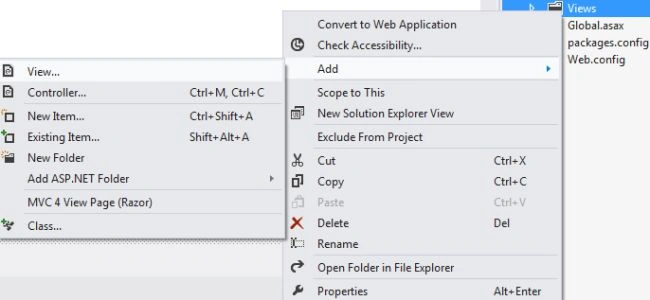
Step 3. Now, these files can be used in our application, so let's work on it. First, we will add a Model Class to our Model Folder. This can be done by right-clicking on the Model Class and then choosing to add a new class.
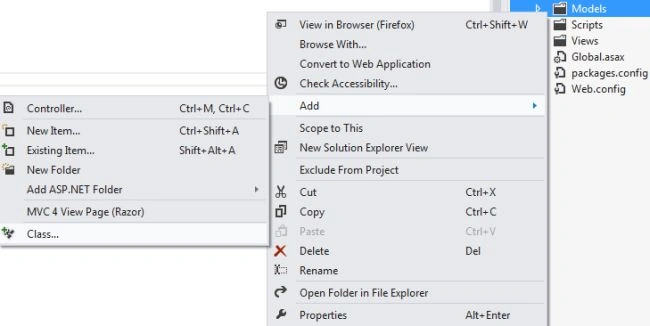
Now, in this class, write the following code.
using PerpetuumSoft.Knockout;
using PerpetuumSoft;
using DelegateDecompiler;
using System.ComponentModel;
using System.ComponentModel.DataAnnotations;
using System.ComponentModel.DataAnnotations.Schema;

namespace MvcApplication20.Models
{
    public class Class1
    {
        public string StringValue { get; set; }
    }
}
This code will add a new variable named "StringValue".
Step 4. Now we will work on the Controller class of our application, for that you need to add a Controller class to your application, this can be done by right-clicking on the Controller Folder and then choosing to add a new Controller.
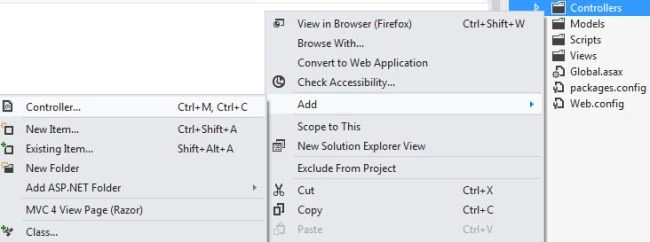
After adding the Controller file, add this code to your class.
using MvcApplication20.Models;
using PerpetuumSoft.Knockout;

namespace MvcApplication20.Controllers
{
    public class HomeController : Controller
    {
        public ActionResult Index()
        {
            var model = new Class1
            {
                StringValue = "Hello",
            };

            return View(model);
        }
    }
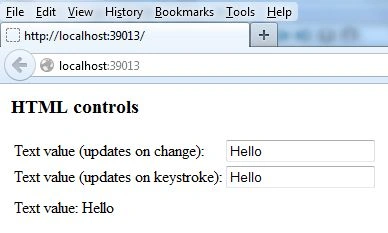
}
Anubhav ChaudharyPosted Oct 17, 2013, 5:11 AM
You may also go to the Download Section of the C-Sharpcorner.com
Anubhav ChaudharyPosted Oct 17, 2013, 5:10 AM
For Downloading the Perpetuum click on this link:- http://www.c-sharpcorner.com/downloads/747/knockoutjs-and-perpetuum.aspx
Premanjali GuptaPosted Oct 16, 2013, 7:46 AM
sir I am not able to install "Perpetuumsoft" from net.can u provide the link from where i can install it.
Mahesh ChandPosted Sep 30, 2013, 9:33 PM
Good Job Anubhav. I will change title from "Binding Various Controls" to "Binding TextBox".. various controls do not make sense. And each Part should say different control in the title.