

Introduction
Paging is a common feature of business applications when reporting and searching specific business entity information. Using paging mechanisms, you can break all the data into smaller page of data and allow the user to step through the data one page at a time, thus improving performance as well as enabling the data be more manageable.
This article is intended to show how to apply the paging mechanisms in Web applications using ASP.NET 2.0 and SQL Server 2005 as well as using the ObjectDataSource components. The underlying business scenario is AdventureWorks Inc. which wants to publish its products using Portal site. The data associated to the business entity Product is persisted in the table Production.Product of the database AdventureWorks shipped with SQL Server 2005.
Developing the solution
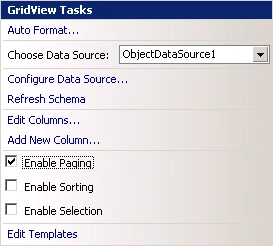
One way to implement paging in ASP.NET application is by setting the Enable Paging checkbox from the GridView control's smart tag. This limits the number of items shown per page allowing the user navigate from one page to another in order to find other items. One drawback with this solution is that we need to re-request all the data from the underlying data source whenever we move from one page to another (even though only a subset of the items is actually rendered). This is not a good choice to navigate through large amounts of data. This style is commonly referred as default paging.
I want to explain another style of paging referred as custom paging. In this case, we request only the required items to be rendered in the Web page. This style of paging improves dramatically the performance of the Web application specifically when we're searching through large amounts of data.
This approach is implemented by writing SQL queries which returns the precise set of items to be displayed for a particular page. In SQL Server we can find a new keyword for ranking results, which enables us to write a query which can efficiently retrieve a subset of records. We're going to use this new feature to write the SQL queries that retrieves the items for the underlying pages.
When you're developing a solution which uses paging mechanisms, we need to consider two things: the page number being requested and the number of items displayed on this page. There are three parameters that dictate which items are retrieved and how the paging user interface should be rendered:
- TotalItemsCount. The total number of items to be paged and displayed. It's not important to determine what records to be retrieve although it's very important for the generation of the user interface, because it dictates how many pages the UI will have.
- MaxItemsCount. The maximum number of items to be displayed in a page.
- StartItemIndex. The index of the first row in the page to be displayed. You can do math to get this index using the following formula StartItemIndex=(PageNumber-1)*MaxItemsCount+1. If MaxItemsCount is equal to 10, then the formula is (PageNumber-1)*10+1 and the first item in the page 3 is (3-1)*10+1=21.
The server-side code
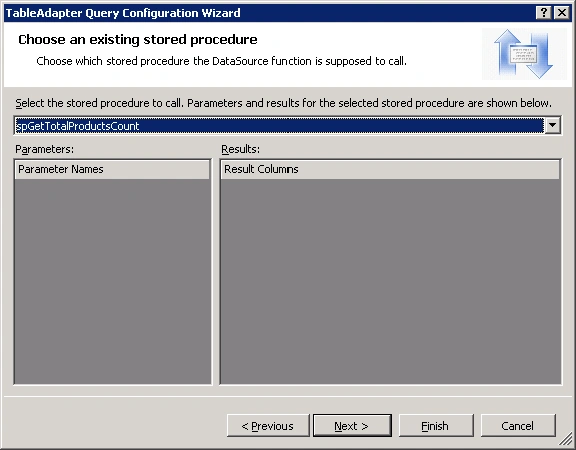
The code to return the total number of records being paged through is implemented using a stored procedure as shown in Listing 1.
create procedure spGetTotalProductsCount
as
begin
select count(*)
from Production.Product;
end;
Listing 1
In order to retrieve the precise subset of products, we need to deal with a new feature of SQL Server 2005: the ROW_NUMBER. The ROW_NUMBER feature associates a ranking with each retrieved row from a table based on some ordering. This ranking can be used as a row index for each row. After we have assigned a row index to each row, thus we can retrieve just those records starting at the StartItemIndex and up to the MaxItemsCount number of records. Let's see how to establish a row index to products using the ROW_NUMBER feature (see Listing 2).
select [Name], ProductNumber, ListPrice, ROW_NUMBER() over(order by [Name]) as ProductIndex
from Production.Product;
Listing 2
One drawback with the ROW_NUMBER feature is that it cannot directly be used in WHERE clause, although a derived table can be used to return the ROW_NUMBER values, which can then be used in WHERE clause.
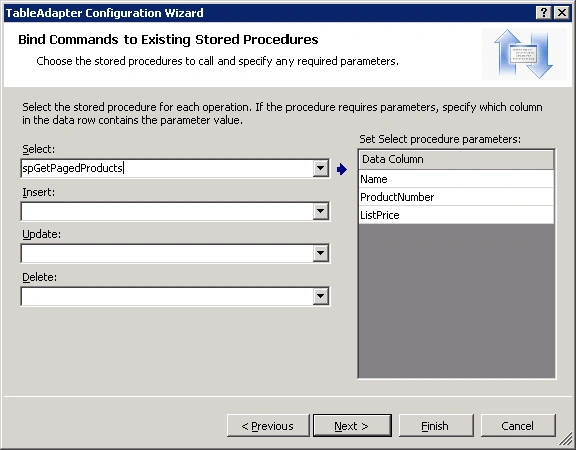
Let's write the code for a stored procedure which receives two input parameters @StartItemIndex and @MaxItemsCount and returns only the subset of products whose row index is greater than the specified @StartItemIndex and less than or equal to the @StartItemIndex+@MaxItemsCount (see Listing 3).
create procedure spGetPagedProducts
@StartItemIndex int,
@MaxItemsCount int
as
begin
select [Name], ProductNumber, ListPrice
Join the conversation! Your thoughts help the community grow.