

This article has been excerpted from the book "A Programmer's Guide to ADO.NET in C#".
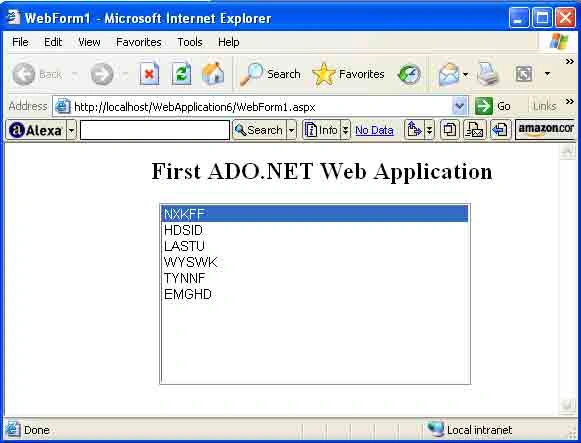
I'll show you how to develop database applications using ADO.NET and ASP.NET. To start creating your first ADO.NET application, you'll create a Web Application project as you did in the previous section. In this example, you're adding only a List Box control to the page and you're going to read data from a database and display the data in the list box.
After dragging a list Box control from the WebForms control toolbox and dropping it on the page, write the code in Listing 7-2 on the Page_Load event. You can add a Page_Load event either by double-clicking on the page or using the Properties window.
Note: If you're using an access 2000 database and OleDb data providers, don't forget to add a reference to the System.Data.OleDb namespace to your project.
Listing 7-2. Filling data from a database to a ListBox control
- using System;
- using System.Collections;
- using System.Configuration;
- using System.Data;
- using System.Linq;
- using System.Web;
- using System.Web.Security;
- using System.Web.UI;
- using System.Web.UI.HtmlControls;
- using System.Web.UI.WebControls;
- using System.Web.UI.WebControls.WebParts;
- using System.Xml.Linq;
- using System.Data.OleDb;
- namespace firstADO {
- public partial class _Default: System.Web.UI.Page {
- protected void Page_Load(object sender, EventArgs e) {
- // Put user code to initialize the page here
- // Create a connection object
- string ConnectionString = @ "Provider = Microsoft.Jet.OLEDB.4.0;" +
- " Data source =c:/Northwind.mdb";
- OleDbConnection conn = new OleDbConnection(ConnectionString);
- // open the connection
- if (conn.State != ConnectionState.Open)
- conn.Open();
- // create a data adapter
- OleDbDataAdapter da = new OleDbDataAdapter("Select customerID From customers", conn);
- //Create and fill a dataset
- DataSet ds = new DataSet();
- da.Fill(ds);
- // Bind dataset to the control
- // Set DataSource property of ListBox as DataSet's DefaultView
- ListBox1.DataSource = ds;
- ListBox1.SelectedIndex = 0;
- // Set Field Name You want to get data from
- ListBox1.DataTextField = "customerID";
- DataBind();
- // Close the connection
- if (conn.State == ConnectionState.Open)
- conn.Close();
- }
- }
- }

praveenkumar sambuPosted May 6, 2010, 1:43 PM
its more easier if you use the following command and its more benifitable than what we have seen here. listbox1.items.add(dr(0)) this is a dynamic way and it doesnt need any other data sources.. so be simple and secure