
Introduction
JavaScript is a language of the Web. This series of articles will talk about my observations, learned during my decade of software development experience with JavaScript.
Before moving further let us look at the previous articles of the series
Before moving further let us look at the previous articles of the series
- Voice of a Developer: JavaScript Data Types - Part One
- Voice of a Developer: JavaScript Objects - Part Two
- Voice of a Developer: JavaScript Engines - Part Three
- Voice of a Developer: JavaScript Common Mistakes - Part Four
- Voice of a Developer: Editors - Part Five
- Voice of a Developer: VSCode - Part Six
- Voice of a Developer: Debugging Capabilities of VSCode - Part Seven
- Voice of a Developer: JavaScript OOP - Part Eight
- Voice of a Developer: JavaScript Useful Reserved Keywords - Part Nine
- Voice of a Developer: JavaScript Functions - Part Ten
- Voice of a Developer: JavaScript Functions Invocations - Part Eleven
- Voice of a Developer: JavaScript Anonymous Functions - Part Twelve
- Voice of a Developer: JavaScript Pure And Impure Function - Part Thirteen
- Voice of a Developer: JavaScript Closures - Part Fourteen
- Voice of a Developer: JavaScript Currying - Part Fifteen
- Voice of a Developer: JavaScript Chaining - Part Sixteen
- Voice of a Developer: JavaScript Array Methods - Part Seventeen
- Voice of a Developer: JavaScript ECMAScript 6 - Part Eighteen
- Voice of a Developer: JavaScript ECMAScript 6 Features v1 - Part Nineteen
- Voice of a Developer: JavaScript ECMAScript 6 Features v2 - Part Twenty
- Voice of a Developer: JavaScript Web Workers - Part Twenty One
- Voice of a Developer: JavaScript JSLint v1 - Part Twenty-Two
- Voice of a Developer: JavaScript JSLint v2 - Part Twenty Three
- Voice of a Developer: XMLHttpRequest API - Part Twenty Four
- Voice of a Developer: Web Storage API - Part Twenty-Five
- Voice of a Developer: Application Cache API - Part Twenty-Six
- Voice of a Developer: Javascript WebSocket - Part Twenty-Seven
- Voice of a Developer: Parse JSON - Part Twenty-Eight
- Voice of a Developer: Save Coding Time With Lodash.js - Part Twenty Nine
- Voice of a Developer: ChakraCore JavaScript Engine by Microsoft - Part Thirty
Our applications should be high performance for good user experience. Users do not prefer working on slow web applications. Our objective is to make our web apps faster. This article has two sections,
Most browsers make multiple connections to a server at the same time. Press F12 (developer tool) and goto Network tab and observe connection stream. Example,
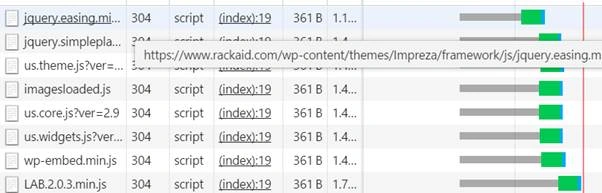
As soon as the browser encounters a script tag, the browser will not start any other download. JavaScript blocks parallel download. This is suggested by YSlow (a tool by Yahoo). In current times, it is a debatable topic because many developers do not agree.
I think if your web app is more content-focused and less dependent on JavaScript then place JavaScript at the bottom. On the contrary, if JavaScript as written in your web app is of a priority then put it at top.
To compress/minify your JavaScript code is a best practice before the production release. The smaller the file, the better would be download speed and your page load time will be better too. There are various online tools available to minify your JavaScript code.
You can paste JavaScript code and it will compress it to a good extent.
Example- my script was compressed by 33%,

There are many command-line utilities available also, which you could use, for example, Grunt Minify files with UglifyJS.
To talk about grunt task runner minify recipe is beyond the scope of this article.
During development, we leverage multiple JavaScript files & libraries, e.g.,
- Section 1: Best practices about handling JavaScript files to make our web app fast.
- Section 2: Measure JavaScript performance using APIs.
Put JavaScript at the bottom?
Most browsers make multiple connections to a server at the same time. Press F12 (developer tool) and goto Network tab and observe connection stream. Example,
As soon as the browser encounters a script tag, the browser will not start any other download. JavaScript blocks parallel download. This is suggested by YSlow (a tool by Yahoo). In current times, it is a debatable topic because many developers do not agree.
I think if your web app is more content-focused and less dependent on JavaScript then place JavaScript at the bottom. On the contrary, if JavaScript as written in your web app is of a priority then put it at top.
Minify JavaScript
To compress/minify your JavaScript code is a best practice before the production release. The smaller the file, the better would be download speed and your page load time will be better too. There are various online tools available to minify your JavaScript code.
You can paste JavaScript code and it will compress it to a good extent.
Example- my script was compressed by 33%,
There are many command-line utilities available also, which you could use, for example, Grunt Minify files with UglifyJS.
To talk about grunt task runner minify recipe is beyond the scope of this article.
Combine JavaScript files into one
During development, we leverage multiple JavaScript files & libraries, e.g.,
- <script src="navbar.js"></script>
- <script src="component.js"></script>
- <script src="page.js"></script>
- <script src="framework.js"></script>
- <script src="script.js"></script>
webapp- The lesser number of <script> tags are better in production code.
You can leverage grunt concat https://github.com/gruntjs/grunt-contrib-concat to do so
In practice, we combine and minify Javascript files for better performance
Remove duplicate Javascript files
Sometimes you may notice developers add duplicate JavaScript files with different versions. One or multiple versions may not be required, but it went unnoticeable. Hence, client is making wasteful HTTP request to the server, e.g.,
- <script type="text/JavaScript" src="library_1.0.17.js"></script>
- <script type="text/JavaScript" src="library_1.1.0.js"></script>
Reduce Cookie Size
We know HTTP cookies are used to keep information about the user. It is recommended to keep the size of the cookie small. The reason is cookie gets transferred in each server request and response. In case the cookie is heavy, it increases the size of the HTTP request and consumes more time. Be mindful of setting the cookie size and set expiry accordingly.
Note: considering security threats like CSRF (in top 10 threat) I prefer session cookies to persistent cookies.
Section 2: Performance APIs
You can use the Performance interface to access certain functions for measuring the performance of web pages and web applications.
now() method: browser returns the timestamp, which is DOMHighResTimeStamp. It is double to store a time value. The unit is milliseconds.
var currentTime = window.performance.now(); //ex- 4135.333
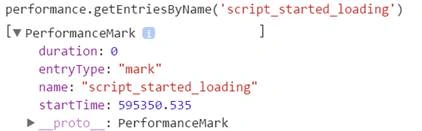
mark() method: browser creates a timestamp, which is DOMHighResTimeStamp in the buffer. The advantage is that we can name a timestamp in memory.
- window.performance.mark('script_started_loading');
- // script goes here
- var req = new XMLHttpRequest();
- req.open('GET', '/data/v1/geoLocation', true); //replace your URL here
- req.onload = function(e) {
- do_something(e.responseText); //some anonymous function
- }
- req.send();
- window.performance.mark('script_fully_loaded');
- // we will mark difference between 'script_fully_loaded' & 'script_started_loading'
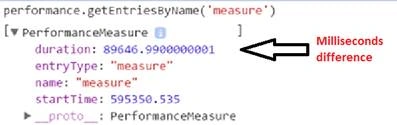
window.performance.mark('measure1','script_started_loading','script_fully_loaded');
getEntriesByName() method: you can read data created in above using this method
Summary
You could use APIs to calculate your JavaScript performance. Please share comments/feedback.
Kuppurasu NagarajPosted May 22, 2016, 5:31 AM
Nice Sharing..
Vignesh ManiPosted May 21, 2016, 9:28 AM
Nice
Vignesh ManiPosted May 21, 2016, 9:28 AM
Nice one
Guest UserPosted May 19, 2016, 8:25 AM
Thanks guys! I am writing more ... can you please suggest topics related to JavaScript.. which you want to read about
Neeraj KumarPosted May 19, 2016, 7:16 AM
Nice article
Debasis SahaPosted May 19, 2016, 6:26 AM
Good One..