A Dropdown list is a combination of items in a list. In the dropdown list menu, only the title is visible but not the contents. The contents are shown only when the user activates it by a small arrow. The user may select an item from the menu by dragging the mouse from the menu title or by clicking the title and then clicking the item. The dropdown list box is read-only.
We can say a drop-down list is a box containing a list of multiple items. A drop-down list is a list in which the selected item is always visible, and the others are visible on demand by clicking a drop-down button.
The main advantage of a drop-down list is to save space because the number of views is not limited by space.
There are two types of dropdown lists, which are as follows:
- Static dropdown list
- Dynamic dropdown list
1. Static Dropdown list
Static dropdown list is used in the HTML form. Static means there is no database connectivity with the dropdown list.
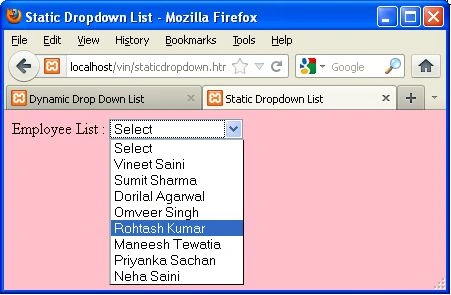
An example of a static dropdown list is as follows:
Code
- <html>
- <head></head>
- <title>Static Dropdown List</title>
- <body bgcolor="pink">
- Employee List :
- <select>
- <option value="Select">Select</option>}
- <option value="Vineet">Vineet Saini</option>
- <option value="Sumit">Sumit Sharma</option>
- <option value="Dorilal">Dorilal Agarwal</option>
- <option value="Omveer">Omveer Singh</option>
- <option value="Rohtash">Rohtash Kumar</option>
- <option value="Maneesh">Maneesh Tewatia</option>
- <option value="Priyanka">Priyanka Sachan</option>
- <option value="Neha">Neha Saini</option>
- </select>
- </body>
- <html>
Output
2. Dynamic Dropdown list
Dynamic dropdown list means, choose items from a list at run time. Dynamic dropdown list is used in the PHP form. Dynamic means there is database connectivity available for the dropdown list.
Step by step solution to create a dynamic dropdown list
Step 1. First of all, we create a database in MySql using the following query.
- CREATE DATABASE `company`;
Step 2. After that then we create a table in the database. For create table in the database you can use the following query.
- CREATE TABLE `company`.`employee` (`emp_id` INT(10) NOT NULL AUTO_INCREMENT, `emp_name` VARCHAR(30) NOT NULL, PRIMARY KEY(`emp_id`)) ENGINE = InnoDB;
Step 3. Now we insert the values in the table using the following queries.
- insert into employee (emp_id,emp_name) values(0,'Vineet Saini');
- insert into employee (emp_id,emp_name) values(0,'Sumit Sharma');
- insert into employee (emp_id,emp_name) values(0,'Dorilal Agarwal');
- insert into employee (emp_id,emp_name) values(0,'Omveer Singh');
- insert into employee (emp_id,emp_name) values(0,'Maneesh Tewatia');
- insert into employee (emp_id,emp_name) values(0,'Rohtash Kumar');
- insert into employee (emp_id,emp_name) values(0,'Priyanka Sachan');
- insert into employee (emp_id,emp_name) values(0,'Neha Saini');
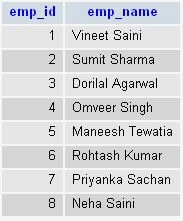
Step 4. When we execute the above query then you will get the following table.
Step 5. Now we will use the above table in the dropdown list using the following code.
Code
- <html>
- <head>
- <title>Dynamic Drop Down List</title>
- </head>
- <BODY bgcolor ="pink">
- <form id="form1" name="form1" method="post" action="<?php echo $PHP_SELF; ?>">
- Employee List :
- <select Emp Name='NEW'>
- <option value="">--- Select ---</option>
- <?
- mysql_connect ("localhost","root","");
- mysql_select_db ("company");
- $select="company";
- if (isset ($select)&&$select!=""){
- $select=$_POST ['NEW'];
- }
- ?>
- <?
- $list=mysql_query("select * from employee order by emp_id asc");
- while($row_list=mysql_fetch_assoc($list)){
- ?>
- <option value="<? echo $row_list['emp_id']; ?>"<? if($row_list['emp_id']==$select){ echo "selected"; } ?>>
- <?echo $row_list['emp_name'];?>
- </option>
- <?
- }
- ?>
- </select>
- <input type="submit" name="Submit" value="Select" />
- </form>
- </body>
- </html>
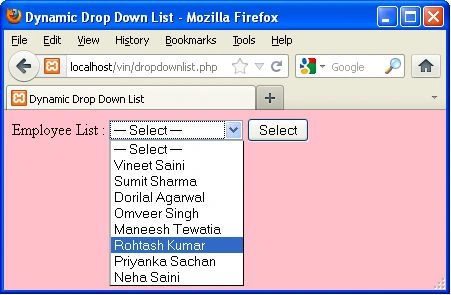
Output
So in this article, you saw how to create a static dropdown list and dynamic dropdown list. Using this article one can easily understand how to create static and dynamic dropdown lists in PHP.
Some Helpful Resources


Dipa MehtaPosted Jul 15, 2019, 2:22 PM
Nice explanation of dropdown list.
Tk MahantaPosted Jan 4, 2019, 4:22 AM
Best Explanation..and real time Example
Tk MahantaPosted Jan 4, 2019, 4:21 AM
Very Nice Articles.
SerdarPosted Jun 16, 2016, 5:41 PM
How can I get value of selected list item ??
SerdarPosted Jun 16, 2016, 4:38 PM
please use <?php ?> , not like <? ?> :))
Asfend YarPosted Feb 29, 2016, 5:59 AM
good
Meghan ReedPosted Apr 1, 2015, 10:43 AM
Hello! Has anyone figured out how to fix the drop down simply giving >
Deepak BlPosted Jun 13, 2014, 4:07 AM
hello Vineeth, i want to enable typing on dropdown list..can u help me?
Charles Van HoutenPosted May 12, 2014, 10:52 AM
Your code has errors as the dropdown selection box is only populated with the < sign and not the values from the database. This is what I think the first comment was trying to express to you. regards
Gopal KanishkaPosted Feb 28, 2013, 11:24 AM
The drop down list does not get populated.
Vineet Kumar SainiPosted Jan 9, 2013, 7:03 AM
Hi Vista , What is problem ?
vista vistaPosted Jan 9, 2013, 3:03 AM
hi. it's not working. why why why? help me.
syafril shahPosted Dec 7, 2012, 1:53 PM
Hi Vineet Kumar Saini, i just wanna ask you how to make a "dynamic product list" in php? for example when user click the QUICK VIEW link for view full detail about the product, then the page of detail information will shown in a same page..thanks.
atira csPosted Dec 4, 2012, 2:19 PM
can u give me ur email...i have problem with my coding this is my email :[email protected]
Vineet Kumar SainieditedPosted Nov 30, 2012, 6:03 AMEdited Nov 30, 2012, 6:05 AM
Hi Atira, What do you want ? Please tell me ? You can copy my code then run. If you get a problem then tell me?
atira cseditedPosted Nov 30, 2012, 3:35 AMEdited Nov 30, 2012, 3:37 AM
can u check my coding.my database called disiplin.the output when i click the arrow it just publish > <html><head><title>Dynamic Drop Down List</title></head><BODY bgcolor ="pink"><form id="form1" name="form1" method="post" action="<?php echo $PHP_SELF; ?>">Employee List :<select Emp Name='NEW'><option value="">--- Select ---</option><?mysql_connect ("localhost","root","");mysql_select_db ("displin");$select="disiplin";if (isset ($select)&&$select!=""){$select=$_POST ['NEW'];}?><?$list=mysql_query("select * from employee order by emp_id asc");while($row_list=mysql_fetch_assoc($list)){?><option value="<? echo $row_list['emp_id']; ?>"<? if($row_list['emp_id']==$select){ echo "selected"; } ?>><? echo $row_list['emp_name']; ?></option><?}?></select><input type="submit" name="Submit" value="Select" /></form></body> </html>