
Introduction
This article demonstrates how and when to use a factory design pattern. This article begins with the intent of the Factory Pattern. After that, it demonstrates a logical and physical model of factory. Then step-by-step implementation of factory pattern. In the end, the article discusses how it is useful.
Consider a Scenario
Consider a scenario where you developed your application for a SQL Server database. And in the future you need to shift from SQL Server to Oracle database. Then you have to change your code if you have not designed your application using a factory method.
Intent
Define an interface for creating an object, but let subclasses decide which class to instantiate.
Logical Model
Rather than creating a product directly, the client uses a factory and the factory creates the product.
Physical Model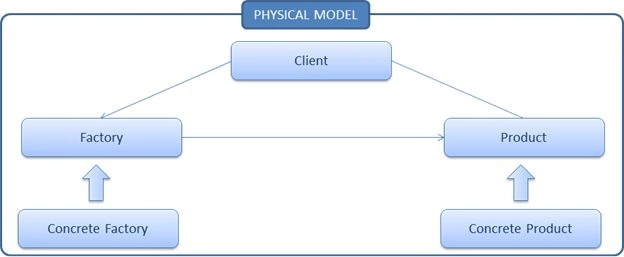
In physical model there is Factory which is an abstract class and implementation of this abstract class is in Concrete Factory. Similarly Product is an abstract class and implementation of this abstract class in Concrete Product.
Let's try to understand using a class diagram
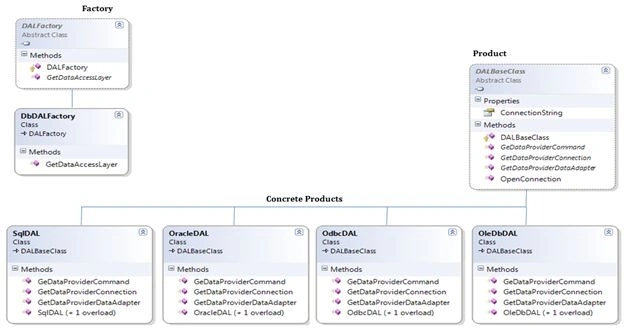
- Products : Declares an abstract class to define products
- Concrete Product : It implements the product to define a concrete object
- Factory : An abstract class, used to create a Factory
- Concrete Factory : It implements the factory methods declared within the factory
Step 1
- Open Visual Studio
- File >> New >> Project >> Class Library
- Give it the name "Product"
- Add one class, "DALBaseClass"
- Copy the following segment of code:
using System;
using System.Data;
namespace Product
{
public abstract class DALBaseClass
{
private string strConnectionString;
private IDbConnection connection;
private IDbCommand command;
private IDbTransaction transaction;
public string ConnectionString
{
get
{
if (strConnectionString == string.Empty || strConnectionString.Length == 0)
throw new ArgumentException("Invalid database connection string.");
return strConnectionString;
}
set
{ strConnectionString = value; }
}
protected DALBaseClass() { }
public abstract IDbConnection GetDataProviderConnection();
public abstract IDbCommand GeDataProviderCommand();
public abstract IDbDataAdapter GetDataProviderDataAdapter();
#region Database Transaction
public string OpenConnection()
{
string Response = string.Empty;
try
{
connection = GetDataProviderConnection(); // instantiate a connection object
//connection.ConnectionString = this.ConnectionString;
//connection.Open(); // open connection
Response = ((System.Reflection.MemberInfo)(connection.GetType())).Name + "
Open Successfully";
}
catch
{
connection.Close();
Response = "Unable to Open " +
((System.Reflection.MemberInfo)(connection.GetType())).Name;
}
return Response;
}
#endregion
}
}
Step 2
- Right-click on the solution file
- Add >> New Project >> Class Library
- Give it the name "Concrete Products"
- Create the concrete product i.e. add classes for SQL, Oracle, ODBC and OleDb and inherit the DALBaseClass i.e. Product; see:
SQL Server
using System.Data;
using System.Data.SqlClient;
using Product;
namespace ConcreteProducts
{
public class SqlDAL : DALBaseClass
{
// Provide class constructors
public SqlDAL() { }
public SqlDAL(string connectionString)
{
this.ConnectionString = "Data Source=xxxx;Initial Catalog=xxxx;
User ID=xxxx;Password=xxxx";
}
// DALBaseClass Members
public override IDbConnection GetDataProviderConnection()
{
return new SqlConnection();
}
public override IDbCommand GeDataProviderCommand()
{
return new SqlCommand();
}
public override IDbDataAdapter GetDataProviderDataAdapter()
{
return new SqlDataAdapter();
}
}
}
Oracle
using System.Data;
using System.Data.OracleClient;
using Product;
namespace ConcreteProducts
{
public class OracleDAL : DALBaseClass
{
// Provide class constructors
public OracleDAL() { }
public OracleDAL(string connectionString)
{
this.ConnectionString = "Data Source=Oracle8i;Integrated Security=yes";
}
// DALBaseClass Members
public override IDbConnection GetDataProviderConnection()
{
return new OracleConnection();
}
public override IDbCommand GeDataProviderCommand()
{
return new OracleCommand();
}
public override IDbDataAdapter GetDataProviderDataAdapter()
{
return new OracleDataAdapter();
}
}
}
ODBC
using System.Data;
using System.Data.Odbc;
using Product;
namespace ConcreteProducts
{
public class OdbcDAL : DALBaseClass
{
// Provide class constructors
public OdbcDAL() { }
public OdbcDAL(string connectionString)
nagabhushan bhushanPosted Jun 12, 2017, 7:24 AM
Thank you. This example was very easy to keeep in mind.
Manas MohapatraPosted Nov 26, 2015, 11:29 AM
Good one. It would be better you put code snippet instead of image screenshot.
Debasis SahaPosted Nov 26, 2015, 9:47 AM
Nice Article..
Akash MalhotraPosted Nov 24, 2015, 3:53 AM
Nice article
Debasis SahaPosted Nov 23, 2015, 7:09 AM
Good One..
Sibeesh VenuPosted Nov 23, 2015, 4:08 AM
Nice Share
Harshad PansuriyaPosted Nov 23, 2015, 2:51 AM
Nice one
Raja TPosted Nov 23, 2015, 2:06 AM
Nice, Thanks for sharing
Mukesh KumarPosted Nov 23, 2015, 1:48 AM
Great Job
Former memberPosted Nov 23, 2015, 12:40 AM
Nice one