

What is WCF?
WCF is a unification technology, which unites .Net Remoting, MSMQ, Web Services
and COM+ technologies.
WCF provides a runtime environment for your services, enabling you to expose CLR
types as services and to consume other services as CLR types.
Creating WCF Service
Open Visual Studio 2008/2010. Click on File menu -> New -> Project ->WCF Service
Application. Change the name as "WCFService" then click Ok button.

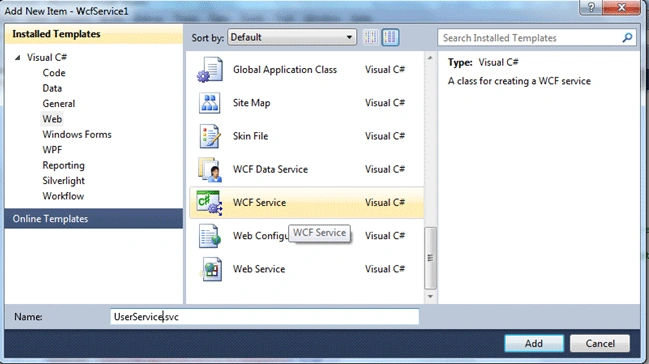
Delete auto generated files IService1.cs and Service1.svc and create new (right
click on WCFService project and select Add -> New Item -> WCF Service).
Rename service as "UserService".
Now add an Entity Data Model in your project to communicate with database.
Service Code
Replace interface IUserService with the code given below :
- using System;
- using System.Data;
- using System.Collections.Generic;
- using System.Linq;
- using System.Runtime.Serialization;
- using System.ServiceModel;
- using System.Text;
- namespace WCFService
- {
- [ServiceContract]
- public interface IUserService
- {
- [OperationContract]
- string Authenticate(string UserName, string A_CryptKey);
- [OperationContract]
- DataTable GetApprovedUser();
- }
- }
- using System;
- using System.Data;
- using System.Collections.Generic;
- using System.Linq;
- using System.Runtime.Serialization;
- using System.ServiceModel;
- using System.Text;
- namespace WCFService
- {
- public class UserService : IUserService
- {
- public string Authenticate(string UserName, string A_CryptKey)
- {
- using (var Context = new UsersEntities())
- {
- var user = Context.Users.Where(c => c.UserName == UserName && c.A_CryptKey == A_CryptKey).FirstOrDefault();
- if (user != null)
- return Convert.ToString(user.UserID) + "," + Convert.ToString(user.B_CryptKey);
- else
- return string.Empty;
- }
- }
- public DataTable GetApprovedUser()
- {
- using (var Context = new UsersEntities())
- {
- DataTable objdt = new DataTable();
- objdt = Context.Users.Where(c => c.IsApproved == true).ToList().CopyToDataTable();
- return objdt;
- }
- }
- }
- }
Service configuration
- <?xml version="1.0" encoding="utf-8"?>
- <configuration>
- <system.web>
- <compilation debug="true" targetFramework="4.0">
- <assemblies>
- <add assembly="System.Data.Entity, Version=4.0.0.0, Culture=neutral, PublicKeyToken=b77a5c561934e089" />
- </assemblies>
- </compilation>
- </system.web>
- <system.serviceModel>
- <behaviors>
- <serviceBehaviors>
- <behavior>
- <!-- To avoid disclosing metadata information, set the value below to false and remove the metadata endpoint above before deployment -->
- <serviceMetadata httpGetEnabled="true" />
- <!-- To receive exception details in faults for debugging purposes, set the value below to true. Set to false before deployment to avoid disclosing exception information -->
- <serviceDebug includeExceptionDetailInFaults="false" />
- </behavior>
- </serviceBehaviors>
- </behaviors>
- <serviceHostingEnvironment multipleSiteBindingsEnabled="true" />
- </system.serviceModel>
- <system.webServer>
- <modules runAllManagedModulesForAllRequests="true" />
- </system.webServer>
- <connectionStrings>
- <add name="UsersEntities" connectionString="metadata=res://*/Model1.csdl|res://*/Model1.ssdl|res://*/Model1.msl;provider=System.Data.SqlClient;provider connection string="Data Source=ServerName;Initial Catalog=Favourites;Persist Security Info=True;User ID=UserName;Password=Password;MultipleActiveResultSets=True"" providerName="System.Data.EntityClient" />
- </connectionStrings>
- </configuration>
Consuming WCF Service
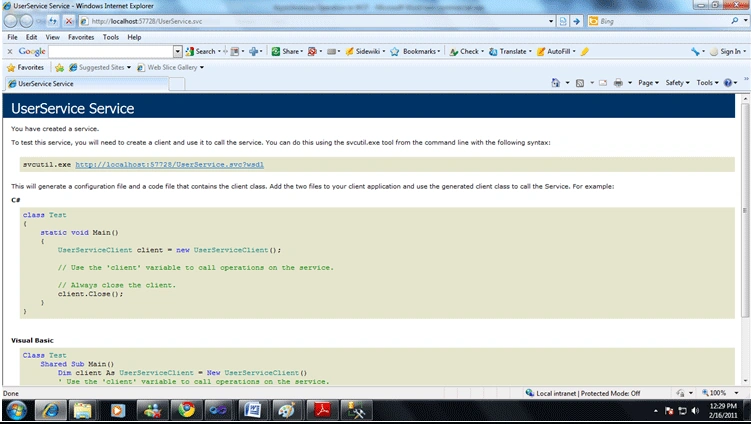
Now right click on UserService.svc and select "View in Browser". it will show a
browser with service URL. Copy that URL
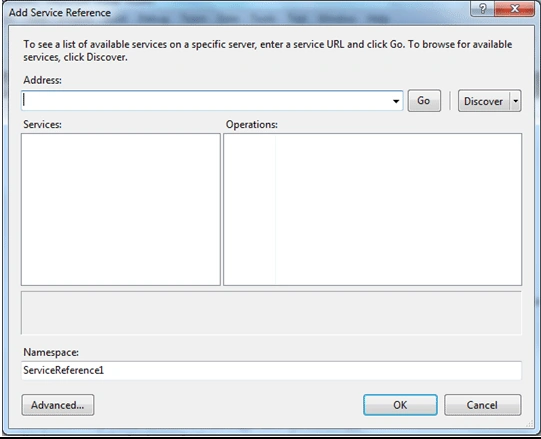
Now right click on WCFClient project select "Add Service Reference" and paste
copied URL in Address section of "Add Service Reference" dialog box and click on
Go button and rename Namespace as "UserService" and click ok button.
WCF Client code
- using System;
- using System.Data;
- using System.Collections.Generic;
- using System.Linq;
- using System.Web;
- using System.Web.UI;
- using System.Web.UI.WebControls;
- using UserService;
- public partial class _Default : System.Web.UI.Page
- {
- protected void Page_Load(object sender, EventArgs e)
- {
- UserServiceClient proxy = new UserServiceClient();
- string User = proxy.Authenticate("Mukesh", "X%AY#$tZ");
- DataTable objdt = new DataTable();
- objdt = proxy.GetApprovedUser();
- proxy.Close();
- }
- }
- <system.serviceModel>
- <bindings>
- <basicHttpBinding>
- <binding name="BasicHttpBinding_IUserService" closeTimeout="00:01:00"
- openTimeout="00:01:00" receiveTimeout="00:10:00" sendTimeout="00:01:00"
- allowCookies="false" bypassProxyOnLocal="false" hostNameComparisonMode="StrongWildcard"
- maxBufferSize="65536" maxBufferPoolSize="524288" maxReceivedMessageSize="65536"
- messageEncoding="Text" textEncoding="utf-8" transferMode="Buffered"
- useDefaultWebProxy="true">
- <readerQuotas maxDepth="32" maxStringContentLength="8192" maxArrayLength="16384"
- maxBytesPerRead="4096" maxNameTableCharCount="16384" />
- <security mode="None">
- <transport clientCredentialType="None" proxyCredentialType="None"
- realm="" />
- <message clientCredentialType="UserName" algorithmSuite="Default" />
- </security>
- </binding>
- </basicHttpBinding>
- </bindings>
- <client>
- <endpoint address="http://localhost:57728/UserService.svc" binding="basicHttpBinding"
- bindingConfiguration="BasicHttpBinding_IUserService" contract="UserService.IUserService"
- name="BasicHttpBinding_IUserService" />
- </client>
- </system.serviceModel>
farid bayramPosted Oct 27, 2022, 1:10 PM
Wcf client creation is missing in this article)
mayank mittalPosted Apr 13, 2012, 4:20 AM
Hi I coded exactly the way described in post but not getting CopyToDataTable in intellisense and have added system.data.DatasetExtensions into reference but still not working. Please suggest
LaliPosted Aug 29, 2011, 11:56 AM
The article is helpful, but I am having problem. When I right click on UserService.svc and select "View in Browser" it shows "There are errors building." The errors show: The type or namespace name 'UsersEntities' could not be found (are you missing a using directive or an assembly reference?) What I need to do to fix the error? Advance thanks for the help
Ramavatar SoneeeditedPosted Jun 8, 2011, 1:02 AMEdited Jun 8, 2011, 1:05 AM
I came to know that we need to host the application to consume it, but here we did not host it, may i know the reason pls
shahid khanPosted Mar 5, 2011, 1:48 AM
hi mukesh your article is very nice but a i am not understanding where is the UsersEntities() class and what it contains.pls reply me with the answer. Thanks
Reeta Singh LodhiPosted Feb 16, 2011, 4:45 AM
Very nicely explained in simple steps.
sarath P VPosted Feb 16, 2011, 3:44 AM
Hi, Explanation about WCF is very helpful and i will successfully create a wcf service and deploy it. Regards, Sarath P V