

Draw Star Using Web Application In TypeScript
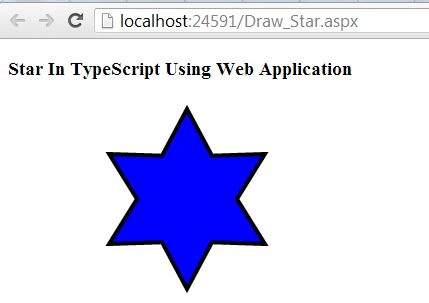
In this article, we draw a star in a web application in TypeScript.
First, we download some files in the following attachment:
-
Kinect.d.ts
-
Kinectic.min.js
These files are added to the project then use the following procedure.
Step 1
Open Visual Studio 2012 and click "File" -> "New" -> "Project...". A window is opened. In this window, click "HTML Application for TypeScript" under Visual C#.
Give the name of your application as "Draw_Star" and then click "Ok".
Step 2
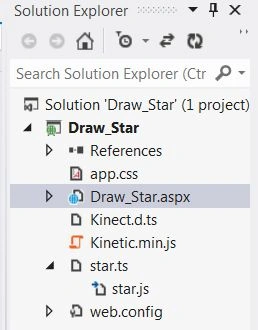
After this session the project has been created; a new window is opened on the right side. This window is called the Solution Explorer. The Solution Explorer contains the ts file, js file, and CSS file and aspx page.
Coding
app.ts
- class Draw_Star {
- Star() {
- var stage = new Kinetic.Stage({
- container: 'content',
- width: 358,
- height: 200
- });
- var layer = new Kinetic.Layer();
- var star = new Kinetic.Star({
- x: stage.getWidth() / 2,
- y: stage.getHeight() / 2,
- numPoints: 6,
- innerRadius: 50,
- outerRadius: 90,
- fill: 'blue',
- stroke: 'black',
- strokeWidth: 4
- });
- layer.add(star);
- stage.add(layer);
- }
- }
- window.onload = () => {
- var obj = new Draw_Star();
- obj.Star();
- };
Image_Animation_Demo.aspx
Santhakumar MunuswamyPosted Jul 27, 2015, 2:59 PM
Thanks for nice article:)