

Introduction
Previously, we have talked about how to change screen resolution and color system via DirectX. Today, we are talking about how to change all display settings -not the resolution and color system only- via API. We will change screen resolution (bounds,) color system (bit count,) rotation (orientation,) and refresh rate (frequency) via API with C# and the .NET Framework.
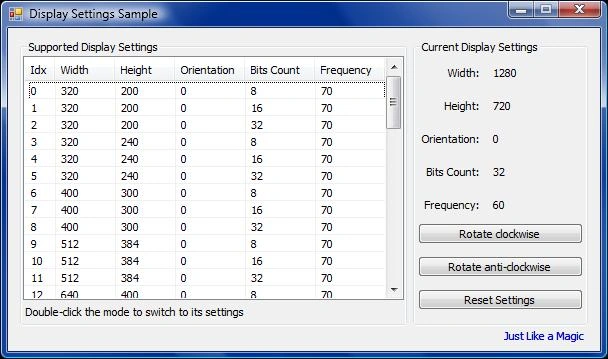
In addition, this lesson comes with a sample application used for changing the display settings.
Now, we are going to discuss the required functions and structure and how to use them. After that, we will focus on the implementation code. Get ready.
DisplaySettings() Function
This function resides in user32.dll. It is used to retrieve one of the modes supported by a graphics device.
The definition of this function is as follows.
BOOL EnumDisplaySettings(
    LPCTSTR lpszDeviceName,  // display device
    DWORD iModeNum,          // graphics mode
    [In, Out] LPDEVMODE lpDevMode  // graphics mode settings
);
This function accepts only three parameters.
- lpszDeviceName: Specifies the display device name that will be used to retrieve its modes. This parameter can be either NULL to indicate the default device, or the name of the display device. You can enumerate display devices using the EnumDisplayDevices() function.
- iModeNum: Specifies the type of information to retrieve. It could be either a mode index or one of these values
- ENUM_CURRENT_SETTINGS = -1: Retrieves current display mode.
- ENUM_REGISTRY_SETTINGS = -2: Retrieves current display mode stored on the registry.
- lpDevMode: A reference (In/Out) parameter represents the DEVMODE object that encapsulates the retrieved display mode information. The DEVMODE's dmSize member is used for input to represent the structure size, while other members are used for output.
As you might expect, to retrieve the current mode (settings) of the current display device, you will need to pass a NULL value as the lpszDeviceName parameter to indicate the current display and the value -1 to the iModeNum parameter to indicate the current mode.
Unfortunately, EnumDisplaySettings() can return only one mode per call, and that mode is encapsulated into the DEVMODE object. To retrieve all modes (or few) supported by a display device, you need to call EnumDisplaySettings() many times, specifying iModeNum as the mode index. Mode indexes start from zero. Therefore, to retrieve all modes, you will need to call the EnumDisplaySettings() function many times, specifying 0 for iModeNum on the first time, and increment that index every call until EnumDisplaySettings() returns FALSE, which indicates that the previous mode was the last mode supported.
Now, it is time for the PInvoke method. We can PInvoke this function in C# as follows.
using System;
using System.Runtime.InteropServices;
public class DisplaySettingsExample
{
    [DllImport("User32.dll")]
    [return: MarshalAs(UnmanagedType.Bool)]
    public static extern bool EnumDisplaySettings(
        [param: MarshalAs(UnmanagedType.LPTStr)]
        string lpszDeviceName,
        [param: MarshalAs(UnmanagedType.U4)]
        int iModeNum,
        [In, Out]
        ref DEVMODE lpDevMode);
    public static void Main(string[] args)
    {
        string deviceName = null;  // Specify the display device (null for the default)
        int modeNum = 0;           // Specify the graphics mode number
        DEVMODE devMode = new DEVMODE();
        devMode.dmSize = (ushort)Marshal.SizeOf(typeof(DEVMODE));  // Initialize the structure size
        bool result = EnumDisplaySettings(deviceName, modeNum, ref devMode);
        if (result)
        {
            Console.WriteLine("Graphics Mode Settings:");
            Console.WriteLine("Width: " + devMode.dmPelsWidth);
            Console.WriteLine("Height: " + devMode.dmPelsHeight);
            // ... other settings ...
        }
        else
        {
            int error = Marshal.GetLastWin32Error();
            Console.WriteLine("EnumDisplaySettings failed with error code: " + error);
        }
    }
[StructLayout(LayoutKind.Sequential)]
public struct DEVMODE
{
    [MarshalAs(UnmanagedType.ByValTStr, SizeConst = 32)]
    public string dmDeviceName;
    public ushort dmSpecVersion;
    public ushort dmDriverVersion;
    public ushort dmSize;
    public ushort dmDriverExtra;
    public uint dmFields;
    // ... other members ...
    public int dmPelsWidth;
    public int dmPelsHeight;
}
What is Platform Invocation (PInvoke)? You already know there is no such compatibility between managed code (.NET) and unmanaged code (Win32 API in our case.) Therefore, they cannot call each other directly. Rather, you make use of the PInvoke service to call unmanaged functions from the managed environment.
What is Marshaling? Marshaling is another service of the CLR. Again, there is no such compatibility between managed code and unmanaged code. Therefore, they cannot communicate directly. To send data between the managed client and unmanaged server, and vice versa, you will need to use marshaling to allow sending and receiving of the data. Marshaling converts managed data types to unmanaged data and vice versa.
As you suggested, now we are going to talk about the DEVMODE structure.
DEVMODE Structure
This structure encapsulates information about a printer or a display device.
This structure is a fairly complex structure, but we will try to break it down to be simple and easier to marshal.
The definition of this structure is as follows.
typedef struct DEVMODE {
    BCHAR dmDeviceName[CCHDEVICENAME];
    WORD dmSpecVersion;
    WORD dmDriverVersion;
    WORD dmSize;
    WORD dmDriverExtra;
    DWORD dmFields;
    union {
        struct {
            short dmOrientation;
            short dmPaperSize;
            short dmPaperLength;
            short dmPaperWidth;
            short dmScale;
            short dmCopies;
            short dmDefaultSource;
            short dmPrintQuality;
        };
        POINTL dmPosition;
        DWORD dmDisplayOrientation;
        DWORD dmDisplayFixedOutput;
    };
    short dmColor;
    short dmDuplex;
    short dmYResolution;
    short dmTTOption;
    short dmCollate;
    BYTE dmFormName[CCHFORMNAME];
    WORD dmLogPixels;
    DWORD dmBitsPerPel;
    DWORD dmPelsWidth;
    DWORD dmPelsHeight;
    union {
        DWORD dmDisplayFlags;
        DWORD dmNup;
    };
    DWORD dmDisplayFrequency;
    #if(WINVER >= 0x0400)
        DWORD dmICMMethod;
        DWORD dmICMIntent;
        DWORD dmMediaType;
        DWORD dmDitherType;
        DWORD dmReserved1;
        DWORD dmReserved2;
        #if (WINVER >= 0x0500) || (_WIN32_WINNT >= 0x0400)
            DWORD dmPanningWidth;
            DWORD dmPanningHeight;
        #endif
    #endif / WINVER >= 0x0400 /
} DEVMODE;
Really complex, Isn't it? Yeah, DEVMODE is one of the large and complex structures.
You might have noticed that two unions are defined inside the structure. In addition, a structure is defined inside the first union –Notice that this structure is only available if it is a printer device. Plus, the union defined the structure also is for printer devices only. Therefore, for display devices, you can omit the structure and define other members of the union sequentially. No additional work is required.
In addition, the last eight members are not supported by Windows NT, while the last two members are not supported by Windows ME and its ascendants. To solve this dilemma and support all versions, you can define three versions of the structure, one for Windows ME and its ascendants, one for Windows NT, and the last for Windows 2000 and higher versions. In addition, you will need to create three overloads of the function for the three structures. For simplicity, we will marshal the whole structure as for Windows 2000 and higher versions.
Notice that there are arrays that are defined with the length CCHFORMNAME which equals 32.
Last but not least, the second union of the structure defined two members inside, dmDisplayFlags and dmNup. For simplicity, we will take away the union and one of its members and define the other. Because both members are 4-bytes wide, we can omit anyone of them.
We can marshal that structure in C# as following.
[StructLayout(LayoutKind.Sequential, CharSet = CharSet.Ansi)]
public struct DEVMODE
{
    [MarshalAs(UnmanagedType.ByValTStr, SizeConst = 32)]
    public string dmDeviceName;
    [MarshalAs(UnmanagedType.U2)]
    public UInt16 dmSpecVersion;
    [MarshalAs(UnmanagedType.U2)]
    public UInt16 dmDriverVersion;
    [MarshalAs(UnmanagedType.U2)]
    public UInt16 dmSize;
    [MarshalAs(UnmanagedType.U2)]
    public UInt16 dmDriverExtra;
    [MarshalAs(UnmanagedType.U4)]
    public UInt32 dmFields;
    public POINTL dmPosition;
    [MarshalAs(UnmanagedType.U4)]
    public UInt32 dmDisplayOrientation;
    [MarshalAs(UnmanagedType.U4)]
    public UInt32 dmDisplayFixedOutput;
    [MarshalAs(UnmanagedType.I2)]
    public Int16 dmColor;
    [MarshalAs(UnmanagedType.I2)]
    public Int16 dmDuplex;
    [MarshalAs(UnmanagedType.I2)]
    public Int16 dmYResolution;
    [MarshalAs(UnmanagedType.I2)]
    public Int16 dmTTOption;
    [MarshalAs(UnmanagedType.I2)]
    public Int16 dmCollate;
    [MarshalAs(UnmanagedType.ByValTStr, SizeConst = 32)]
    public string dmFormName;
    [MarshalAs(UnmanagedType.U2)]
    public UInt16 dmLogPixels;
    [MarshalAs(UnmanagedType.U4)]
    public UInt32 dmBitsPerPe
    [MarshalAs(UnmanagedType.U4)]
    public UInt32 dmPelsWidth;
    [MarshalAs(UnmanagedType.U4)]
    public UInt32 dmPelsHeight;
    [MarshalAs(UnmanagedType.U4)]
    public UInt32 dmDisplayFlags;
    [MarshalAs(UnmanagedType.U4)]
    public UInt32 dmDisplayFrequency;
    [MarshalAs(UnmanagedType.U4)]
    public UInt32 dmICMMethod;
    [MarshalAs(UnmanagedType.U4)]
    public UInt32 dmICMIntent;
    [MarshalAs(UnmanagedType.U4)]
    public UInt32 dmMediaType;
    [MarshalAs(UnmanagedType.U4)]
    public UInt32 dmDitherType;
    [MarshalAs(UnmanagedType.U4)]
    public UInt32 dmReserved1;
    [MarshalAs(UnmanagedType.U4)]
    public UInt32 dmReserved2;
    [MarshalAs(UnmanagedType.U4)]
    public UInt32 dmPanningWidth;
    [MarshalAs(UnmanagedType.U4)]
    public UInt32 dmPanningHeight;
}
We will cover the PONTL structure soon.
Actually, these dozens of MarshalAsAttribute attributes are not all required. Honestly, it is not required for marshaling DWORD into UInt32 because they are counterparts. On the hand, MarshalAsAttribute attribute must be applied to arrays.
From all of those members, we are interested only in a few.
- dmPelsWidth and dmPelsHeight: Represent the bounds (width and height) of the display. These values can be used also to determine whether the display orientation is portrait or landscape.
- dmBitsPerPel: Represents the bit count (color system) of the display.
- dmDisplayOrientation: Represents the orientation (rotation) of the display. This member can be one of these values:
- DMDO_DEFAULT = 0: The display is in the natural orientation. It is the default.
- DMDO_90 = 1: The display is rotated 90 degrees (measured clockwise) from DMDO_DEFAULT.
- DMDO_180 = 2: The display is rotated 180 degrees (measured clockwise) from DMDO_DEFAULT.
- DMDO_270 = 3: The display is rotated 270 degrees (measured clockwise) from DMDO_DEFAULT.
- dmDisplayFrequency: Represents the frequency (refresh rate) of the display.
jason TsengPosted Feb 16, 2012, 4:43 AM
Hi Sir, I run this API with windows services for WES(Windows Embedded Standard 2009) the result is correct. Similarly under condition When I run for WES(Windows Embedded Standard 2010)7 doesn't change screen resolution. Please help...thanks sorry!! my english is poor !!
Michael BrowneditedPosted Mar 1, 2011, 6:00 PMEdited Mar 1, 2011, 6:02 PM
Cool, good info here. Can you suggest how to set 2nd monitor to duplicate/mirror the 1st via C#. Target is Win7 x86/x64 systems with display adapters supporting two monitors. Doing this via WMI would be cool as well; might avoid nuisance of marshalling data back and forth. Prefer not to do anything adapter driver-specific. Thanks...