

Welcome to the Design Pattern For Beginner article series. In this article we will try to understand the Bridge Design Pattern. If this article is your first article in this series then I suggest you visit the other articles in this series.
- Design Pattern For Beginners - Part 1: Singleton Design Pattern
- Design Pattern For Beginners - Part 2: Factory Design Pattern
- Design Pattern For Beginners - Part 3: Prototype Design Pattern
- Design Pattern For Beginners - Part 4: Decorator Design Pattern
- Design Pattern For Beginners - Part 5: Composite Design Pattern
- Design Pattern For Beginners - Part 6: Adaptor Design Pattern
- Design Pattern For Beginners - Part 7: Bridge Design Pattern
- Design Pattern For Beginners - Part 8: memento Design Pattern
- Design Pattern for Beginners - Part-9: Strategy Design Pattern
- Design Pattern for Beginners - Part-10: Observer Design Pattern
- Design Pattern For Beginners - Part 11: Implement Decouple Classes in Application
Why Bridge Pattern?
Before starting with a technical explanation and example we will try to understand why the Bridge Design Pattern is essential and in which scenario it will be implemented.
As the name suggests, it makes a bridge between two components. Here the component may be two classes or any other entity. So the Bridge Design Pattern basically makes a channel between two components. And in this way it helps to create a de-couple architecture. We can communicate with two classes through the bridge component without changing existing class definitions.
So if we summarize the basic need for the Bridge Design Pattern then we will see that it help us to design a de-couple architecture in the software project. It makes abstraction over implementation.
Let's implement the first example
In the following we implement one small example of the Bridge Design Pattern. When we are talking of bridge let's implement a simple bridge between two cities. Here instead of city we will call it node.
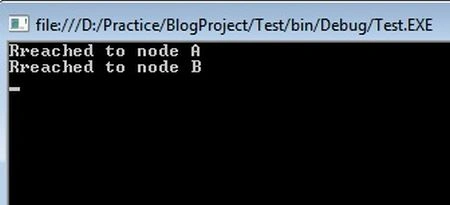
In the example we have implemented an Inode interface in both the Node_A and Node_B class. Then in the following, the two node classes, we have defined another class called Bridge, that will communicate between two cities. The ReachTo() function of the bridge class will take us to a specific city (node). Now we are clearly seeing the Program class (Main() function) is talking with any city class (node) through the Bridge class.
- using System;
- using System.Collections;
- namespace BridgeDesign
- {
- public interface Inode
- {
- void Reach();
- }
- class Node_A : Inode
- {
- public void Reach()
- {
- Console.WriteLine("Rreached to node A");
- }
- }
- class Node_B : Inode
- {
- public void Reach()
- {
- Console.WriteLine("Rreached to node B");
- }
- }
- class Bridge
- {
- public void ReachTo(Inode obj)
- {
- obj.Reach();
- }
- }
- class Program
- {
- static void Main(string[] args)
- {
- Bridge br = new Bridge();
- Node_A a = new Node_A();
- Node_B b = new Node_B();
- br.ReachTo(a); //Reach to Node_A
- br.ReachTo(b); //Reach to Node_B
- Console.ReadLine();
- }
- }
- }
Masood MohammadPosted Mar 22, 2019, 1:24 AM
Thank you. Crisp and clear .
Rajitha ReshmaiPosted Jan 21, 2014, 7:19 AM
Very Understandable