

This is the "Understand WCF" article series; we are explaining various concepts of WCF applications in this series. We have learned how to create a simple service, host it in a hosting environment, consume it and much more about WCF applications. Here are the complete URL set for your reference:
- Understand WCF: Part 1: What is SOA, Services and Messages
- Understand WCF: Part 2: Understand RESTful Service
- Understand WCF: Part 3: Create simple WCF Service
- Understand WCF: Part 4: What is Address, Binding, and Contract
- Understand WCF: Part 5: Exception handling in WCF
- Understand WCF: Part 6: Function overloading in WCF application
- Understand WCF: Part 7: Self Hosting in WCF application
- Understand WCF: Part 8: Observe SOAP message in WCF communication
- Understand WCF: Part 9: Data Contracts in WCF
In this article, we will see how to add attributes to a Data Contract and Data Member. In our previous article we saw that a Data Contract is nothing but a simple C# class and the Data Member is the member of the class, it might be any data type.
Properties of Data Contract
According to MSDN, there are the following 4 properties of a Data Contract:
- IsReference: Gets or sets a value that indicates to preserve object reference data
- Name: Gets or sets the name of the data contract for the type
- Namespace: Gets or sets the namespace for the data contract for the type
- TypeId: When implemented in a derived class, gets a unique identifier for this Attribute.
Properties of Data Member
- EmitDefaultValue: If you want to add default values in the serialization then set the EmitDefaultValue to true, else set EmitDefaultValue to false. By default it is true.
- IsRequired: It controls the minOccurs attribute for the schema element. The default value is false.
- Name: It creates the schema element name generated for the member.
- Order: It maintains the order of each element in the schema. By default it appears alphabetically.
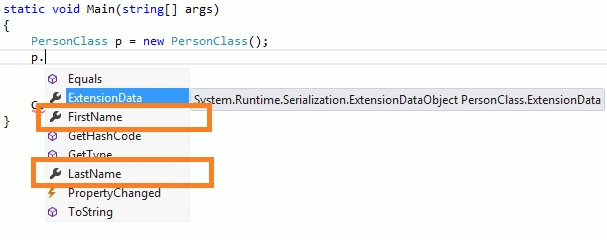
But the most used property for Data Contract is the "name" property. We will see one example of it in a WCF application.
Create one WCF application and modify code for the Data Contract as in the following.
- using System;
- using System.Collections.Generic;
- using System.Linq;
- using System.Runtime.Serialization;
- using System.ServiceModel;
- using System.ServiceModel.Web;
- using System.Text;
- namespace DataContract
- {
- [ServiceContract]
- public interface IService1
- {
- [OperationContract(Name="AddTowPerson")]
- string AddName(Person obj);
- }
- //Create data contract and set property into it.
- [DataContract(Name="PersonClass")]
- public class Person
- {
- [DataMember(Name="FirstName",IsRequired=true,Order=0)]
- public string name;
- [DataMember(Name="LastName",IsRequired=true,Order=1)]
- public string surname;
- }
- }
Arul RPosted Jan 19, 2016, 6:28 AM
Super
Anoop P.GPosted Dec 9, 2015, 4:25 AM
wonderful
Rakesh KalluriPosted Nov 9, 2013, 9:22 AM
good work realy
Rakesh KalluriPosted Nov 9, 2013, 9:21 AM
good