

In this article, I would like to show the DATEDIFF Function in SQL Server. The DATEDIFF Function is a built-in function. The DATEDIFF Function is used to calculate the difference between two dates. So let's have a look at a practical example of how to use a DATEDIFF Function in SQL Server 2012. The example is developed in SQL Server 2012 using the SQL Server Management Studio.
The DATEDIFF Function
The SQL Server DATEDIFF Function is used to calculate the difference between two dates.
Syntax
The syntax of the DATEDIFF built-in date function is as follows :
DATEDIFF(Datepart, Startdate, Enddate)
Here, The "Datepart" parameter is the part of the datetime to calculate the difference of. The Datepart can be any of the following:
Ms         Milliseconds
Yy          Year
Qq         Quarter of the Year
Mm        Month
Dy          The Day of the Year
Dd         Day of the Month
Wk         Week
Dw         The Day of the Week
Hh          Hour
Mi          Minute
Ss           Second
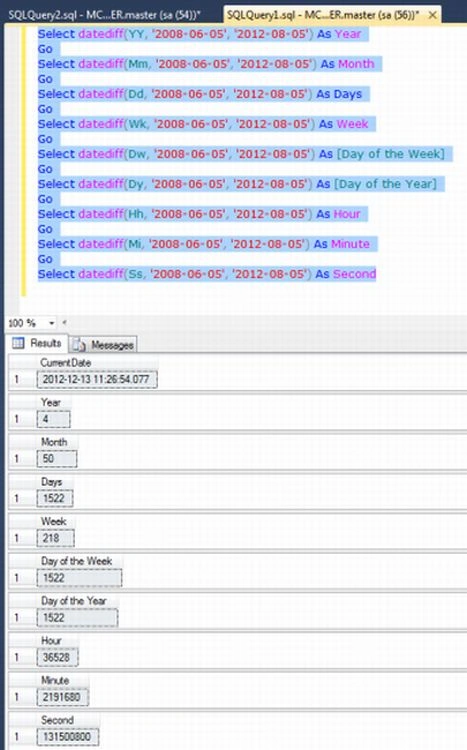
Example-1
Selectdatediff(YY,'2008-06-05','2012-08-05')AsYear
Go
Selectdatediff(Mm,'2008-06-05','2012-08-05')AsMonth
Go
Selectdatediff(Dd,'2008-06-05','2012-08-05')AsDays
Go
Selectdatediff(Wk,'2008-06-05','2012-08-05')AsWeek
Go
Selectdatediff(Dw,'2008-06-05','2012-08-05')As[Day of the Week]
Go
Selectdatediff(Dy,'2008-06-05','2012-08-05')As[Day of the Year]
Go
Selectdatediff(Hh,'2008-06-05','2012-08-05')AsHour
Go
Selectdatediff(Mi,'2008-06-05','2012-08-05')AsMinute
Go
Selectdatediff(Ss,'2008-06-05','2012-08-05')AsSecond
Jiyaul MustaphaPosted Aug 24, 2019, 1:46 AM
DECLARE @LastDate DATETIME='05-05-2019' SELECT (DATEDIFF(DAY,(@LastDate),GETDATE())) As DifferenceDays