

Introduction and Goal
Many times we would like to monitor events of WCF application in production environment. We would like to monitor events like errors, security audits, performance etc. This can be achieved by extending the ASP.NET health monitoring system in WCF. The health monitoring system is also termed as instrumentation.
Here's my small gift for all my .NET friends , a complete 400 pages FAQ Ebook which covers various .NET technologies like Azure , WCF , WWF , Silverlight , WPF , SharePoint and lot more http://tinyurl.com/4nvp9t
The event provider model
Instrumentation is provided using the event provider model. Events are notification which you receive from the WCF application which can be a security event like password change, UI click events, or exception events like application level errors. These events are captured by the provider and routed to some source like event viewer, SQL Server etc.
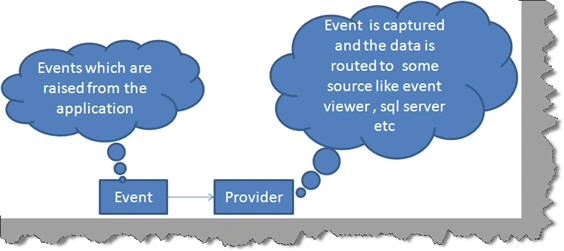
Both events and provider are specified in the 'web.config' file. The 'eventmapping' element is where you specify your provider and 'rules' elements helps you tie up the event with the provider.
<healthMonitoring>
<eventMappings>...</eventMappings>
<rules>...</rules>
</healthMonitoring>
What will we do in this article?
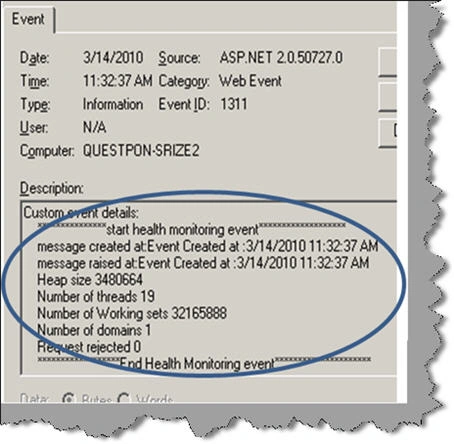
In this article we will create a simple audit function which will help us to track all calls made to the WCF service in to event viewer. So any calls by the WCF client will be tracked and audited in to the event viewer. For every call we will be tracking details like number of threads, working sets, app domains, when the message was created and when was it raised. Below is the snippet for the same which will be tracked in the event viewer.
***************start health monitoring event*******************
message created at:Event Created at :3/14/2010 11:32:37 AM
message raised at:Event Created at :3/14/2010 11:32:37 AM
Heap size 3480664
Number of threads 19
Number of Working sets 32165888
Number of domains 1
Request rejected 0******************End Health Monitoring event*********************
Step 1: Create the main event class
The first step is to create a class which will help us to track the calls made to the WCF service. This class needs to be inherited from 'WebAuditEvent' class. This class helps us to track audit events, generate information about security related operation and provide both success and failure audit events.
using System;
using System.Collections.Generic;
using System.Linq;
using System.Text;
using System.Web.Management;
namespace healthmonitering
{
public class CustomAudit : WebAuditEvent
{
}
}
In the same class lets add 3 private fields ,' msgcreated' , ' msgraised' and 'WebProcessStatistics'. By using ' msgcreated' and ' msgraised' we can track at what time event is created and raised. 'WebProcessStatistics' will provide information for assessing the health of a running process.
private string msgcreated = string.Empty;
private string msgraised = string.Empty;
private static WebProcessStatistics processStatistics;
Implement the necesarry public constructors that call the protected equivalents in the parent WebAuditEvent class.Base keyword is used to access the member of base class within the derived class as shown in the below code snippet. Note we have created the 'WebProcessStatistics' object and set it to the private member variable.
public CustomAudit(string message, object eventsource, int
eventcode)
: base(message, eventsource, eventcode)
{
msgcreated = string.Format("Event
Created at :{0}", EventTime.ToString());
processStatistics =
new WebProcessStatistics();
}
In both the constructors we are checking at what time event is created. Now override the Raise method as shown in the below code snippet.
public override void Raise()
{
msgraised = string.Format("Event Created at :{0}",
EventTime.ToString());
base.Raise();
Join the conversation! Your thoughts help the community grow.