

This article shows how to create an ASP.Net Web Application for login using WCF. Whenever a valid employee tries to login into the application the service will revert the employee id to the application if the input credentials are correct.
Database Structure
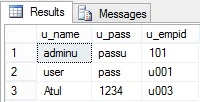
- create table tbl_emp(
- u_name nvarchar(50),
- u_pass nvarchar(50),
- u_empid nvarchar(50),)
- insert into tbl_emp values('useru','passu','101')
- insert into tbl_emp values('user','pass','u001')
- insert into tbl_emp values('Shubham','12@!','u002')
- insert into tbl_emp values('Atul','1234','u003')
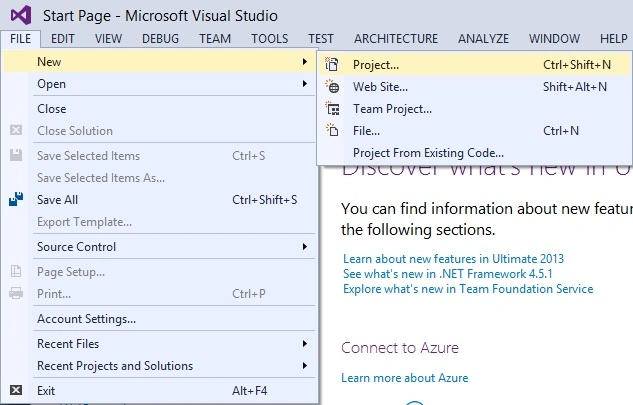
Now open Visual Studio for creating a WCF Service.
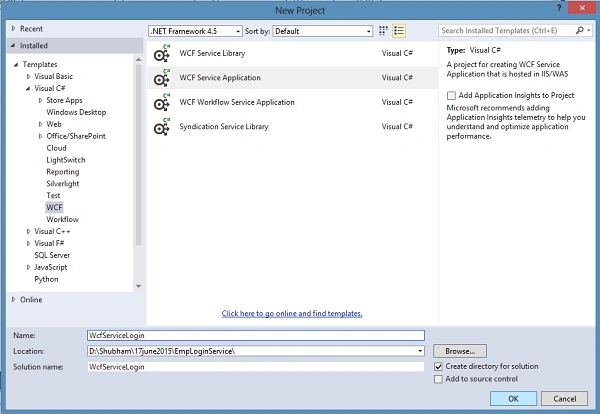
IService1.cs
- using System;
- using System.Collections.Generic;
- using System.Linq;
- using System.Runtime.Serialization;
- using System.ServiceModel;
- using System.ServiceModel.Web;
- using System.Text;
- namespace WcfServiceLogin
- {
- // NOTE: You can use the "Rename" command on the "Refactor" menu to change the interface name "IService1" in both code and config file together.
- [ServiceContract]
- public interface IService1
- {
- [OperationContract]
- List<string> LoginUserDetails(UserDetails userInfo);
- // TODO: Add your service operations here
- }
- // Use a data contract as illustrated in the sample below to add composite types to service operations.
- [DataContract]
- public class UserDetails
- {
- string username = string.Empty;
- string password = string.Empty;
- string empid;
- [DataMember]
- public string UserName
- {
- get { return username; }
- set { username = value; }
- }
- [DataMember]
- public string Password
- {
- get { return password; }
- set { password = value; }
- }
- [DataMember]
- public string RoleId
- {
- get { return empid; }
- set { empid = value; }
- }
- }
- }
- using System;
- using System.Collections.Generic;
- using System.Linq;
- using System.Runtime.Serialization;
- using System.ServiceModel;
- using System.ServiceModel.Web;
- using System.Text;
- using System.Data.SqlClient;
- using System.Data;
- namespace WcfServiceLogin
- {
- // NOTE: You can use the "Rename" command on the "Refactor" menu to change the class name "Service1" in code, svc and config file together.
- // NOTE: In order to launch WCF Test Client for testing this service, please select Service1.svc or Service1.svc.cs at the Solution Explorer and start debugging.
- public class Service1 : IService1
- {
- public List<string> LoginUserDetails(UserDetails userInfo)
- {
- List<string> usr = new List<string>();
- SqlConnection con = new SqlConnection("Data Source=XXXXXXX;Initial Catalog=XXXXX;User ID=XXXX;Password=XXXXXX");
- con.Open();
- SqlCommand cmd = new SqlCommand("select * from tbl_emp where u_name=@UserName and u_pass=@Password", con);
- cmd.Parameters.AddWithValue("@UserName", userInfo.UserName);
- cmd.Parameters.AddWithValue("@Password", userInfo.Password);
- SqlDataReader dr = cmd.ExecuteReader();
- if (dr.Read() == true)
- {
- usr.Add(dr[0].ToString());
- usr.Add(dr[2].ToString());
- }
- con.Close();
- return usr;
- }
- }
- }
- <?xml version="1.0"?>
- <configuration>
- <appSettings>
- <add key="aspnet:UseTaskFriendlySynchronizationContext" value="true" />
- </appSettings>
- <connectionStrings>
- <add name="log" connectionString="Data Source=XXXX; Initial Catalog=XXXX; User Id=XXXX; Password=XXXX" providerName="System.Data.SqlClient"/>
- </connectionStrings>
- <system.web>
- <compilation debug="true" targetFramework="4.5" />
- <httpRuntime targetFramework="4.5"/>
- </system.web>
- <system.serviceModel>
- <behaviors>
- <serviceBehaviors>
- <behavior>
- <!-- To avoid disclosing metadata information, set the values below to false before deployment -->
- <serviceMetadata httpGetEnabled="true" httpsGetEnabled="true"/>
- <!-- To receive exception details in faults for debugging purposes, set the value below to true. Set to false before deployment to avoid disclosing exception information -->
- <serviceDebug includeExceptionDetailInFaults="false"/>
- </behavior>
- </serviceBehaviors>
- </behaviors>
- <protocolMapping>
- <add binding="basicHttpsBinding" scheme="https" />
- </protocolMapping>
- <serviceHostingEnvironment aspNetCompatibilityEnabled="true" multipleSiteBindingsEnabled="true" />
- </system.serviceModel>
- <system.webServer>
- <modules runAllManagedModulesForAllRequests="true"/>
- <!--
- To browse web app root directory during debugging, set the value below to true.
- Set to false before deployment to avoid disclosing web app folder information.
- -->
- <directoryBrowse enabled="true"/>
- </system.webServer>
- </configuration>
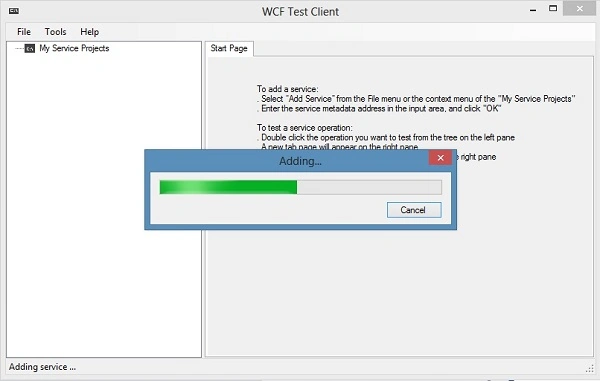
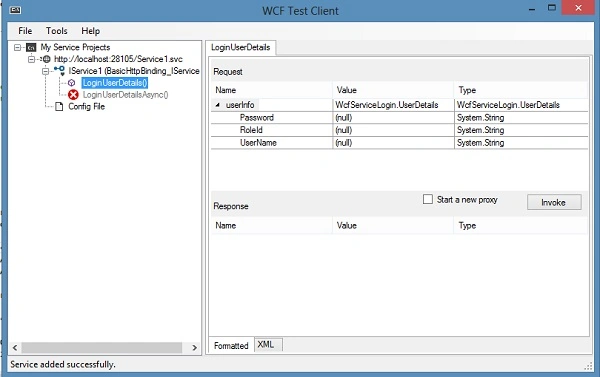
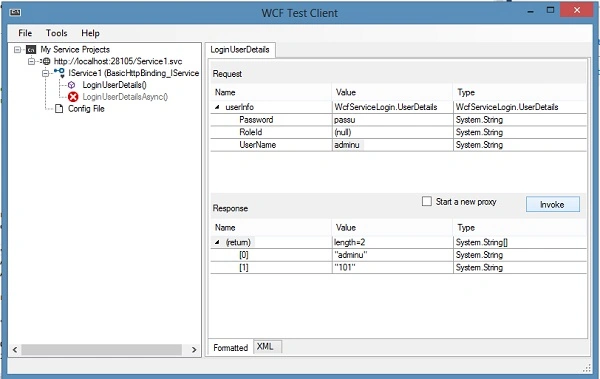
Input the credentials and click on the Invoke button . If the credentials match, it will revert the emp_id with name.
Now open new Visual Studio window and create a new web application in which we will use the service.
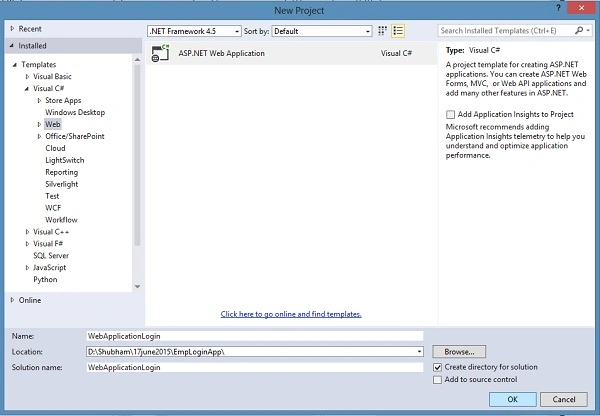
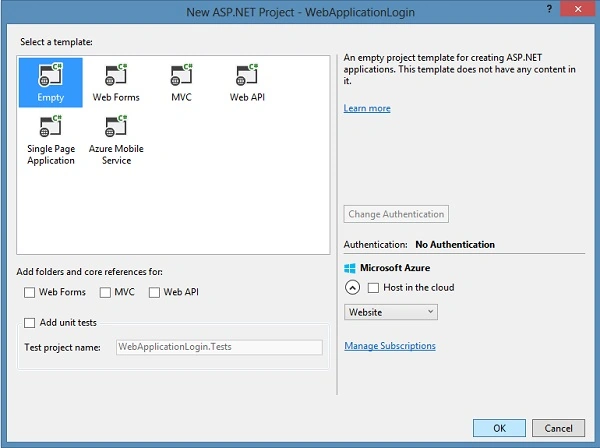
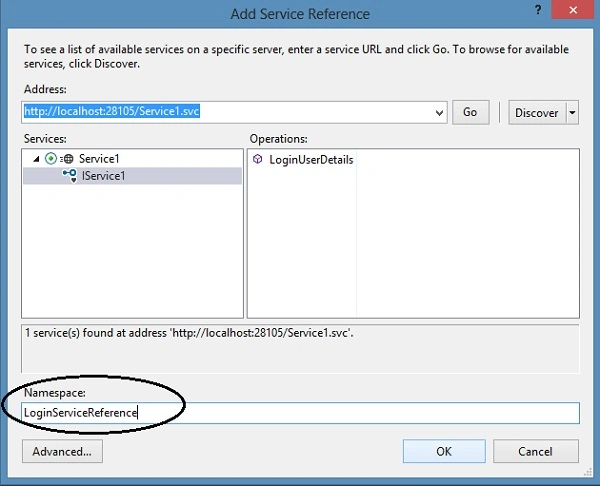
Add Service Reference.
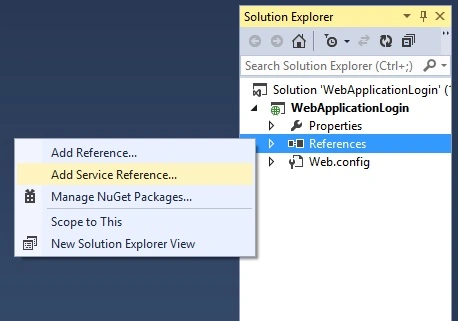
To determine the service, return to the WCF Test Client and copy the Address and paste in an Add Service Reference into the web application.
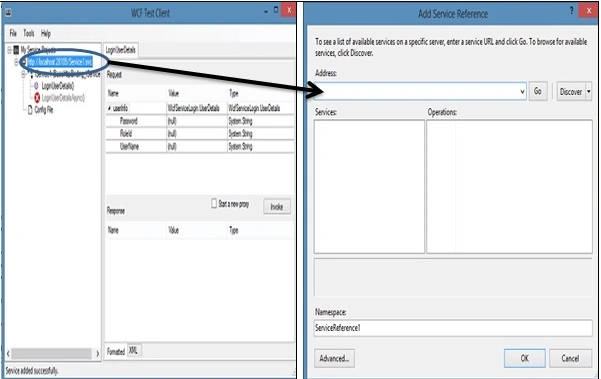
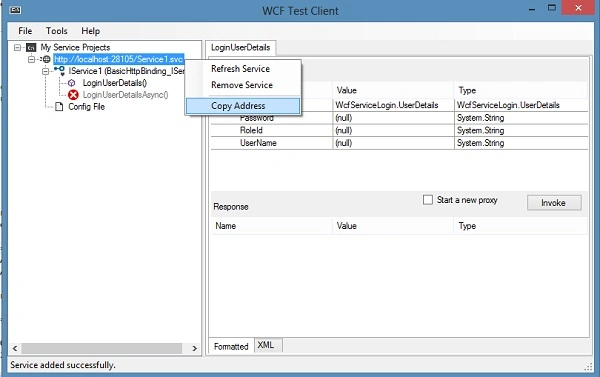
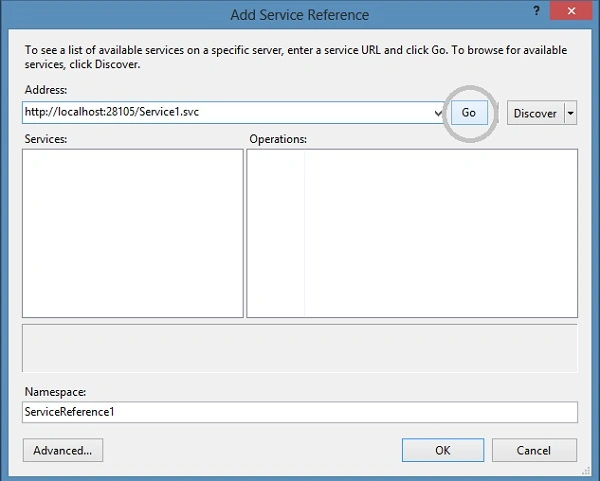
After clicking Go, we will find that one of our services contains an operation and we can change it here to a suitable name for a namespace.
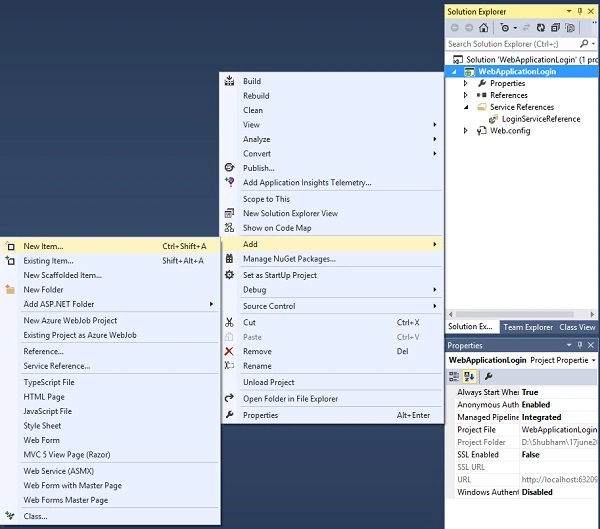
Add Web Form.
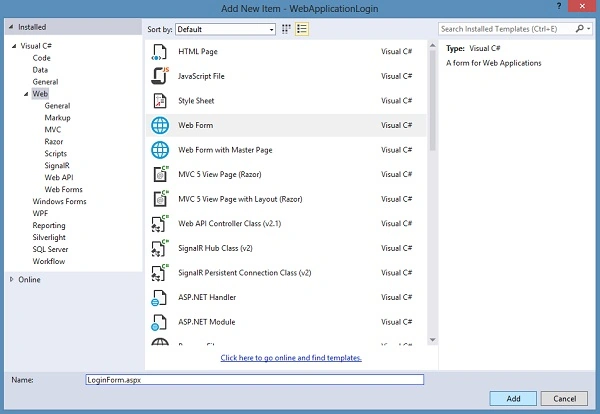
LoginForm.aspx
- <%@ Page Language="C#" AutoEventWireup="true" CodeBehind="LoginForm.aspx.cs" Inherits="WebApplicationLogin.LoginForm" %>
- <!DOCTYPE html>
- <html xmlns="http://www.w3.org/1999/xhtml">
- <head runat="server">
- <title></title>
- </head>
- <body>
- <form id="form1" runat="server">
- <table style="font-family:Arial">
- <tr>
- <td>
- <asp:Label ID="Label1" runat="server" Text="User Name"></asp:Label></td>
- <td></td>
- <td>
- <asp:TextBox ID="TextBox1" runat="server"></asp:TextBox></td>
- </tr>
- <tr>
- <td></td>
- <td></td>
- <td></td>
- </tr>
- <tr>
- <td>
- <asp:Label ID="Label2" runat="server" Text="Password"></asp:Label></td>
- <td></td>
- <td>
- <asp:TextBox ID="TextBox2" runat="server" TextMode="Password"></asp:TextBox></td>
- </tr>
- <tr>
- <td></td>
- <td></td>
- <td></td>
- </tr>
- <tr>
- <td>
- <asp:Button ID="Button1" runat="server" Text="Submit" OnClick="Button1_Click" /></td>
- <td></td>
- <td>
- <asp:Button ID="Button2" runat="server" Text="Reset" OnClick="Button2_Click" /></td>
- </tr>
- <tr>
- <td></td>
- <td></td>
- <td></td>
- </tr>
- <tr>
- <td></td>
- <td colspan="3">
- <asp:Label ID="Label3" runat="server"></asp:Label></td>
- <td></td>
- </tr>
- </table>
- </form>
- </body>
- </html>
- using System;
- using System.Collections.Generic;
- using System.Linq;
- using System.Web;
- using System.Web.UI;
- using System.Web.UI.WebControls;
- using WebApplicationLogin.LoginServiceReference;
- namespace WebApplicationLogin
- {
- public partial class LoginForm : System.Web.UI.Page
- {
- LoginServiceReference.Service1Client obj = new LoginServiceReference.Service1Client();
- protected void Page_Load(object sender, EventArgs e)
- {
- }
- protected void Button1_Click(object sender, EventArgs e)
- {
- try
- {
- UserDetails userinfo = new UserDetails();
- userinfo.UserName = TextBox1.Text;
- userinfo.Password = TextBox2.Text;
- List<string> msg = obj.LoginUserDetails(userinfo).ToList();
- Label3.Text = "Employee Name = " + msg.ElementAt(0)+ " Employee Id = "+ msg.ElementAt(1);
- }
- catch (Exception ex)
- {
- Label3.Text = "Wrong Id Or Password";
- }
- }
- protected void Button2_Click(object sender, EventArgs e)
- {
- TextBox1.Text = "";
- TextBox2.Text = "";
- }
- }
- }
Summary
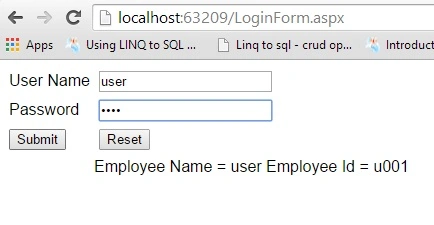
In this article, we made a login service in WCF. We will use that service in our web application to check the login data from SQL Server and if the input data is correct, then the Service will revert the Name and Employee id to the application.
Abhishek TyagiPosted Nov 3, 2020, 7:25 AM
When I have to Run our application then is not giving actual option..
Akshat GuptaPosted Dec 5, 2018, 5:53 AM
I am getting this error : Error: Cannot obtain Metadata from http://localhost:43604/Service1.svc If this is a Windows (R) Communication Foundation service to which you have access, please check that you have enabled metadata publishing at the specified address. For help enabling metadata publishing, please refer to the MSDN documentation at http://go.microsoft.com/fwlink/?LinkId=65455.WS-Metadata Exchange Error URI: http://localhost:43604/Service1.svc Metadata contains a reference that cannot be resolved: 'http://localhost:43604/Service1.svc'. The content type text/html; charset=utf-8 of the response message does not match the content type of the binding (application/soap+xml; charset=utf-8). If using a custom encoder, be sure that the IsContentTypeSupported method is implemented properly. The first 1024 bytes of the response were:
Akshat GuptaPosted Dec 5, 2018, 5:52 AM
I nam getting this error
Debasis SahaPosted Jun 19, 2015, 12:50 AM
Nice
Santhakumar MunuswamyPosted Jun 18, 2015, 2:11 PM
Thanks for nice article:)
Sibeesh VenuPosted Jun 18, 2015, 6:00 AM
Good one.
NitinPosted Jun 18, 2015, 5:29 AM
nice