Introduction
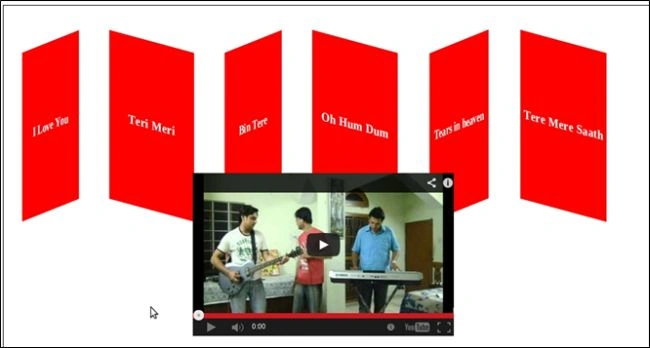
In this article, we will be using the transform property to show a video like this:
Now we will write the code for that
Step 1
First, we create a table to show the names of the videos.
- <table cellpadding="2" cellspacing="2">
- <tr>
- <td id="td1" style="font-weight: bold; color: white; font-size: 20px;" align="center"
- onclick="ShowVideo1()">
- I Love You
- </td>
- <td id="td2" style="font-weight: bold; color: white; font-size: 20px;" align="center"
- onclick="ShowVideo2()">
- Teri Meri
- </td>
- <td id="td3" style="font-weight: bold; color: white; font-size: 20px;" align="center"
- onclick="ShowVideo3()">
- Bin Tere
- </td>
- <td id="td4" style="font-weight: bold; color: white; font-size: 20px;" align="center"
- onclick="ShowVideo4()">
- Oh Hum Dum
- </td>
- <td id="td5" style="font-weight: bold; color: white; font-size: 20px;" align="center"
- onclick="ShowVideo5()">
- Tears in heaven
- </td>
- <td id="td6" style="font-weight: bold; color: white; font-size: 20px;" align="center"
- onclick="ShowVideo6()">
- Tere Mere Saath
- </td>
- <td id="main">
- <iframe id="i1" width="400px" height="250px" src="http://www.youtube.com/embed/QqgJkkVaWk8"
- frameborder="0" allowfullscreen></iframe>
- </tr>
- </table>
Here we will use 6 columns and one <iframe> tag to show the videos.
Step 2
Now we will set the transform property in order to show the columns in the specified style:
- <style>
- #td1
- {
- width: 200px;
- height: 100px;
- background-color: Red;
- -webkit-transform: perspective( 400px ) rotateY(-45deg);
- }
-
- #td2
- {
- width: 200px;
- height: 100px;
- -webkit-transform: perspective( 400px ) rotateY(45deg);
- background-color: Red;
- }
-
- #td3
- {
- width: 200px;
- height: 100px;
- background-color: Red;
- -webkit-transform: perspective( 400px ) rotateY(-45deg);
- }
- #td4
- {
- width: 200px;
- height: 100px;
- background-color: red;
- -webkit-transform: perspective( 400px ) rotateY(45deg);
- }
-
- #td5
- {
- width: 200px;
- height: 100px;
- background-color: Red;
- -webkit-transform: perspective( 400px ) rotateY(-45deg);
- }
-
- #td6
- {
- width: 200px;
- height: 100px;
- background-color: red;
- -webkit-transform: perspective( 400px ) rotateY(45deg);
- }
- #main
- {
- -webkit-transform: translate(-650px,200px);
- }
- </style>
Now we will look at this code:
Here we specify the perspective and rotateY property of CSS3.
- Perspective property: This property is only supported by Safari and Chrome. It specifies how many pixels are a 3d element placed from a view (in my case it's 400px).
- RotateY: It defines the rotation relative to the y-axis (in my case its 45 degrees).
Here we also specify another peoperty, translate, to define the 2D translation:
- webkit-transform: translate(-650px,200px);
Step 3
Now we will write the code, by which when we click on the name of the video it will be run like this, for this we first specify the function on the onclick event of the columns like this:
- <td id="td1" style="font-weight:bold;color:white;font-size:20px;" align="center" onclick="ShowVideo1()">I Love You</td>
Now we will write the JavaScript code for this:
- <script language="javascript">
- function ShowVideo1() {
-
- document.getElementById('i1').src = "http://www.youtube.com/embed/TEk_KpLaRag";
- }
- </script>
- Here we will change the source of the
- <iframe>tag. So when we click on that particular column the video will be run. Like
- this, we will write the code for other columns:
- <script language="javascript">
- function ShowVideo1() {
-
- document.getElementById('i1').src = "http://www.youtube.com/embed/TEk_KpLaRag";
- }
- function ShowVideo2() {
- document.getElementById('i1').src = "http://www.youtube.com/embed/QqgJkkVaWk8";
- }
- function ShowVideo3() {
- document.getElementById('i1').src = "http://www.youtube.com/embed/MI-0wy_qai0";
- }
- function ShowVideo4() {
- document.getElementById('i1').src = "http://www.youtube.com/embed/0hL0tanw43o";
- }
- function ShowVideo5() {
- document.getElementById('i1').src = "http://www.youtube.com/embed/Ei1eJokw6SY";
- }
- function ShowVideo6() {
- document.getElementById('i1').src = "http://www.youtube.com/embed/8yMYpCHwVLE";
- }
-
- </script>
Output
So when we will click on "Bin Tere" the following video will be run:


 Now we will write the code for that
Step 1
First, we create a table to show the names of the videos.
Now we will write the code for that
Step 1
First, we create a table to show the names of the videos.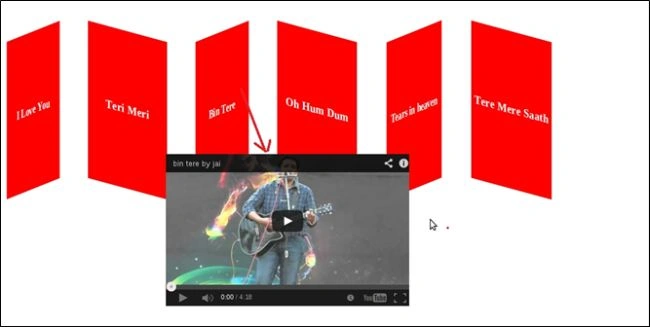
Gowtham RajamanickamPosted Mar 13, 2015, 2:16 AM
great and simple...
Mahak GuptaPosted May 17, 2013, 2:00 AM
Thank you Sam Sir for the article extension.
Sam HobbsPosted May 16, 2013, 2:08 PM
The videos play for me in IE 10 but the style for the table cells are not the same. The style is correct in Safari at least. Teri Meri is pretty. Bin tere however is restricted and I must click on a link to "Watch on YouTube". The Tere Mere Saath video is not available in America; YouTube says that the "uploader has not made this available in your country". I wonder why that is.
Mahak GuptaPosted May 16, 2013, 10:23 AM
I am using the perspective property here: -webkit-transform: perspective( 400px ) rotateY(-45deg); It is not supported by IE, Opera and FireFox. For the other Browsers , you can use the skew method like this: For IE: -ms-transform: skew(40deg,20deg); rotate with scale method: -ms-transform: rotate(20deg) scale(2.5, 0.5); these methods are working on all browsers.
Shantanu ChandraPosted May 16, 2013, 5:54 AM
It is not working in IE10... any particular reason as to why or how it can be fixed?