

In this fast changing era we are developing applications that are most descriptive to the end-user. Our goals are changing every day, primarily we have a goal to deploy an application with functionality specified by the client but now the client is changing their requirements on a daily basis so we began from the Waterfall Model then the Agile and now we are using a continuous release Candence.
Application Insights is not just a small amunt of info about the application, it is complete end-to-end monitoring, we will get a true 360-degree monitoring of your application, not just small pieces of data.
And it is designed to work with services built into the Microsoft Azure, Microsoft .NET Framework, Java, Web sites, Windows Store and Windows Phone 8 applications.
Now how to do it
First go to Visual Studio and add an extension and download the Application Insights Tools for Visual Studio the extension.
Now, create a new project.

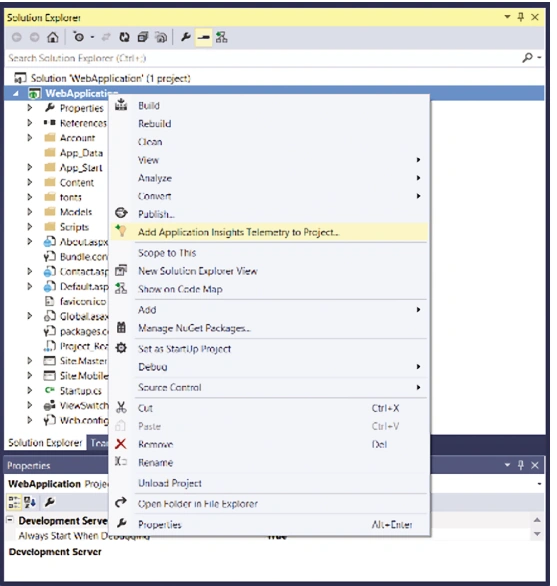
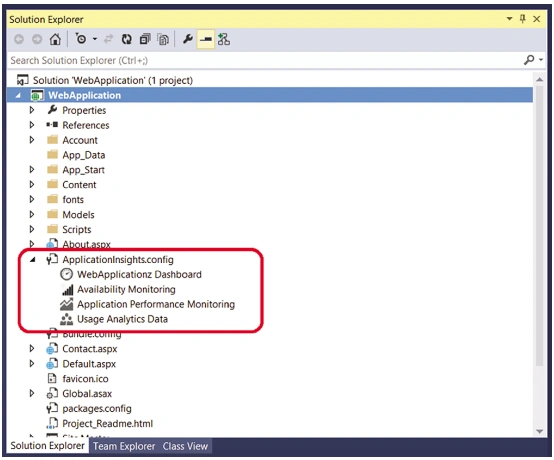
Once you have added Application Insights to a new or existing project, the usage monitoring on your Web, Windows Store and Windows Phone applications is automatically enabled.
Asfend YarPosted Feb 27, 2016, 3:53 AM
Nice Share
Sumit JoshiPosted Aug 19, 2015, 9:37 AM
thanks sir.
Santhakumar MunuswamyPosted Aug 18, 2015, 2:40 PM
Good one
Nilesh JadavPosted Aug 17, 2015, 4:22 AM
Nice Article sir
Sibeesh VenuPosted Aug 17, 2015, 4:11 AM
Nice Share. Thank you.
Rajeesh MenothPosted Aug 17, 2015, 2:48 AM
Nice Share..
Sumit JoshiPosted Aug 17, 2015, 1:27 AM
Thanks Ankit Bansal
Ankit BansalPosted Aug 17, 2015, 1:25 AM
thanks for share...
Sumit JoshiPosted Aug 17, 2015, 1:20 AM
Thanks
Vaikesh K PPosted Aug 17, 2015, 12:35 AM
Good one
Gopi ChandPosted Aug 16, 2015, 11:34 PM
Its nice one
Karthikeyan KPosted Aug 16, 2015, 11:17 PM
Good one..Thanks for sharing sir...