

Introduction
Today we will learn how to align HTML DIV elements horizontally using normal CSS styles. I hope you will like this small demo.
Please see this article on my blog here.
Background
In our daily programming life, we are all familiar with DIV elements used in most client-side coded web applications. So it is important that we style them well. This article shows how to align those DIV elements horizontally.
Using the code
Create the UI elements as in the following:
- <div id="parent">
- <div id="div1" class="div">Number 1</div>
- <div id="div2" class="div">Number 2</div>
- <div id="div3" class="div">Number 3</div>
- </div>
- .div
- {
- background-color:red;
- color:white;
- border: 1px solid;
- }
- #parent
- {
- border:1px solid #ccc;
- text-align: center;
- height:150px;
- width:400px;
- }
Then you can see output as in the following.
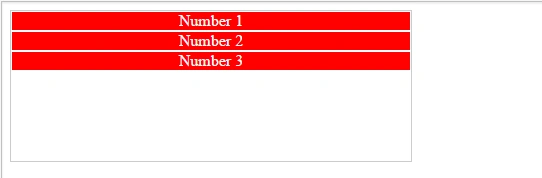
Now we will align those divs horizontally using pure CSS.
- #div2
- {
- display: inline;
- }
- #div3
- {
- float:right;
- }
- #div1
- {
- float:left;
- }
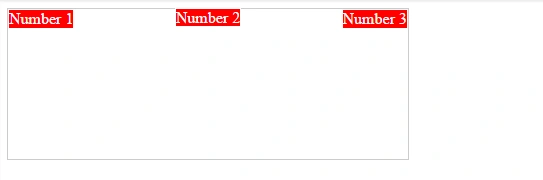
You can see a JSFiddle demo here. Please go ahead and try your experience now.
That is all for now. I will see you soon in another article.
Sibeesh VenuPosted Jun 4, 2015, 4:50 AM
Gopi Chand Thank you.
Gopi ChandPosted Jun 4, 2015, 2:09 AM
Short and simple with complete explanation :)
Sibeesh VenuPosted Jun 4, 2015, 12:46 AM
Miche Thank you
Sibeesh VenuPosted Jun 4, 2015, 12:45 AM
Santhakumar Munuswamy Thank you
MichePosted Jun 3, 2015, 5:14 PM
useful
Santhakumar MunuswamyPosted Jun 3, 2015, 2:56 PM
Nice one