Introduction
This article describes
Amazon S3 from the C# developer point of view. It shows how to access Amazon S3 service from C#, what operations can be used, and how they can be programmed.
Amazon S3 is called a simple storage service, but it is not only simple but also very powerful. It supports a lot of features that can be used in everyday work. But of course, the main feature is the ability to store data by key.
Storage Service.
You can store any data by key in S3 and then you can access and read it. But to do it a bucket should be created at first. A bucket is similar a namespace in terms of C# language. One AWS account is limited by 100 buckets and all buckets' names are shared through all of Amazon accounts. So you must select a unique name for it. See more details at
http://docs.amazonwebservices.com/AmazonS3/latest/dev/UsingBucket.html.
Let's see how to check if a bucket is already created and to create it in case of its' absence:
- ListBucketsResponse response = client.ListBuckets();
- bool found = false;
- foreach(S3Bucket bucket in response.Buckets) {
- if (bucket.BucketName == BUCKET_NAME) {
- found = true;
- break;
- }
- }
- if (found == false) {
- client.PutBucket(new PutBucketRequest().WithBucketName(BUCKET_NAME));
- }
where "client" is
Amazon.S3.AmazonS3Client object. You can see how to initialize it in the example that is attached to the article.
A code that stores some data for some key in a bucket is the following:
- PutObjectRequest request = new PutObjectRequest();
- request.WithBucketName(BUCKET_NAME);
- request.WithKey(S3_KEY);
- request.WithContentBody("This is body of S3 object.");
- client.PutObject(request);
Here S3 Object is created with a key defined in the constant S3_KEY and a string is written into it.
Content of a file can also be put into S3 (instead of a string). To do it the code should be modified a little:
- PutObjectRequest request = new PutObjectRequest();
- request.WithBucketName(BUCKET_NAME);
- request.WithKey(S3_KEY);
- request.WithFilePath(pathToFile);
- client.PutObject(request);
To write a file the method
WithFilePath should be used instead of the method
WithContentBody. See more details about S3 objects at
http://docs.amazonwebservices.com/AmazonS3/latest/dev/UsingObjects.html.
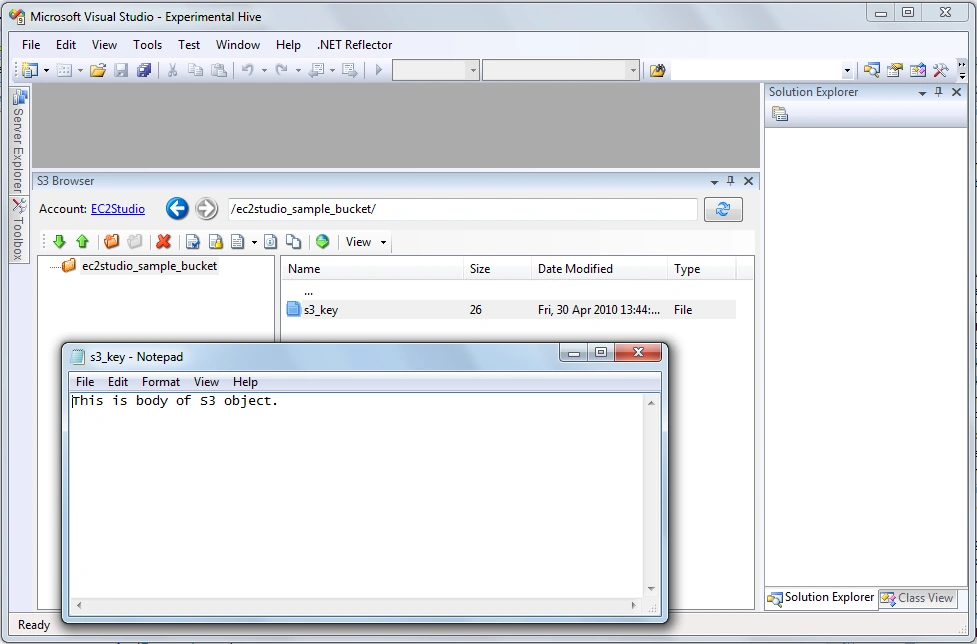
Now let's make sure that the data into S3 have really been written:
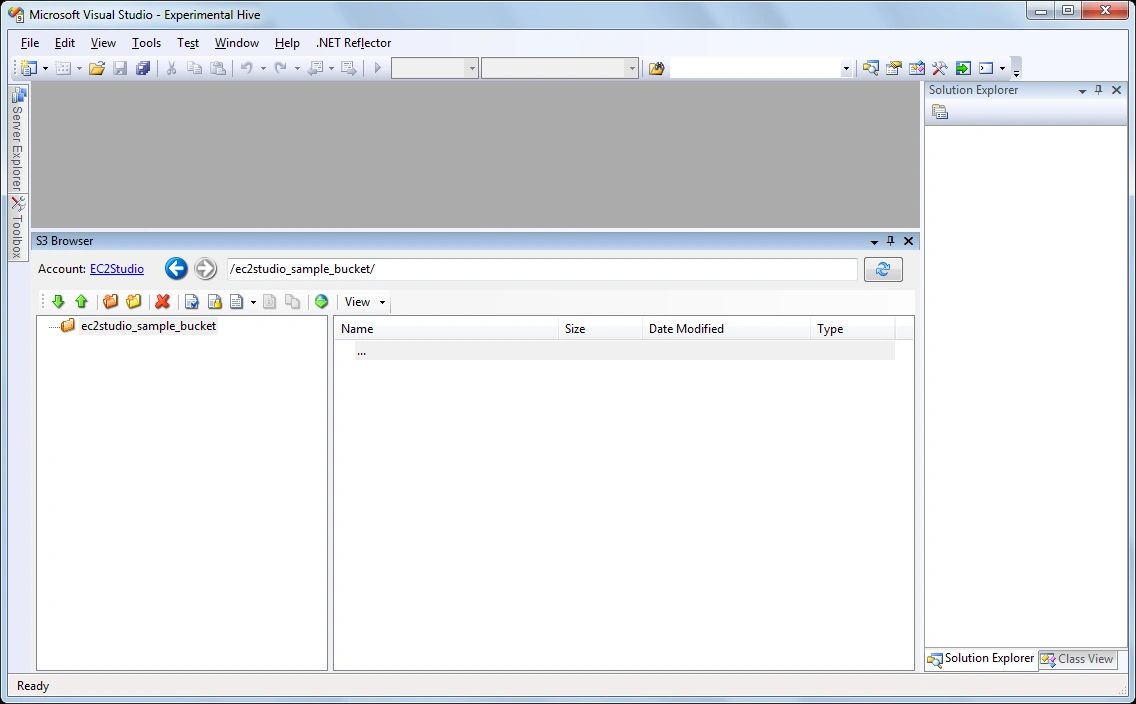
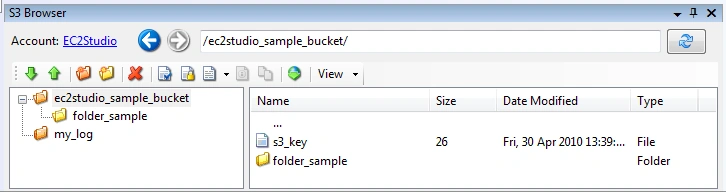
After you see S3 Object in the S3 browser in EC2Studio add-in, double click at it and select a program to use to show its' content. The screenshot shows that S3Object has been created and its' content is opened in Notepad.
To read S3 Object from C# code:
- GetObjectRequest request = new GetObjectRequest();
- request.WithBucketName(BUCKET_NAME);
- request.WithKey(S3_KEY);
- GetObjectResponse response = client.GetObject(request);
- StreamReader reader = new StreamReader(response.ResponseStream);
- string content = reader.ReadToEnd();
Metadata
In addition to the S3 Object content metadata (key/value pair) can be associated with an object. Here is an example of how it can be done:
- CopyObjectRequest request = new CopyObjectRequest();
- request.DestinationBucket = BUCKET_NAME;
- request.DestinationKey = S3_KEY;
- request.Directive = S3MetadataDirective.REPLACE;
- NameValueCollection metadata = new NameValueCollection();
-
- metadata.Add("x-amz-meta-test", "Test data");
- request.AddHeaders(metadata);
- request.SourceBucket = BUCKET_NAME;
- request.SourceKey = S3_KEY;
- client.CopyObject(request);
Amazon S3 does not have a special API call to associate metadata with an S3 object. Instead of it the copy method should be called.
But S3 API has a special method for reading metadata:
- GetObjectMetadataRequest request = new GetObjectMetadataRequest();
- request.WithBucketName(BUCKET_NAME).WithKey(S3_KEY);
- GetObjectMetadataResponse response = client.GetObjectMetadata(request);
- foreach(string key in response.Metadata.AllKeys) {
- Console.Out.WriteLine(" key: " + key + ", value: " + response.Metadata[key]);
- }
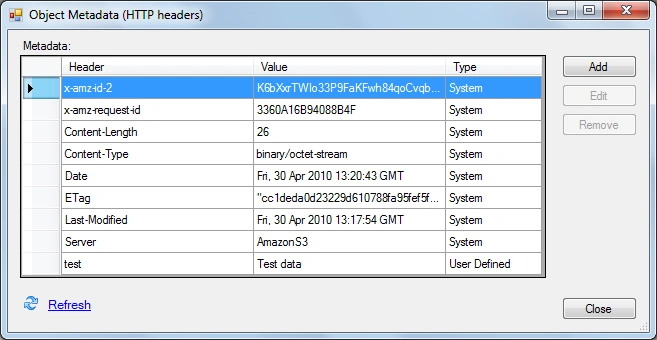
Let's see through EC2Studio add-in that the metadata have been assigned:
HTTP access.
And the good news is that S3 allows accessing S3 objects not only by API calls but directly by HTTP (so each S3 object has URL that can be used to access it by any web browser). You can use S3 as a simple static HTTP server, where you can host your static web content.
Moreover S3 has access control that allows limiting users who can access data (see more about ACL access below). And not only who but also when...
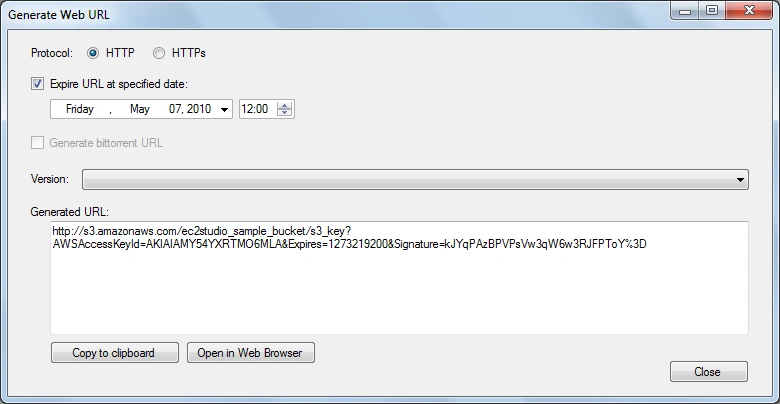
Amazon SDK API allows generating a signed URL that is valid for a limited time only. Here is a code that makes URL with validity for a week:
- GetPreSignedUrlRequest request = new GetPreSignedUrlRequest().WithBucketName(BUCKET_NAME).WithKey(S3_KEY);
- request.WithExpires(DateTime.Now.Add(new TimeSpan(7, 0, 0, 0)));
- string url = client.GetPreSignedURL(request));
And the same can be done through EC2Studio add-in:
Then you can send the URL to everyone and be sure that the access to your data is stopped for them after the defined time.
Logging
On talking about hosting a static web content at Amazon S3 it should be mentioned about a log access feature, because you should know who accesses your web site and when.
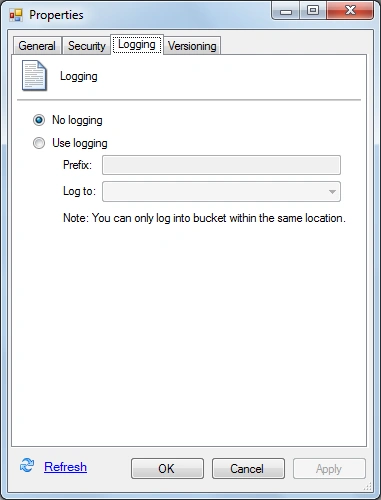
S3 has such a feature. First of all you should configure logging for a bucket. It can be done through API, but it is a quite rare operation, so let's just use EC2Studio add-in to turn to log on for a bucket.
A target bucket where your logging files are stored must be defined. A prefix can be defined to know where those log files are from.
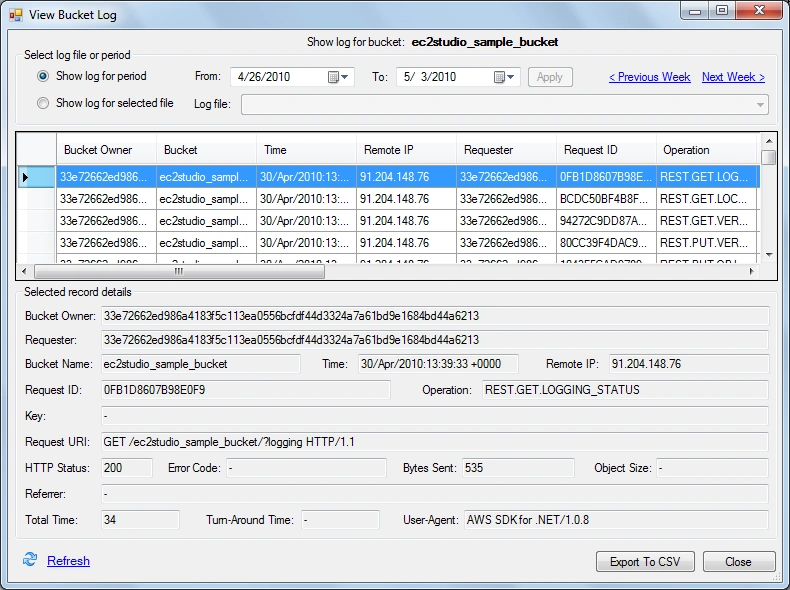
As a result, every access to any object in the bucket will be logged to the destination bucket and Amazon S3 will create the file with logging info from time to time. The file can be read by the usual API call for reading any S3 object.
But it has a special format that is not very convenient to view, so let's use EC2Studio again to see logging info.
See more details at
http://docs.amazonwebservices.com/AmazonS3/latest/dev/ServerLogs.html.
Access Control Lists.
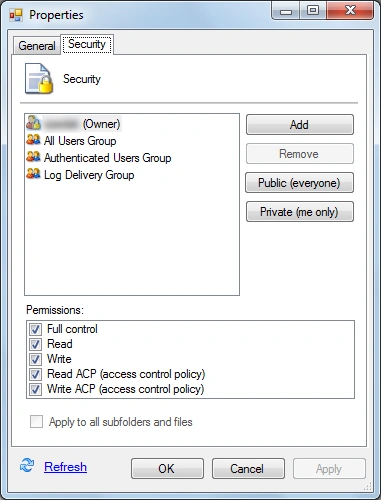
As I mentioned earlier Amazon S3 has a feature to define access. There are 2 types of access: by user id/email or by URL (it means predefined groups or users):
So you can define a read or write access and define who is permitted to read and write ACL for any S3 object or bucket.
There is a special API call to set of reading ACLs, for example, an owner of S3Object can be found:
- GetACLResponse response = client.GetACL(new GetACLRequest().WithBucketName(BUCKET_NAME).WithKey(S3_KEY));
- Console.Out.WriteLine("Object owner is " + response.AccessControlList.Owner.DisplayName);
See more details at
http://docs.amazonwebservices.com/AmazonS3/latest/dev/UsingAuthAccess.html.
Versions
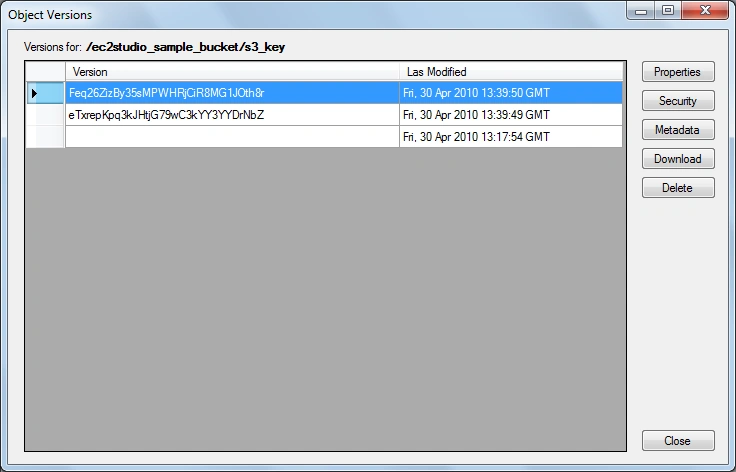
Another cool feature of Amazon S3 is versioning. You can turn versioning on for a bucket and when you put any object into it, it will not be simply replaced, but the new version of the object will be created and stored under the same key. So you will be able to access and manage all versions (modifications) of the object.
All versions of an S3 object can be received by the following call:
- ListVersionsResponse response = client.ListVersions(new ListVersionsRequest().WithBucketName(BUCKET_NAME).WithPrefix(S3_KEY));
- Console.Out.WriteLine("Found the following versions for prefix " + S3_KEY);
- foreach(S3ObjectVersion version in response.Versions) {
- Console.Out.WriteLine(" version id: " + version.VersionId + ", last modified time: " + version.LastModified);
- }
For accessing versions by UI:
To delete a particular object version a usual call client.DeleteObject can be used. The required version id should be put as a request parameter.
The same is for accessing objects. A version can be read by the client.GetObject with the version id a request parameter.
See more details at
http://docs.amazonwebservices.com/AmazonS3/latest/dev/Versioning.html.
Like a filesystem.
If you use any S3 browser (EC2Studio add-in or any other) you notice that all of them represent the S3 storage as a filesystem while it is just a key/value storage. Moreover most of the tools show S3 primarily as file storage (usually to backup files). As shown early it has a lot of cool features that don't exist in usual filesystems. So S3 can be used as more generic storage for keeping application data.
It is useful to have a hierarchical structure, and S3 supports it. Every key of S3Object can have special delimiters (usually '/' is used, but you can define your own delimiter) that divides a full key into some path. And you can request an S3 object list for a defined path (directory):
- ListObjectsRequest req = new ListObjectsRequest();
- req.WithBucketName(BUCKET_NAME);
- req.WithPrefix(DIR_NAME);
- ListObjectsResponse res = client.ListObjects(req);
- Console.Out.WriteLine("Enumerating all objects in directory: " + DIR_NAME);
- foreach(S3Object obj in res.S3Objects) {
- Console.Out.WriteLine(" S3 object key: " + obj.Key);
- }
And the same can be view at UI:
Conclusion
Amazon S3 service is a full-featured service that can be utilized from C# code to store application data, to define additional metadata for it, with the ability to define who and when will have pure HTTP access to your data. See a log of data access. And moreover there is the versioning storage with the ability to define a hierarchical structure.

RG GPosted Jul 23, 2018, 5:29 AM
I want to download whole bucket data to local. pls help me thanks
sivakumar murugesanPosted Apr 11, 2018, 8:40 AM
I need folder delete using s3 in c#
naresh bahekarPosted Jul 12, 2011, 7:12 AM
during execution of your program i get an error that" Your account is not signed up for the S3 service. You must sign up before you can use S3".i already sign up for the s3 service of amazone and i have secret access key and acess key both.then what is the issue after execution of program.
Craig LebowitzPosted Mar 16, 2011, 4:03 PM
I like how you highlight the hierarchical abilities of S3. I recently signed up and have been thinking about how my current employer use Amazon services. We should be able to spin up ~10 new micro instances for automated load testing of a high-cpu instance. As a fairly typical asp.net dev, your level of explanation was perfect for me. Nice post!