Introduction
Let’s try to understand what is Dataverse first, before jumping to Dataverse for Teams. Microsoft Dataverse can be considered as a backend to store data securely, where all the data associated with your Power platform is stored. Dataverse is not just a database, it is a service and is coming with more features. In Dataverse you can secure a,
- Table level
- Row-level
- Field level
- Hierarchy level
In power platform the suite consists of Power Apps, Power Automate, Power Virtual Agents, Power BI. it spans across Microsoft 365, Dynamics 365, Azure, and stand-alone applications.
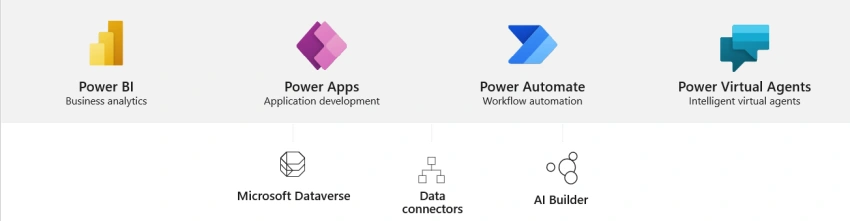
- Power Apps: for acting on the content using rich and intuitive interfaces
- Power Automate: To built dynamic business and workflow processes
- Power BI: for showcasing the data in form of rich charts, bars
- Power Virtual Agents: Intelligent Bots that converse with users using NLP (natural language processing).
Data stored in the Dataverse is relational in nature. You can store both structured data and unstructured data. You can create relationships easier in the form of just a button click. Imagine in relational database systems if you have 2 tables, and you need to create a relationship you should create a primary key in the source database and a foreign key in the target database, and you need to manually configure to relate the tables with primary and foreign keys.
Also, it has view, which is very powerful. Using this you can configure views dynamically for your app. Dataverse comes with premium licenses realm, it doesn’t come free with M365 subscriptions (E1, E3, E5, etc).
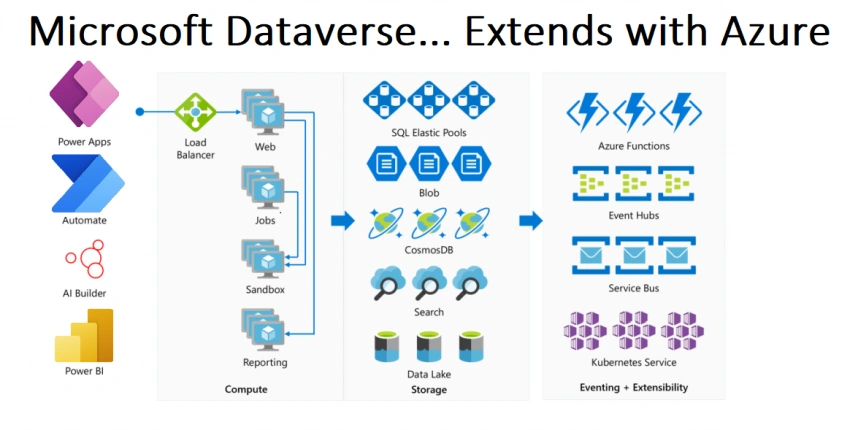
Dataverse Extends with Azure
Dataverse extends with Azure storage, Azure Cosmos DB, Webhooks, event hubs, and much more. it can be defined as an amalgamation of powerful azure services built-in and offered inside the MS Teams.
Delegation is the ability to delegate the query work to underlying data sources for large data sets. As of this document, we have 4 data sources that support delegation in the order of highest to lowest
- Dataverse
- MS SQL
- SharePoint
- Salesforce
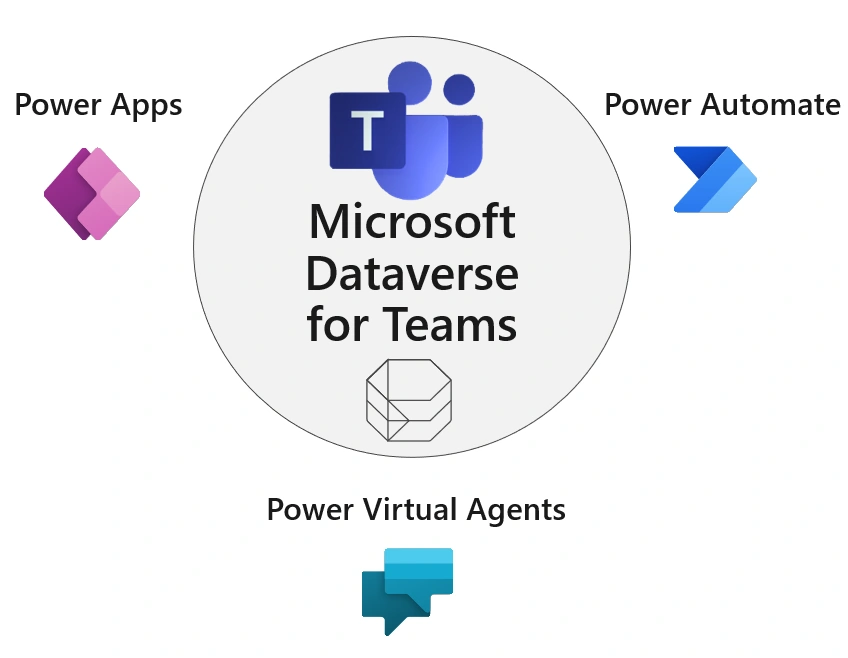
Dataverse for Teams
It is the lightweight version of Dataverse. MS Teams is the main hub for M365 where the users can chat, share content, and work together collaboratively. iI delivers a built-in low code data platform for MS teams and provides relational data storage, rich data types, enterprise-grade governance, and one-click solution deployment. it enables citizen developers, professional developers, powerful users to design and deploy apps easily satisfying each individual needs. Any Teams Owners, Members can create Dataverse for Teams environment and start utilizing unless this feature is blocked by your Tenant Admin.
Security
Security for the Dataverse for teams has the following roles OMG (Owners, Members, Guests).
Owners – Full access to tables and rows. They can create apps, flows, and bots
Members – Members also have full access to tables and rows. They can create apps, flows, and bots as well. However, owners can limit/configure the security for members at the table or row or at field level.
Guests- Guests will have read-only access to the data of their own. They can not create any apps, flows, or bots. They can only view and use them.
It comes with a sophisticated security model. If you create a Table, the following permission levels are available for Owners, Members, and Guests.
|
Roles \ Capabilities
|
Create new records
|
Read all records
|
Update or delete records
|
|
Full Access
|
Yes
|
Yes
|
Yes
|
|
Collaborate
|
Yes
|
Yes
|
Can be modified
|
|
Reference
|
No
|
Yes
|
No
|
|
Private
|
Yes
|
Can be modified
|
Can be modified
|
|
None
|
No
|
No
|
No
|
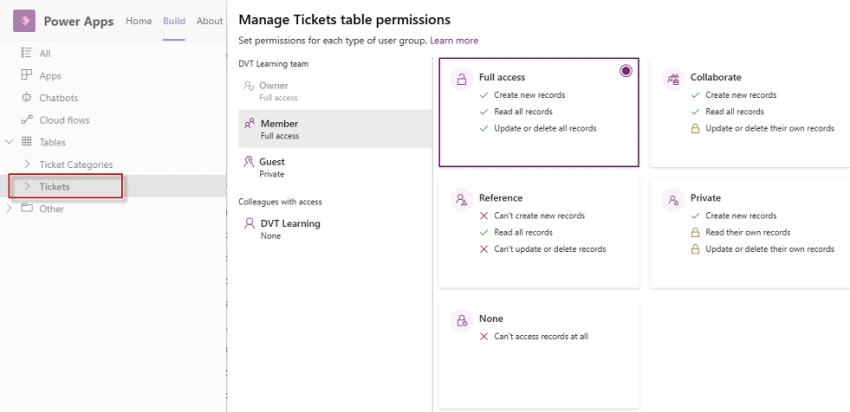
As an ‘Owner’ of the team, the user has ‘Full Access’. Only an Owner can modify the permissions as needed, where it says, ‘Can be modified’. Below is the screen capture for the table called 'Tickets' and the permission levels for each set of users Owners, Members, and Guests.
Basic Flow for Dataverse for teams
When you create power apps inside teams here is the basic flow

- An environment (Dataverse for teams) gets created, if it did not already exist
- The app is created inside the Teams context
- The app is y default shared with Owners, Members, and guests in that team only
If the App needs to be shared outside the teams, it can only be shared with colleagues (users within the same organization), not with guests outside the teams. The app can be shared by creating an AD security group and adding members to it. Please note that the AD group has 1000 members limit. Please note that you can only create one AD security group as this document published.
Dataverse comes with a premium license, Dataverse for teams with standard licenses comes free with no additional cost. Yes, you read it right 😊.
Note on limitations
Please note that each power app you create for teams, creates a backend database called Dataverse for teams, and that database can store up to 1 M records and it has 2 GB of storage per team. If you need to have more than 2 GB you need to upgrade to the premium license realm where the users interacting with this app should have a premium license.
Dataflow for Teams
This feature comes with Dataverse for teams, currently in the preview stage. Using this you can connect to data from Power BI, SharePoint, or any data sources on the fly just using power query to get the result set.
FAQs
How can I create Power Apps in Teams (Dataverse for Teams)?
- For creating Power Apps for teams, you need to install the Power Apps App for Microsoft Teams and go to the Power Apps interface inside teams via the App. The power apps maker portal (https://maker.powerapps.com) will not be the location for building Dataverse for Teams-based Apps.
What is the difference in licensing between Dataverse and Dataverse for Teams (DVT)
- Dataverse for teams comes free with a standard M365 subscription (Office licenses which include Teams) with a database capacity limit of 2 GB or 1 M records per Team, whereas Dataverse requires the premium license.
- There is a limit on the number of environments you create in Dataverse for Teams. For every 20 M365 licenses you can create 1 Teams environment for free.
What if I use a Premium connector for PowerApps created inside Teams?
- You need to have premium licenses for all the users interacting with App.
What if I use a custom connector for PowerApps created inside Teams?
- If you developed an API in Azure, using APIM (API Management) and you are deploying inside your Microsoft Teams, and this is also called building custom connector and if your application interacts with this custom connector, you do not require a premium license. You still need to pay for the Azure cost.
Is there a limit on API runs consumed by Power Virtual Agents? If so what are the limitations?
- If you have an App inside the teams, and it has configured with PVA (Power Virtual Agent) there is an API limit for PVA interacting with your App which is 15000 API calls per day which is more powerful. There is no limit on no. of PVAs you create for your App.
How can I overcome the 2 GB storage limitation and not pay a premium license cost? Are there any directions?
- There is no way to overcome the 2 GB / 1 Million storage limit. If you upgrade your Dataverse for Teams environment to full Dataverse, each user using this app would need to have a premium license to use it.
- Alternatively, the maker can create a flow to move the data from the Dataverse Table to a different data source (SharePoint, Excel, etc.) to archive the data.
Is there any way to share the App outside the Teams?
- You can share the app with users outside of Teams. This is called colleagues who are part of your organization and you can do it by creating an AD security group. The current limit for sharing with an SG was upped from 1000 to 10,000 and can be updated beyond that using a PowerShell script. By default, the app inside the teams will be shared with OMG (Owners, Members, and Guests) users of the Team.
What is the connection between capacity, licensing in the Power Platform?
- Environments require capacity not licensing. Licensing adds to capacity. If you have a standard M365 subscription (E1, E3 E5, etc), for every 20 licenses you can create a 1 Teams environment for free. To create Power Platform environments, you need to have a minimum of 1 GB storage capacity free to spin up the environment. You can buy additional capacity. Please note that Microsoft Dataverse capacity (database, file, log, and add-ons) is pooled across the tenant and shared among all environments and workloads.
Can I make my PowerApps inside teams, Canvas, and Model-driven offline?
- Dataverse for Teams currently does not support Model-Driven Apps. Model-driven apps can be made fully offline, for Canvas App inside Teams there is no offline features. Standalone Canvas Apps can have offline features, but offline data capacity is limited.
How can I better manage environments for my organization that is created as part of Dataverse for Teams?
- It is best to put governance in place. Each user can create a Power App inside teams as long as they have a valid Teams license. The better use case would be to create an additional power app, which requests for Power App inside teams, and a flow gets triggered to start an approval process, once the manager and Teams admin approves, a Teams environment for Dataverse is created and you will be added as an owner.
Are the Apps created by Power Apps inside teams responsive?
- By default the apps that are created inside the team's Power Apps context are not responsive, you can make it responsive but you need to do it via responsive container controls. you can refer more to responsive design by going through this YouTube link. a) talks about responsive design for canvas apps. b) talks about responsive design using containers and templates.
What happens to guest users if my app gets upgraded to a premium license?
- The guest users should have a premium license to use it. They can get premium licenses assigned from their source tenant, or they can get one assigned to your tenant.
Conclusion
Thus in this article, we have seen what Dataverse and Dataverse for Teams are and some FAQs on them.
References
- https://powerapps.microsoft.com/en-us/blog/announcing-power-query-dataflows-for-dataverse-in-teams-preview/
- https://www.youtube.com/watch?v=SF6iF6aEhsA
- https://www.c-sharpcorner.com/article/relationship-bw-tables-in-dataverse-in-ms-team-from-power-app/
- https://www.c-sharpcorner.com/article/share-dataverse-for-teams-apps-and-add-security-to-associated-table/
- Plan and manage license and capacity allocations - Microsoft Power Platform - Power Platform | Microsoft Docs
- https://github.com/vayinapurapu/dataverseforteams/wiki/FAQ


Join the conversation! Your thoughts help the community grow.