

I am here to continue the discussion around AngularJS 2.0. Today, we will discuss about pipes in AngularJS 2. Also, if, you did not have a look at the previous articles of this series, go through the links, mentioned below.
- AngularJS 2.0 From Beginning Introduction of AngularJS 2.0 (Day 1)
- AngularJS 2.0 From Beginning Component (Day 2)
- AngularJS 2.0 From Beginning Data Binding (Day 3)
- AngularJS 2.0 From Beginning Input Data Binding (Day 4)
- AngularJs 2.0 From Beginning - Output Property Binding (Day 5)
- AngularJs 2.0 From Beginning - Attribute Directive (Day 6)
- AngularJs 2.0 From Beginning - Structural Directives (Day 7)
In my previous article, I already discussed about the structural Directives in Angular 2.0. In that article, we discussed about some inbuilt structural Directives. Now, in this article, I will discuss about pipes, one of the new flavors of Angular 2 architectures.
In Angular 1.x, we are familiar with the term filter. Filters are a great way of returning a new collection of data or formatting the new or doing any existing changes or mutating. Filters are basically just functions, which take a single value or a collection of values as an input and return a new value or collection of the value, which is based on the logical responsibilities. In Angular 2.0, the pipes are the modernized version of the filters. Most of the inbuilt filters of Angular 1.x have been converted as pipes in Angular 2.0 with some new pipes. Pipes are accessed in our templates in the same way that filters were--with the "pipe" character |. The table given below shows a comparison of pipes or filters in both Angular 1.x and Angular 2.0.
| Filter / Pipes Available | Angular 1.x | Angular 2.0 |
| currency | Yes | Yes |
| date | Yes | Yes |
| uppercase | Yes | Yes |
| lowercase | Yes | Yes |
| Json | Yes | Yes |
| limitTo | Yes | Yes |
| Number | Yes | |
| orderBy | Yes | |
| Filter | Yes | |
| async | Yes | |
| decimal | Yes | |
| percent | Yes |
Thus, in this article, we will discuss how to use Angular 2.0 predefined pipes and also discuss how to create a custom pipe in Angular 2.0.
Basic Pipes
Most of the pipes provided by Angular 2.0 will be familiar to us, if we already worked in Angular 1.x. Actually pipes do not provide any new features in Angular 2.0. In Angular 2.0, we can use logic in the template. Also, we can execute or fire any function within the template to obtain its return value but actually pipe is a handsome way to handle this entire thing within the template. Also, it makes our code clean and structural. The pipe syntax starts with the actual input value followed by the pipe (|) symbol and then the pipe name. The parameters of that pipe can be sent separately by the colon (;) symbol. The order of execution of a pipe is right to left. Normally pipes works within our template and not in JavaScript code.
New pipes
The decimal and percent pipes are new in Angular 2.0. These take an argument that indicates the digit information, which should be used – that is how many integers and fraction digits; the number should be formatted with. The argument, which we pass for formatting follows this pattern: {minIntegerDigits}.{minFractionDigits} -{maxFractionDigits}.
Create app.inbuildpipe.ts file and write down the code given below.
- import { Component, OnInit } from '@angular/core';
- @Component({
- moduleId: module.id,
- selector: 'inbuild-pipe',
- templateUrl: 'app.component.inbuildpipe.html'
- })
- export class InBuildPipeComponent implements OnInit {
- private todayDate: Date;
- private amount: number;
- private message: string;
- constructor() { }
- ngOnInit(): void {
- this.todayDate = new Date();
- this.amount = 100;
- this.message = "Angular 2 is a Component Based Framework";
- }
- }
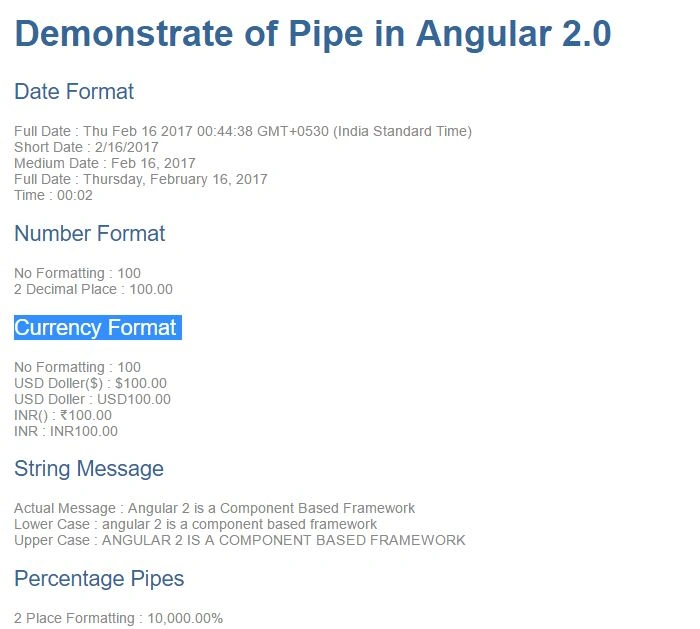
Now, add HTML file named app.component.inbuildpipe.html and add the code given below.
- <div>
- <h1>Demonstrate of Pipe in Angular 2.0</h1>
- <h2>Date Format</h2>
- Full Date : {{todayDate}}<br />
- Short Date : {{todayDate | date:'shortDate'}}<br />
- Medium Date : {{todayDate | date:'mediumDate'}}<br />
- Full Date : {{todayDate | date:'fullDate'}}<br />
- Time : {{todayDate | date:'HH:MM'}}<br />
- <h2>Number Format</h2>
- No Formatting : {{amount}}<br />
- 2 Decimal Place : {{amount |number:'2.2-2'}}
- <h2>Currency Format</h2>
- No Formatting : {{amount}}<br />
- USD Doller($) : {{amount |currency:'USD':true}}<br />
- USD Doller : {{amount |currency:'USD':false}}<br />
- INR() : {{amount |currency:'INR':true}}<br />
- INR : {{amount |currency:'INR':false}}<br />
- <h2>String Message</h2>
- Actual Message : {{message}}<br />
- Lower Case : {{message | lowercase}}<br />
- Upper Case : {{message | uppercase}}<br />
- <h2> Percentage Pipes</h2>
- 2 Place Formatting : {{amount | percent :'.2'}}<br /><br />
- </div>
Now, add another TypeScript file named app.module.ts and add the code given below.

yashwanth kumarPosted May 31, 2017, 7:29 AM
Custom Pipe or Proper Case : {{message | propercase}} not working sir please help me.