

I am going to write this article series to help you learn AngularJS 1.x.x very quickly and in a simple way from basic to expert level.
We will see what is AngularJS and we will learn the basics of AngularJS - Modules, Controllers, Directives, Expressions, Filters, Databinding, Scopes, Validations, Routing, Service, DI, and more. And, we will create one SPA in AngularJS with MVC for practical implementation. We will continue this application from the first post to last, from small applications to big enterprise applications.
After this AngularJS 1 series, I will write on AngularJS 2 and AngularJS 4.
This article covers,
- Introduction to AngularJS
- What AngularJS is
- Why angularJS is a good fit for web applications.
- How to use AangularJS in our applications.
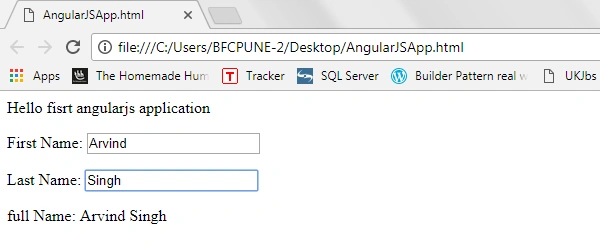
- First AngularJS application.
Introduction to AngularJS
AngularJS is client side JavaScript light-weight framework to create dynamic web applications. It's developed and maintaining by Google. AngularJS can be added to an HTML page by adding reference with a <script> tag.
- <script src="https://ajax.googleapis.com/ajax/libs/angularjs/1.5.6/angular.min.js"></script>
Why AngularJS is a good fit for web applications
Nowadays, everybody wants to create an application which should work faster and smoother. There are many client-side frameworks to help create dynamic and faster web pages, and AngularJS is becoming a popular one for this. It provides minimal or no configuration and is easy to learn and supported by all modern browsers.
AngularJS supports MVC (Model View Controller) style for application design.
- Model – contains the data for the application.
- Views – it displays the data with HTML for User Interface.
- Controller – Controller manages the relationship between the Model and the View. It is like interface between View and Model.
How to use
AngularJS extends HTML tags with ng directives. The ng-app directive is the start and first thing for the AngularJS application, it defines an AngularJS application.
To use AngularJS library, go to AngularJS official site, i.e., "https://angularjs.org/ " and download the package. Add reference of the Angular.js file or we can directly add reference of the AngularJS CDN like below:
Sagar Pandurang KapPosted Jan 3, 2018, 11:56 PM
Thanks a lott.Keep going.
Arvind SinghPosted Dec 13, 2017, 10:37 PM
Thanks Hrides..............
Hrides ThakurPosted Dec 12, 2017, 11:42 PM
Good one Arvind sir..................
Arvind SinghPosted Oct 4, 2017, 12:06 AM
Thanks Amit Singh..........................
Amit Kumar SinghPosted Oct 3, 2017, 5:48 AM
Good one ...........