

Introduction
Arrays in F# are mutable data types. I started intentionally with this line, as FSharp(F#) is a functional programming language, and the paradigm of the language promotes immutability. So, whenever there is a mutable type or value, be careful with the usage. Let's go back to the main topic, i.e., Arrays. In this post, we'll see how to initialize, iterate, update, and manipulate arrays in FSharp(F#). In this post, we'll cover only one-dimensional array. Maybe we can discuss 2D, 3D, and Jagged arrays in an advanced array post in the future.
Static array initialization
In FSharp(F#), we initialize the array with the following notations.
let fruits = [|"Apple"; "Orange"; "Grapes"|]
// or using every item in a separate line without a separator
let fruits = [| "Apple" "Orange" "Grapes" |]
Note. The additional symbol | (pipe) used with square braces to declare the array. Also, the separator is no longer a ",", comma, but it's a ";" semicolon. Here's an example of an array of integers and a possible mistake that can be made by a C# developer without getting any compile-time error.
let arr = [| 1; 2; 3; 4 |]
Possible mistakes #1
let arr1 = [| 1, 2, 3 |]
// This is an array of tuples with one element, so no error is displayed.
// The ',' separator is used to create tuples.
Possible mistakes #2
let arr2 = [1; 2; 3]
// This is also valid, but this would be a list, and it's "IMMUTABLE".
Initialization using sequence expressions
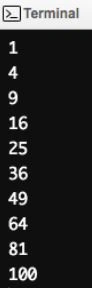
// Array of squares of positive integers from 1 to 10
let arr3 = [| for i in 1 .. 10 -> i * i |]
Output
Initialization using Array module
Array.empty
// Create an empty array without specifying the type.
let array1 = Array.empty

// Create an empty array with a type annotation.
let array2 : int array = Array.empty

// Create an empty array with type inference.
let array3 = Array.empty

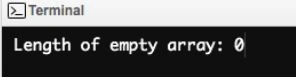
// Print the length of the empty array.
printfn "Length of empty array: %d" array3.Length
Output.
Array.create
Creates an array of a specified size and sets all the elements to provided values.
// Create an array of length 10, with all elements initialized to the default value -1.
let arrayOfTenZeroes : int array = Array.create 10 (-1)

// Create a bool array with a length of 10, with all elements initialized to the default value true.
let primeFlaggedArr : bool array = Array.create 10 true
Note. In the end of this article, we'll solve the find prime number problem using Sieve of Eratosthenes.
Array.zeroCreate
Creates an array, given a dimension and a function to generate the elements.
// create a bool array with default values (false)

let primeFlaggedArr : bool array = Array.zeroCreate 10
Array.init
Creates an array, given a dimension and a function to generate the elements.
// Another way to create an array of squares starting from 1 to 10

printfn "Array of squares: %A" (Array.init 10 (fun index -> index * index))
Accessing array elements
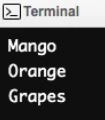
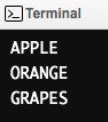
You can access array elements by using a dot operator (.) and brackets ([ and ]).

Bhuvanesh MohankumarPosted Apr 30, 2016, 3:15 PM
Good one...
Kuppurasu NagarajPosted Apr 14, 2016, 9:33 AM
Nice Sharing..
Vignesh ManiPosted Apr 14, 2016, 8:22 AM
Nice
Rahul Kumar SaxenaPosted Apr 14, 2016, 6:29 AM
Good One
Debasis SahaPosted Apr 13, 2016, 1:38 PM
Nice one..
Mohammed IbrahimPosted Apr 13, 2016, 1:10 PM
nice